CRM Automation 101: Close Deals on Autopilot




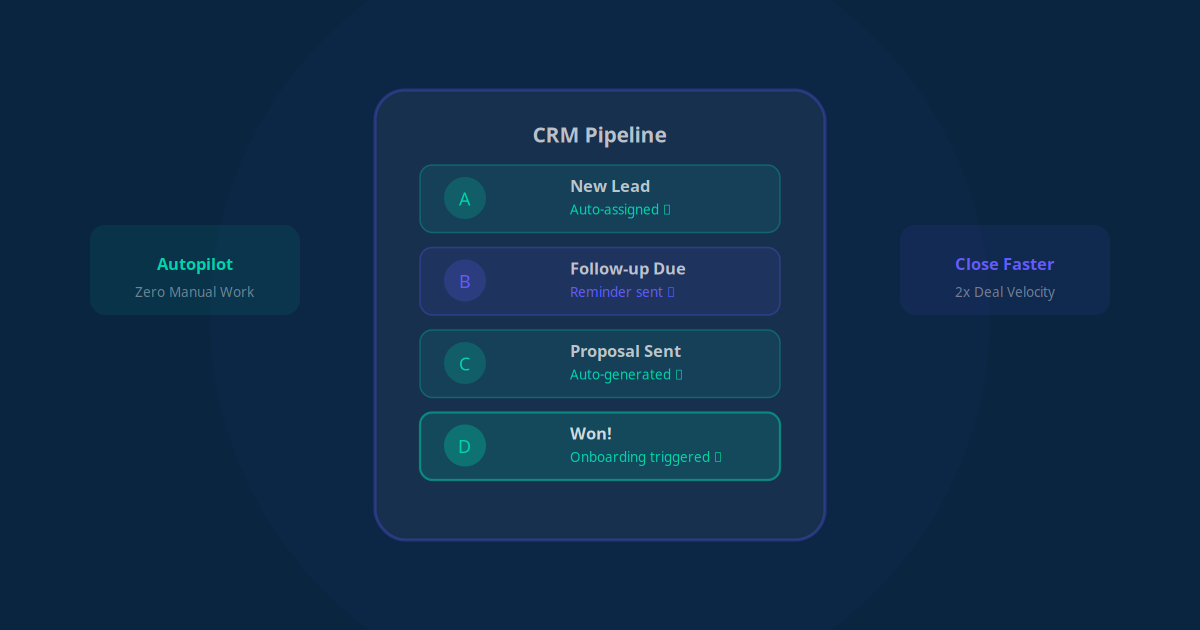
Your CRM is supposed to be your sales team's best friend. Instead, for most businesses, it has become a data graveyard -- full of outdated contacts, incomplete records, and leads that were never followed up on. The reason is simple: manual CRM management is tedious, time-consuming, and the first thing that falls off when your team gets busy.
CRM automation fixes this by handling the boring parts automatically -- data entry, lead routing, follow-up reminders, pipeline updates -- so your sales team can focus on what they are actually good at: building relationships and closing deals.
Why Most CRMs Fail (It Is Not the Tool's Fault)
Before we talk about automation, let us address why CRM implementations fail for so many businesses:
- Data entry burden: Sales reps spend 28% of their time entering data into the CRM instead of selling. Most of them stop doing it consistently within 3 months.
- Dirty data: Duplicate contacts, missing fields, outdated information -- when the data is unreliable, nobody trusts the CRM and nobody uses it.
- No follow-up system: Leads enter the CRM and sit there. Without systematic follow-up workflows, 80% of leads are never contacted after the first interaction.
- Pipeline blindness: Without automatic stage updates, managers have no idea where deals actually stand. Pipeline reviews become guessing games.
- Reporting headaches: Creating reports requires manual data compilation, so they are either never done or always outdated by the time they are finished.
The pattern is clear: CRMs fail not because the software is bad, but because humans are bad at the repetitive tasks required to keep them useful. Automation solves this at every level.
Auto Data Entry: Never Type a Contact Again
The single highest-impact CRM automation is eliminating manual data entry. Here is how it works:
Automatic Lead Capture
Every lead source automatically creates a CRM contact with all available information:
- Website forms: Form submission instantly creates a contact with name, email, phone, and any other fields they filled out
- Email inquiries: AI reads incoming emails, extracts contact information and the nature of the inquiry, and creates a properly tagged CRM record
- WhatsApp messages: New WhatsApp conversations automatically create contacts with the phone number and message content
- Business card scans: Take a photo of a business card, and AI extracts and enters all the information
- Social media inquiries: DMs and comments that express interest are captured as leads with social profile links
Automatic Data Enrichment
Once a contact is created, automation enriches it with additional data:
- Company information: Revenue, employee count, industry, and website -- pulled automatically from business databases
- Social profiles: LinkedIn, Twitter, and other social links matched to the contact
- Past interactions: If they have visited your website before, opened your emails, or engaged with your content, that history is attached to their record
- Geographic data: Location, timezone, and local market information
The result: when your sales rep picks up the phone to call a lead, they have a complete picture of who they are talking to -- without anyone manually researching or typing anything.
Key Takeaway
Automated data entry and enrichment alone saves the average sales team 10-15 hours per week. More importantly, it ensures every contact record is complete and accurate, which makes every other CRM function more effective.
Automated Lead Scoring: Know Who to Call First
Not every lead deserves the same attention. Automated lead scoring assigns a numerical value to each contact based on their likelihood to buy, so your sales team always knows who to prioritize.
Scoring Criteria
| Signal Type | Examples | Points |
|---|---|---|
| Demographic fit | Matches your ideal customer profile (industry, size, role) | +10 to +25 |
| Engagement | Opened emails, clicked links, visited pricing page | +5 to +20 |
| Intent signals | Requested a demo, asked about pricing, downloaded a guide | +15 to +30 |
| Recency | Last interaction within 24 hours vs 30 days ago | +5 to +15 |
| Source quality | Referral vs cold form vs paid ad | +5 to +20 |
| Negative signals | Unsubscribed, marked as spam, bounced email | -10 to -25 |
How Scoring Drives Action
Once scores are calculated automatically, your CRM triggers different workflows:
- Score 80+: Instant notification to the assigned sales rep -- call this lead now
- Score 50-79: Enter the lead into a targeted nurture sequence and schedule a follow-up task
- Score 20-49: Add to a general nurture campaign with educational content
- Score below 20: Archive or add to a re-engagement campaign for future potential
The beauty of automated scoring is that it is always running. A cold lead that suddenly starts engaging with your content will automatically move up the priority list, and your sales team will be notified at the exact right moment.
Pipeline Management on Autopilot
A well-managed sales pipeline tells you exactly how much revenue to expect and where deals are getting stuck. Automation keeps your pipeline accurate without requiring reps to manually update deal stages.
Automatic Stage Progression
Set rules that automatically move deals through your pipeline based on actions:
- New Lead → Contacted: Automatically moves when the first email is sent or call is logged
- Contacted → Qualified: Moves when the lead responds positively or a discovery call is completed
- Qualified → Proposal Sent: Moves when a proposal document is sent via email
- Proposal Sent → Negotiation: Moves when the prospect replies to the proposal or requests changes
- Negotiation → Won/Lost: Moves based on contract signature or explicit rejection
Stale Deal Alerts
Automation monitors every deal in your pipeline and triggers alerts when something stalls:
- No activity for 3 days on a hot deal → Slack notification to the rep
- No activity for 7 days on any deal → Manager notification + automatic follow-up email to the prospect
- Deal stuck in same stage for 14+ days → Escalation to sales manager for review
- Proposal not opened after 48 hours → Automatic reminder email to the prospect
These automated guardrails ensure that no deal falls through the cracks simply because someone forgot to follow up.
Key Takeaway
Automated pipeline management does two things that manual management cannot: it keeps stage data accurate in real time, and it proactively prevents deals from going cold. Together, these typically shorten the average sales cycle by 20-30%.
Follow-Up Sequences That Close Deals
The difference between a good sales team and a great one usually comes down to follow-up discipline. Automation makes perfect follow-up effortless.
The Art of Automated Follow-Ups
Here is a sample follow-up sequence for a B2B sales process:
- Day 0 (instant): Personalized thank-you email after the first meeting, summarizing key points discussed and next steps
- Day 2: Share a relevant case study or resource related to their specific pain point
- Day 5: Check-in message: "Had a chance to review the information I sent? Happy to answer any questions."
- Day 8: Social proof message: Share a testimonial from a similar client or industry
- Day 12: Value-add message: Share an industry insight or article that is relevant to their business
- Day 15: Direct ask: "Would you like to schedule a follow-up call this week to discuss next steps?"
- Day 21: Break-up message: "I do not want to be a nuisance. If now is not the right time, no worries. I will check in again in a month."
The critical detail: the sequence pauses automatically when the lead replies. Once a human conversation starts, the automated sequence hands off to the sales rep. This prevents embarrassing situations where a bot sends a follow-up to someone already in conversation with your team.
Multi-Channel Follow-Ups
The best follow-up sequences do not rely on a single channel. Mix it up:
- Email: For detailed information, proposals, and resources
- WhatsApp: For quick check-ins and time-sensitive messages
- LinkedIn: For connecting and sharing relevant content
- Phone calls: Scheduled automatically when engagement signals are high
Automated Reporting: Insights Without the Work
Manual reporting is one of the biggest time wasters in sales management. Here is what automated CRM reporting looks like:
Real-Time Dashboards
Set up once, updated automatically forever:
- Pipeline value by stage: How much potential revenue is at each stage right now
- Conversion rates: What percentage of leads convert from one stage to the next
- Average deal cycle time: How long deals take to close, by source and by rep
- Revenue forecast: Predicted revenue for the next 30, 60, and 90 days based on pipeline data
- Rep performance: Activities logged, deals progressed, and revenue closed per team member
Scheduled Report Delivery
- Daily: Activity summary for each sales rep (calls made, emails sent, deals updated)
- Weekly: Pipeline snapshot with week-over-week changes, highlighting stale deals and new opportunities
- Monthly: Full performance review with conversion rates, revenue trends, and forecast accuracy
These reports are generated and delivered automatically via email or Slack. No one needs to log into the CRM, export data, or build spreadsheets.
"Before automation, our Monday pipeline review took 2 hours because everyone had to update their deals first. Now the data is always current, and our reviews take 20 minutes. We spend the time on strategy instead of data entry." -- Sales Manager, SaaS company
CRM Automation by Platform
The good news is that most popular CRMs support automation, either natively or through integration tools. Here is a quick comparison:
| CRM Platform | Built-in Automation | Best For | Automation Level |
|---|---|---|---|
| HubSpot | Excellent (workflows, sequences, scoring) | Small to mid-size B2B companies | Advanced |
| Zoho CRM | Strong (workflow rules, blueprints, Zia AI) | Budget-conscious SMBs, Indian market | Advanced |
| Salesforce | Enterprise-grade (Flow, Process Builder, Einstein) | Large teams with complex processes | Expert |
| Pipedrive | Good (automations, smart contact data) | Sales-focused small teams | Intermediate |
| Freshsales | Good (workflows, Freddy AI, auto-assignment) | Growing businesses, all-in-one needs | Intermediate |
| Google Sheets + Automation | Basic (needs Make/Zapier for advanced) | Solopreneurs, very early stage | Basic |
Regardless of which CRM you use, external automation tools like Make.com, Zapier, or n8n can connect your CRM to hundreds of other apps and add automation capabilities beyond what the CRM offers natively.
Key Takeaway
You do not need to switch CRMs to get automation. Most platforms support it natively, and tools like Make.com and Zapier can add powerful automation to any CRM. Start with the platform you are already using and add automation layer by layer.
Your CRM Automation Roadmap
Do not try to automate everything at once. Follow this proven sequence:
Phase 1: Clean Data (Week 1-2)
- Deduplicate existing contacts
- Set up automatic data capture from all lead sources
- Configure required fields and validation rules to keep data clean going forward
Phase 2: Automatic Follow-Ups (Week 3-4)
- Build your first follow-up sequence for new leads
- Set up stale deal alerts
- Configure automatic task creation for sales reps
Phase 3: Lead Scoring and Routing (Month 2)
- Define your scoring criteria based on historical conversion data
- Set up automatic lead assignment rules
- Create different nurture tracks for different score ranges
Phase 4: Pipeline Automation (Month 2-3)
- Configure automatic stage progression rules
- Set up pipeline health alerts
- Build automated reporting dashboards
Phase 5: AI Enhancement (Month 3+)
- Add AI-powered lead scoring that learns from your data
- Deploy AI for personalized email drafting
- Implement predictive analytics for revenue forecasting
Each phase builds on the previous one. By month 3, you will have a CRM that essentially runs itself -- capturing leads, scoring them, nurturing them, moving them through your pipeline, and giving you real-time visibility into everything.
Common CRM Automation Mistakes
Learn from others' failures so you do not repeat them:
- Automating a broken process: If your sales process is disorganized, automating it just creates automated chaos. Fix the process first, then automate it.
- Over-automating the human touch: Automation should handle admin work and routine communication. The discovery call, the negotiation, the relationship building -- those should stay human.
- Ignoring data quality: Automation is only as good as the data feeding it. If your CRM is full of duplicates and outdated records, clean it up before adding automation.
- Not getting team buy-in: If your sales reps do not understand or trust the automation, they will work around it. Involve them in the design process and show them how it makes their job easier.
- Setting and forgetting: Review your automation performance monthly. Are follow-up sequences getting responses? Are scoring models accurate? Optimize continuously.
CRM automation is not about replacing your sales team. It is about removing the friction that prevents them from doing their best work. When data entry, follow-ups, and reporting happen automatically, your team can spend 100% of their energy on what actually generates revenue: having great conversations and closing deals.