How to Build a Custom AI Chatbot Using Your Company Data (RAG Explained Simply)




You ask a generic AI tool a question about your own product. It answers confidently and completely incorrectly. It invented a pricing tier that does not exist, cited a returns policy you scrapped two years ago, and recommended a service you discontinued last quarter.
This is not a rare edge case. It is what happens every time a business tries to use a general-purpose AI — ChatGPT, Gemini, any of them — to represent their specific products, policies, and processes. These tools are trained on the internet. They know nothing about your business. When pushed, they fill the gaps with plausible-sounding fiction.
The solution is a custom AI chatbot built on your company data. One that only answers from what you have explicitly given it — your documents, your FAQs, your CRM, your pricing, your policies. No invention. No outdated information. No off-brand responses.
The technology that makes this possible is called RAG — Retrieval-Augmented Generation. And in this guide, we will explain how it works and exactly how a custom AI chatbot using your data is built from the ground up.
Why Generic AI Tools Fall Short for Business
Before diving into the solution, it is worth understanding precisely why general AI tools are the wrong choice for customer-facing business applications:
- They hallucinate. When a general AI does not know something, it does not say so. It generates a confident-sounding answer that may be entirely fabricated. For a business, this is a trust and liability risk.
- They have no knowledge of your business. Your pricing structure, your product variants, your specific service tiers, your cancellation policy — a generic AI knows none of this. It will either decline to answer or invent something that sounds reasonable.
- Their training data is outdated. LLMs have a knowledge cut-off date. Any changes you made to your products or policies after that date simply do not exist to the model.
- They cannot speak in your brand voice. Generic AI speaks generically. A customer-facing assistant should reflect the tone, terminology, and values of your specific brand.
- They have no access to live data. They cannot check your inventory, look up an order status, or retrieve a customer's account history in real time.
A custom AI chatbot built using RAG eliminates every one of these problems — because it only speaks from what you give it, and it retrieves the right information before it speaks.
What Is RAG? A Plain-English Explanation
RAG stands for Retrieval-Augmented Generation. It is a technique that gives an AI model access to a private knowledge base before generating any response.
The Library Analogy
Imagine two employees at an information desk. The first has memorised a general encyclopaedia and answers every question from memory — fast, but sometimes wrong, and completely unaware of your specific organisation. The second has access to a well-organised filing room containing every document your company has ever produced. Before answering any question, they walk to the filing room, pull out the most relevant files, read them, and then construct a precise, accurate answer.
The second employee is your RAG-powered AI chatbot.
The "filing room" is your company's knowledge base — stored in a vector database. The "walking to the filing room" is the retrieval step. The "constructing an answer" is what the large language model does after reading the retrieved documents.
Why RAG Matters
RAG is what separates a chatbot that knows about AI from one that knows about your business. Without it, you have a general assistant. With it, you have a knowledgeable representative of your specific brand, products, and policies.
How a Custom AI Chatbot Is Built — Step by Step
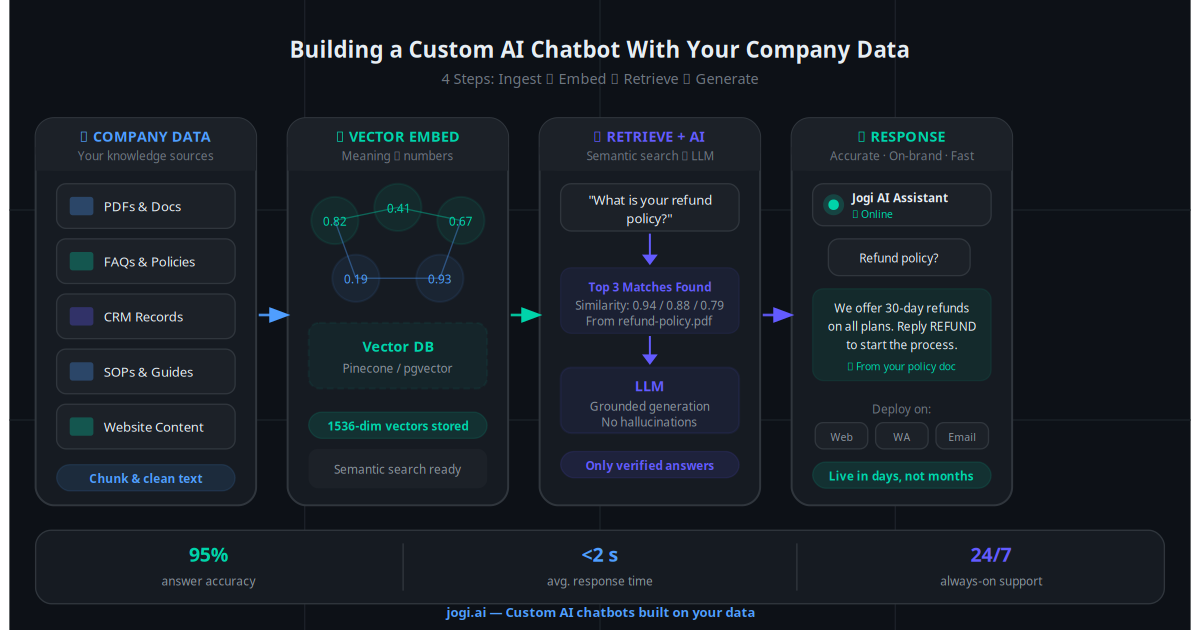
Building a custom AI chatbot on your company data is a four-stage process. Each stage is important, and the quality of your output is directly determined by the care you put into each one.
The first step is assembling all the information your chatbot should be able to answer questions about. This becomes the foundation of its knowledge base. Typical sources include:
- PDF documents — product manuals, service guides, training materials
- Website pages — your services, pricing, about, and FAQ pages
- Spreadsheets — pricing tables, product catalogues, feature comparison matrices
- Support tickets — historical queries and resolved cases that reveal what customers actually ask
- Internal SOPs — processes, policies, and operational guidelines
- CRM notes — customer history, account details, common objections
The quality of this step determines everything downstream. Incomplete, outdated, or poorly organised documents produce an inaccurate chatbot. Audit your content before ingestion.
Raw documents cannot be searched semantically — you need to convert them into a format the AI can retrieve intelligently. This involves two sub-steps:
- Chunking — Documents are split into logical, overlapping segments (typically 200–500 words each). Good chunking preserves context across boundaries — a poorly chunked document will produce incomplete retrievals.
- Embedding — Each chunk is passed through an embedding model that converts it into a numerical vector representing its meaning. Similar meanings produce similar vectors, enabling semantic search rather than keyword matching.
This is where "I was charged twice" and "double billing issue" become retrievable as the same type of query — even though the words are different.
All embedded chunks are stored in a vector database (such as Pinecone, Weaviate, or pgvector). When a user asks a question, the system:
- Embeds the question into the same vector space
- Performs a similarity search across all stored chunks
- Returns the top 3–5 most semantically relevant pieces of content
This retrieved content is then passed to the language model — not as training data, but as live context for the current query. The model reads it and generates a response based solely on what was retrieved. This is the "grounding" that eliminates hallucination.
The large language model (GPT-4, Claude, Gemini, or an open-source equivalent) receives two inputs: the user's question and the retrieved content. It uses the retrieved content as its source of truth and generates a natural-language response grounded entirely in that material.
Critically, a well-configured RAG system also includes a guardrail instruction: "If the answer is not in the retrieved content, say so clearly and offer to connect the user with a human." This is what makes a RAG chatbot safe for customer-facing use — it knows what it does not know.
Real-World Use Cases
💬 Customer Support Chatbot
A SaaS company ingests its product documentation, pricing tiers, and 2,000 past support tickets into a RAG system. The chatbot now resolves 72% of inbound queries — billing questions, feature explanations, account issues — without a human agent. When it cannot resolve an issue, it escalates with a full conversation summary attached. Support costs drop by 60% in the first quarter.
🏨 Hotel and Hospitality Chatbot
A hotel builds a chatbot trained on its room types, amenity descriptions, booking policies, check-in/check-out rules, and local attraction guides. Guests on WhatsApp ask: "Is the pool heated in March?" "Do you allow early check-in?" "What is the cancellation policy for the suite?" The chatbot answers every question accurately, 24/7, in the hotel's brand voice — handling over 400 guest interactions per week that previously required front desk staff.
📚 Internal Knowledge Base Assistant
A 200-person company builds an internal RAG assistant trained on HR policies, onboarding documents, IT guides, project wikis, and team SOPs. Employees ask questions like "How do I claim travel expenses?" or "What is the approval process for vendor contracts?" — and receive precise, sourced answers in seconds. The HR team estimates 15 hours saved per week on repetitive internal queries.
🎯 Sales Assistant Chatbot
A B2B software company builds a sales chatbot trained on their product catalogue, case studies, pricing logic, and competitive comparison documents. Website visitors ask detailed technical questions that would normally require a sales engineer. The chatbot handles the qualification, answers objections with specific evidence, and books a demo when intent is high. The sales team enters every demo already knowing the prospect's specific interests and objections.
Common Mistakes Businesses Make With AI Chatbots
Having built AI chatbot systems across dozens of industries, these are the mistakes we see most consistently:
- Starting with the technology, not the use case. "We need a chatbot" is not a strategy. Start with the specific function — what questions should it answer, what actions should it take, and how does success get measured?
- Skipping the knowledge audit. Dumping every document into the knowledge base without reviewing it first. Outdated, contradictory, or incomplete content produces an inaccurate chatbot that erodes customer trust faster than having no chatbot at all.
- No escalation path. A chatbot with no graceful handoff to a human is a dead end for anything complex. Every AI chatbot needs a clear escalation flow — and humans on the other end who are briefed on how to pick up the conversation.
- Never updating the knowledge base. Prices change. Products change. Policies change. A chatbot trained on outdated content will confidently give customers wrong information. Build a process for regular knowledge base updates from day one.
- Measuring vanity metrics. Tracking conversations, not resolutions. A chatbot that deflects every question into "please contact us" will show high conversation volume and zero business impact. Measure resolution rate, customer satisfaction, and cost per ticket.
- Deploying on a single channel. Building for website chat only, while customers actually reach out via WhatsApp, email, and Instagram. The same knowledge base can power all channels simultaneously — design for omnichannel from the start.
Build vs Buy vs Custom — What Is Right for You?
When businesses decide to deploy a chatbot, they face three broad paths. Each has different trade-offs:
| Approach | What You Get | Where It Falls Short |
|---|---|---|
| Off-the-shelf tools (Intercom, Tidio, Drift) |
Quick to deploy, no-code setup, standard support flows | No custom data, scripted responses, no RAG capability, generic answers |
| Build it yourself | Full control over architecture and integrations | Requires AI engineers, 3–6 months minimum, ongoing maintenance burden |
| Custom AI build Recommended | RAG on your data, CRM integration, brand voice, omnichannel, professional architecture | Requires an expert partner — but delivers production-ready results in weeks, not months |
For most businesses, custom-built is the clear choice — not because it is the most technically impressive, but because it is the only option that actually works for your specific context. Off-the-shelf tools cannot access your data. Building it yourself is a 6-month engineering project. A specialist partner delivers the right system in 2–4 weeks.
The Practical Architecture: What Connects to What
A production-grade custom AI chatbot is not just a language model and a text box. It is a connected system:
- Knowledge base — Your structured documents, embedded and stored in a vector database. Updated regularly via an ingestion pipeline.
- Retrieval layer — Semantic search that finds the right chunks before every response. Configurable for precision and recall trade-offs.
- LLM with guardrails — The language model with a system prompt that defines tone, scope, escalation triggers, and brand voice.
- CRM integration — Pulls live customer data (order history, account tier, past interactions) to personalise responses at the individual level.
- Workflow automation — Actions the chatbot can take: create a support ticket, send a follow-up email, update a CRM field, book a calendar slot.
- Channel connectors — APIs that connect the same AI brain to WhatsApp Business, website chat, email, Instagram DM, and any other touchpoint.
- Analytics and monitoring — Tracks resolution rates, escalations, common failure points, and knowledge gaps — so the system improves continuously.
Future Trends: Where Custom AI Chatbots Are Heading
The current generation of RAG-based chatbots is already transforming customer experience. The next generation will go further:
- Multi-source knowledge systems — Chatbots that simultaneously retrieve from your documents, live CRM data, real-time inventory feeds, and external APIs — composing answers that blend static knowledge with live operational data.
- Personalised AI assistants — Chatbots that maintain a memory of each individual customer across every interaction — knowing their preferences, purchase history, and past issues without being told.
- Proactive AI engagement — Moving from reactive (waiting for questions) to proactive — reaching out to customers when a relevant event triggers it: a new product matching past interests, a contract renewal approaching, a delivery delay that needs acknowledgement.
- Voice-enabled RAG — The same retrieval architecture powering natural-language phone support — eliminating call queues without sacrificing accuracy.
Businesses that build their custom AI chatbot infrastructure now are not just solving today's support volume. They are laying the foundation for the personalised AI customer relationships that will define the next five years.
The Central Insight
The gap between a useful AI chatbot and a damaging one is entirely determined by what data it is built on and how well that data is organised. Generic AI tools are powerful for general tasks. For your business — your customers, your products, your brand — only a custom-built system on your data delivers results you can trust.
Your Custom AI Chatbot Starts With Your Data
You almost certainly already have 80% of what you need to build a powerful custom AI chatbot. Your product documentation, your FAQ responses, your support history, your pricing guides — the knowledge exists. It just needs to be organised, embedded, and connected to an AI that can retrieve and explain it to your customers.
The build itself — done properly — takes two to four weeks. The return begins in the first month.
At Jogi AI, we specialise in building custom AI chatbots using your company data. From knowledge base architecture and RAG implementation through to CRM integration, multi-channel deployment, and ongoing optimisation — we handle the full build, so you handle the business.
Every customer query your team answers manually today is a query an AI chatbot could handle tomorrow — faster, more consistently, and at a fraction of the cost.