Multimodal AI for Business: What Text + Image + Video AI Means for How You Operate




Beyond Text: Why AI That Sees and Hears Changes Everything
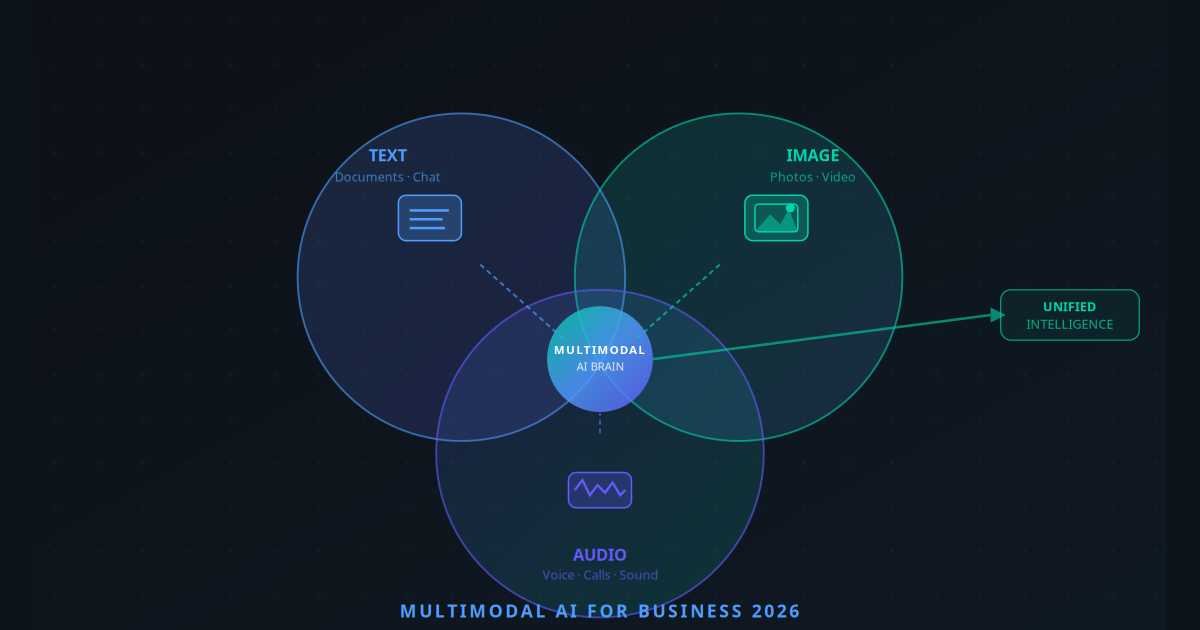
When most business owners think of AI, they picture a chatbot — something that reads and writes text. And for two years, that was largely accurate. But the AI landscape of 2026 looks radically different. The most impactful AI systems today are not text-only. They are multimodal — meaning they can process text, images, audio, and video simultaneously, within a single reasoning context.
The implication is enormous. Think about how much of your business actually runs on text. Your invoices arrive as PDFs with handwritten notes. Your product quality is assessed visually. Your customer complaints come as voicemails. Your supplier contracts are scanned documents. None of these were previously automatable with a text-only AI. With multimodal AI, they are.
This is not a future capability. It is live, production-ready, and already being used by businesses across every industry. The question is whether yours is one of them.
What Is Multimodal AI?
Multimodal AI refers to artificial intelligence systems trained on and capable of reasoning across multiple input types — most commonly text, images, audio, and increasingly video. Rather than treating each modality separately, multimodal models develop a unified representation that allows them to understand relationships between different types of information.
A multimodal AI can:
- Read a scanned invoice image and extract all line items into structured data
- Look at a photo of a product and generate a complete product description
- Analyse a customer support call recording and produce a structured summary with sentiment score
- Watch a short video walkthrough and produce written step-by-step documentation
- Compare two product images and identify quality defects or differences
- Process a handwritten form and extract the information into a database
The core insight is that business data is inherently multimodal. Most real-world information does not arrive as clean, typed text. Multimodal AI bridges the gap between messy, mixed-format reality and the structured data your systems need to operate.
Key Takeaway
Multimodal AI does not just add image recognition to a chatbot. It fundamentally changes what can be automated — because it can finally process the majority of real-world business information that text-only AI could not touch.
Why 2026 Is the Inflection Point for Multimodal AI
Three things converged in 2025–2026 to make multimodal AI genuinely production-ready for businesses:
1. Model Quality Crossed the Reliability Threshold
GPT-4o, Claude 3.5 Sonnet, and Gemini 2.0 Ultra all achieved accuracy rates on document and image understanding tasks that are now comparable to or better than trained human professionals in many domains. Invoice extraction, for example, now reaches 97%+ accuracy on clean documents — above the typical human data entry error rate of 1–3%.
2. API Costs Dropped to Business-Viable Levels
Processing a high-resolution image through a multimodal model costs less than $0.01 today. A business processing 500 invoices per day would spend less than $150/month on AI inference costs — a fraction of one data entry employee's salary for an afternoon.
3. No-Code Integration Became Available
You no longer need a machine learning engineer to use multimodal AI. Platforms like Make.com, n8n, and Zapier now have native multimodal AI nodes. You can build a workflow that watches a folder, processes incoming invoice images, and pushes structured data to your accounting software — with no code at all.
High-Value Business Use Cases in 2026
Invoice & Receipt Processing
Suppliers email scanned invoices. Multimodal AI extracts vendor, date, line items, and totals into your accounting system automatically. Zero manual data entry. 97%+ accuracy.
Product Catalogue Automation
Upload product photos. AI generates descriptions, extracts dimensions, suggests categories, and flags image quality issues — populating your e-commerce catalogue without a copywriter.
Visual Quality Control
Manufacturing defect detection, restaurant food presentation scoring, property condition assessment for real estate — AI that sees and scores visual quality at scale.
Contract & Document Review
Scanned contracts, handwritten agreements, and mixed-format documents are parsed, summarized, and key clause extraction happens automatically — reducing legal admin time by 70%.
Customer Support Call Analysis
Audio recordings of support calls are transcribed, sentiment-scored, key issue categorized, and recommended resolution generated — all before a human manager even sees the ticket.
Competitive Intelligence
Screenshots of competitor websites, product images, and pricing pages are fed to an AI agent that tracks changes and alerts your sales team to competitive threats in real time.
Deep Dive: E-Commerce Visual Product Intelligence
One of the most impactful applications is in e-commerce. A fashion retailer with 2,000 SKUs previously needed a team of copywriters, photographers, and catalogue managers to keep product listings accurate and compelling. With multimodal AI:
- Product photos are uploaded to a folder
- AI analyses each image: identifies garment type, colour, material texture, style, and key features
- Generates an SEO-optimised product description and title
- Suggests appropriate category tags and size guidance
- Flags images with poor lighting or background quality
- Publishes approved listings directly to Shopify
What previously took two copywriters 40 hours per week now runs in four hours — entirely automated, with a human reviewing and approving the final batch.
"We went from 3 days to 4 hours to launch new products. Our catalogue accuracy improved and the copy quality is actually better than what we were producing manually."
How to Implement Multimodal AI Without an Engineering Team
The no-code path to multimodal AI is more accessible than most business owners realize. Here is a practical starting framework:
For Document Processing (Invoices, Contracts, Forms)
Use an n8n or Make.com workflow triggered by email attachments or a watched folder. Connect a GPT-4o or Claude 3.5 node with a structured extraction prompt. Output directly to Google Sheets, Airtable, QuickBooks, or Xero. Build and test in under a day.
For Product Image Analysis
A similar workflow triggered by file upload to Google Drive or Dropbox. The AI node receives the image and a prompt defining what to extract (description, tags, dimensions). Output flows to your CMS or product database. Add a human review step before publishing with a simple approval form.
For Call Recording Analysis
Most modern VoIP systems (RingCentral, Aircall, JustCall) provide recording URLs via webhook. n8n receives the webhook, downloads the audio, passes it to a transcription + analysis node, and pushes the structured summary into your CRM ticket. Your support manager sees a pre-analysed ticket, not a raw recording.
The Multimodal Models Powering Business in 2026
| Model | Best For | Modalities | Cost (per image) |
|---|---|---|---|
| GPT-4o (OpenAI) | General document + image tasks | Text, Image, Audio | ~$0.005–$0.015 |
| Claude 3.5 Sonnet (Anthropic) | Complex document reasoning, long context | Text, Image | ~$0.003–$0.012 |
| Gemini 2.0 Ultra (Google) | Video analysis, native Google Workspace | Text, Image, Audio, Video | ~$0.004–$0.018 |
| Llama 3.2 Vision (Meta) | Self-hosted, privacy-sensitive data | Text, Image | Infrastructure only |
What Comes Next: Video Intelligence and Real-Time Multimodal
The current generation of multimodal AI excels at static analysis — process a document, analyse a photo, transcribe a recording. The next wave is real-time multimodal reasoning: AI that watches a live video feed, listens to an ongoing conversation, and makes decisions in real time.
Early applications are already emerging: AI systems that monitor retail shop floors for customer behaviour and queue length, construction site safety monitoring, restaurant kitchen quality checks during service, and live customer support calls where AI provides real-time guidance to human agents.
For most businesses, the immediate priority should be static multimodal automation — documents, images, and recordings. Real-time applications will follow as infrastructure costs continue to fall.
Conclusion: Your Business Data Is Already Multimodal
Here is the practical reality: the information that runs your business — invoices, product photos, customer calls, contracts, forms — has always been multimodal. Only the AI tools to process it have been missing. That gap has now closed.
The businesses that act on this in 2026 will eliminate entire categories of manual processing work. The ones that wait will find themselves competing against companies that operate leaner, faster, and more accurately — at lower cost per transaction.
The starting point does not have to be complex. Pick your most painful manual data processing task. Build one multimodal workflow. Measure the time saved. Then expand. For help identifying where multimodal AI will have the highest impact on your specific business, the AI Business Twin provides a personalised analysis in minutes.
Frequently Asked Questions
What is multimodal AI?
Multimodal AI is an artificial intelligence system that can process and reason across multiple types of data simultaneously — such as text, images, audio, and video. Unlike text-only AI, it can read a scanned invoice, understand a photo of a product defect, or listen to a customer call while also accessing written context.
Which businesses benefit most from multimodal AI?
Businesses that handle physical documents (accountants, legal firms, logistics), visual products (retail, manufacturing, real estate), or high-volume customer interactions (hospitality, healthcare, e-commerce) see the highest ROI because they have data types that traditional text-only AI cannot process.
Is multimodal AI available for small businesses?
Yes. GPT-4o with vision, Claude 3.5 Sonnet, and Gemini 2.0 are all available via API at costs accessible to small businesses. Many no-code platforms like Make.com and n8n have integrated multimodal AI capabilities, making implementation possible without a developer team.
Multimodal AI by Industry: Real-World Applications in 2026
Multimodal AI is not a single technology with a single use case. Its impact plays out differently depending on the type of data your business generates and how that data has historically required human interpretation. Here are five industries where multimodal AI is already producing measurable results — not in pilot programmes, but in live production workflows.
Retail & E-Commerce
Retailers are using multimodal AI to handle the entire product content pipeline. When a new shipment arrives, warehouse staff photograph items on a mobile device. The AI reads the product image, generates a complete SEO-optimised description, detects any visible defects in photos from customer returns, and understands voice queries from shoppers — so when a customer says "show me something like this but in blue," the AI matches style, silhouette, and material from the reference image and returns visually similar products in the requested colour. Entire content teams have been replaced by a single reviewer who approves AI-generated listings before they go live.
Healthcare
Clinics and diagnostic centres are deploying multimodal AI that reads X-rays, lab reports, and patient intake forms simultaneously to surface the most clinically relevant notes for attending physicians before each consultation. Rather than a doctor spending eight minutes reviewing fragmented records, the AI produces a one-page structured summary with flagged anomalies in under 30 seconds. Clinics using this approach have reported cutting administrative time per patient by 55%, with physicians consistently noting higher confidence entering consultations. Critically, the AI does not diagnose — it organises and highlights, keeping the physician in full clinical control.
Real Estate
Property agencies are using AI agents that analyse listing photos, floor plans, and written property descriptions simultaneously to auto-score properties for buyers based on their stated preferences. A buyer who says "bright kitchen, open plan, no carpets" gets a scored shortlist from 400 active listings in seconds — with the AI cross-referencing image evidence against the text description to catch listings where the written copy does not match reality. Agents report that qualified viewing rates have improved significantly because buyers arrive having already seen AI-verified properties that match their criteria.
Manufacturing
Vision AI on manufacturing lines inspects products moving along a conveyor belt, cross-references what it sees against the written specification sheet for that batch, and flags anomalies in real time — sending an alert with an annotated image to the line supervisor before the defective unit reaches the packaging stage. Facilities that have deployed this approach report defect escape rates dropping by up to 73%, meaning fewer recalls, fewer customer complaints, and significantly lower warranty costs. The system runs continuously without fatigue, and the per-unit inspection cost is a fraction of manual quality checks.
Legal & Compliance
Legal teams are using multimodal AI to read contracts, extract key clauses, and cross-reference image-embedded signatures, stamps, and notarial seals for document authentication. When a scanned contract arrives, the AI identifies the parties, flags non-standard clauses, verifies that all required signatures are present and match the expected signatories, and summarises the document in plain English for the client. Document review tasks that previously took a paralegal two hours now take under five minutes — and the AI maintains a full audit trail of what it found and why it flagged each item.
The 5 Multimodal AI Tools SMBs Are Using Right Now
The multimodal AI landscape has consolidated quickly. A small number of models dominate business use cases in 2026, each with a distinct strength profile. Here is what SMBs are actually deploying — with honest assessments of where each excels and what it costs to run.
- GPT-4o (OpenAI) — Handles text, image, and audio input within a single API call. Best for: customer support bots that can analyse photos of damaged products sent by customers alongside their written complaint, producing a structured damage report and recommended resolution automatically. Cost runs approximately $0.01–0.03 per 1,000 tokens, making it affordable even for high-volume document processing workflows.
- Gemini 1.5 Pro (Google) — Stands out for its one-million token context window, which means it can process an entire lengthy document — including embedded images, charts, and tables — in a single pass without chunking. Best for: legal and financial document analysis where context across a 200-page contract matters. Native integration with Google Workspace means it connects easily to Drive, Docs, and Sheets without custom engineering.
- Claude 3.5 Sonnet (Anthropic) — Excels at reading charts, tables, and mixed-format documents where both visual layout and written content carry meaning. Best for: data analysis and automated report generation where the AI needs to interpret a dashboard screenshot and produce a written narrative summary of what changed and why it matters.
- LLaVA and Open-Source Vision Models — Self-hosted alternatives that run entirely on your own servers or private cloud. Best for: businesses with strict data privacy requirements — healthcare providers, legal firms, financial institutions — where sending data to a third-party API is not acceptable. Accuracy on standard vision tasks is now competitive with commercial models for well-defined use cases.
- Vapi + ElevenLabs Combination — A voice-plus-language stack that powers call bots capable of understanding what customers say and responding naturally, while also processing documents or images that customers reference during the call. Best for: voice-first SMB workflows like appointment booking, order status enquiries, and customer onboarding where callers may also need to share photos or documents as part of the interaction.
The right choice depends on your specific workflow, data sensitivity requirements, and existing technology stack. For most SMBs starting out, GPT-4o or Gemini 1.5 Pro via a no-code integration platform provides the fastest path to a working multimodal workflow without infrastructure overhead.
How to Get Started with Multimodal AI: A 4-Week Rollout Plan
The most common failure mode for businesses adopting AI is trying to automate too much at once. A phased approach — starting narrow, proving value, then expanding — produces better outcomes and avoids the costly rework that comes from deploying before you understand your data. Here is a realistic four-week rollout plan for an SMB with no existing AI infrastructure.
Week 1 — Audit Your Current Workflows
Before touching any technology, identify the three tasks in your business where employees currently look at images or documents and then type or say something in response. These are your primary multimodal automation candidates because they represent exactly the gap that multimodal AI fills. Common examples include: a staff member photographing a delivery, counting items, and entering numbers into a spreadsheet; an accounts payable clerk opening a scanned invoice PDF, reading the totals, and keying figures into accounting software; or a customer service agent reviewing a photo of a damaged product and typing a damage assessment. Write down the three tasks, the time each takes per instance, and how many instances occur per week. This is your baseline for measuring ROI.
Week 2 — Choose Your Entry Point
Start with a single, low-risk workflow — one where errors are catchable before they cause downstream problems. Most SMBs find the clearest entry point is either: (a) product image to auto-generated description for e-commerce listings, where quality is easy to assess visually before publishing, or (b) invoice or receipt photo to auto-extracted line items for bookkeeping, where the accounting team can spot-check outputs against the original document. Avoid starting with workflows where AI errors would have significant financial or regulatory consequences until you have established baseline accuracy on lower-stakes tasks.
Week 3 — Build and Test
Use a no-code platform such as Make.com or Zapier connected to GPT-4o Vision or Gemini. Define a structured output format — exactly what fields the AI should extract and in what format — rather than asking for free-form text. Feed it 20 to 50 real examples from your actual business data and measure accuracy before any live deployment. Track field-level accuracy: how often does the AI correctly extract the invoice total? The vendor name? The line-item descriptions? Identify which fields are reliable (typically above 90%) and which need improvement. Adjust your prompt before going live.
Week 4 — Monitor and Expand
Deploy to a live but supervised workflow — meaning a human reviews AI outputs before they are acted upon. Track accuracy, time saved, and edge cases systematically. Most teams find that within two weeks of live operation they have enough real-world data to identify the specific document types or image conditions where the AI struggles. Fix those edge cases, refine the prompt, and once you reach 85% or higher accuracy on your target workflow, begin transitioning oversight from full review to exception-only review. At that point, expand to your second workflow using the same structured process.
3 Misconceptions About Multimodal AI That Are Slowing Businesses Down
Despite the growing body of evidence for multimodal AI's practical utility, a number of persistent misconceptions are causing SMB owners to delay adoption — often for reasons that were valid two years ago but are no longer accurate in 2026. Here are the three most common ones, and the current reality behind each.
Myth 1: "Multimodal AI is only for big tech companies."
Reality: GPT-4o and Gemini 1.5 Pro are available via public API with no minimum commitment. A small e-commerce store can process 1,000 product images for under $10 in API costs. The no-code integration platforms that connect these models to your existing tools — Make.com, Zapier, n8n — have pricing that starts under $20 per month. The total cost of a working multimodal invoice processing system for a small business is often under $50 per month in combined platform and API fees. The technology is not enterprise-only. It never was — but the tooling to make it accessible to non-technical businesses has now caught up with the underlying model capability.
Myth 2: "You need a data science team to implement it."
Reality: No-code tools including Make.com, Zapier, and n8n now have native integrations with the major multimodal AI models. Building a basic image-to-text extraction workflow requires no code — only an understanding of what input you are providing, what output you need, and how to write a clear instruction prompt. A non-technical business owner can set up a functional invoice extraction or product description workflow in an afternoon using drag-and-drop nodes. For more complex workflows involving multiple AI steps, custom business logic, or integration with specialised software, a single AI automation consultant engagement is typically sufficient — not an ongoing data science team.
Myth 3: "The accuracy isn't good enough for business use."
Reality: For well-defined, structured tasks — read this invoice and extract these specific fields, describe this product image, identify whether this item is defective — modern multimodal models achieve 90–95% accuracy in production environments. That is better than many human data-entry workers, who operate at 97–99% accuracy but with far higher per-unit costs, lower throughput, and zero scalability. The key word is "well-defined." Multimodal AI performs best when the task is specific and the expected output format is structured. Open-ended or highly ambiguous tasks still require more human oversight — but those represent a small fraction of the high-volume document and image processing tasks that multimodal AI is most commonly deployed for.
Key Takeaway
The barriers to multimodal AI adoption for SMBs — cost, technical complexity, and accuracy — have all dropped significantly in the past 18 months. What remains is awareness and willingness to run a structured pilot. Most businesses that commit to a four-week trial of a single multimodal workflow find a clear ROI case within the first month.