AI Workflow Automation: 10 Business Processes You Should Automate First




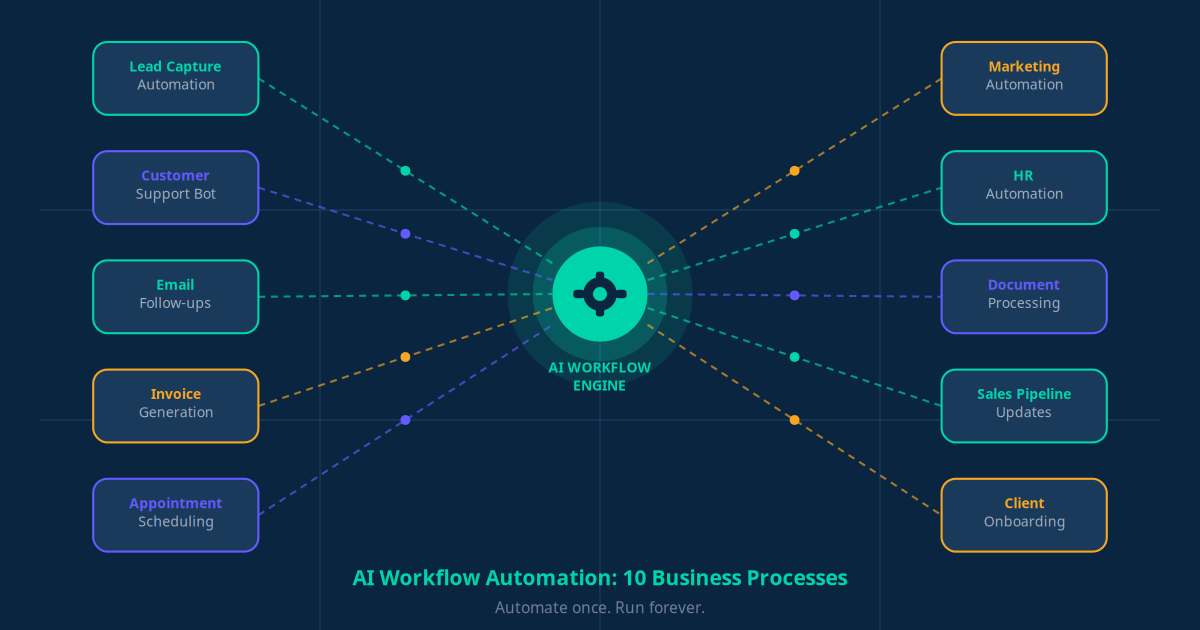
AI workflow automation is the use of artificial intelligence to automatically execute recurring business tasks — such as responding to leads, sending invoices, updating CRMs, and scheduling appointments — without human intervention. By connecting your existing tools through platforms like Make, Zapier, or n8n and adding AI intelligence via models like Claude or GPT, you can eliminate dozens of hours of manual work every week.
What Is AI Workflow Automation?
Every business runs on workflows. A customer enquires. Someone qualifies them. A quote gets sent. A follow-up email goes out. An invoice is raised. These steps are predictable, repeatable, and — in most businesses — done manually by a human every single time.
AI workflow automation changes that. Instead of a person executing each step, a connected system of AI models, APIs, and automation platforms handles the work automatically — triggered by specific events, data inputs, or schedules.
Think of it as building a digital operating system for your business. Once a workflow is automated, it runs 24 hours a day, 7 days a week, without fatigue, errors, or delays. A new lead fills out your website form at 2 AM — your AI system qualifies them, adds them to your CRM, sends a personalised welcome email, and notifies your sales team before 9 AM. All without anyone lifting a finger.
The difference between basic automation and AI-powered workflow automation is intelligence. Traditional automation follows rigid rules: "if X happens, do Y." AI automation can interpret context, understand natural language, make decisions based on nuance, and handle exceptions — making it far more powerful for real business operations.
AI Automation vs Traditional Automation
Before diving into which processes to automate, it helps to understand why AI-powered automation outperforms traditional rule-based tools:
| Capability | Traditional Automation | AI Workflow Automation |
|---|---|---|
| Handles exceptions | No — breaks on edge cases | Yes — interprets context and adapts |
| Understands natural language | No | Yes — reads emails, chats, documents |
| Personalises responses | Limited (name/date merge) | Deep personalisation based on history |
| Learns from data | No | Yes — improves over time |
| Setup complexity | Low | Low to medium (no-code tools available) |
| ROI potential | Moderate | High — replaces skilled labour tasks |
10 Business Processes You Should Automate First
Not all workflows deliver equal returns when automated. The ten processes below are chosen because they are high-frequency, time-consuming, and directly connected to revenue or customer satisfaction. Start here and you will feel the impact within weeks.
1. Lead Capture Automation
Saves 3–5 hrs/week · Increases lead conversion by 30%The problem: New leads fill out website forms, send WhatsApp messages, or enquire via email — and sit uncontacted for hours because someone has to manually process them.
The automation: When a lead comes in through any channel, an AI workflow instantly captures their details, qualifies them using a scoring model (based on company size, industry, or enquiry type), creates a contact in your CRM, assigns them to the right sales rep, and triggers a personalised first-touch message — all within 60 seconds of their enquiry.
Example: A cleaning company connects its website form to Make.com. Every new enquiry is scored by an AI model, added to HubSpot, and receives a WhatsApp message confirming receipt and asking two qualification questions — automatically.
Business benefit: Speed-to-lead is the biggest driver of conversion. Research shows that responding within 5 minutes increases contact rates by 100x compared to responding after 30 minutes. Automation makes that response time a guarantee, not an aspiration.
2. Customer Support Automation
Saves 8–12 hrs/week · Resolves 60–70% of queries without human involvementThe problem: Your team spends hours every day answering the same questions — pricing, availability, status updates, returns policy — questions that have the same answer every time.
The automation: An AI chatbot connected to your knowledge base handles FAQs, order status lookups, appointment confirmations, and policy queries around the clock. When a query requires human judgement, the bot escalates with full conversation context so the agent starts informed — not from zero.
Example: A dental clinic deploys an AI support bot on their website and WhatsApp. It answers questions about treatments, costs, and opening hours, books appointments directly in the practice management system, and only escalates to a receptionist for complex clinical queries.
Business benefit: Fewer support tickets mean your team focuses on work that genuinely requires human empathy and judgement. Customer satisfaction improves because queries are resolved instantly, not after a 4-hour wait.
3. Email Follow-Up Sequences
Saves 2–4 hrs/week · Increases deal close rate by 20–25%The problem: Most deals are lost not because of a bad product, but because no one followed up. Sales teams are busy; follow-ups slip.
The automation: When a prospect is added to your CRM or downloads a resource, an AI-powered email sequence launches automatically. Each email is timed and contextualised — if the prospect opens email 2 but not email 3, the sequence adapts. If they reply, the automation pauses and notifies the sales rep.
Example: A marketing consultant connects HubSpot to an AI email writer. When a prospect books a discovery call, they automatically receive a preparation guide, a case study relevant to their industry, and a reminder 24 hours before the call — without the consultant writing a single email manually.
Business benefit: Consistent follow-up without human effort. Every prospect receives the same high-quality experience regardless of how busy your team is.
4. Invoice Generation
Saves 3–6 hrs/week · Reduces payment delays by 40%The problem: Generating invoices manually — pulling job details, calculating totals, formatting documents, emailing clients — takes time and introduces errors.
The automation: When a job is marked complete in your project management tool or CRM, an automation workflow pulls the relevant data, generates a professional PDF invoice, and emails it to the client — with a payment link — within seconds. Overdue invoice reminders are sent automatically at 7, 14, and 30 days.
Example: A plumbing business connects their job management app to Xero and Make.com. The moment a job is closed, an invoice is raised and emailed. Payment reminders fire automatically, reducing average payment time from 28 days to 12 days.
Business benefit: Faster invoicing means faster payment. Automated reminders recover cash without awkward phone calls.
5. Appointment Scheduling
Saves 2–3 hrs/week · Reduces no-shows by 35–45%The problem: Back-and-forth emails and calls to schedule a single meeting waste enormous time. No-shows cost service businesses real money.
The automation: Prospects and clients book directly via a calendar link (Calendly, Cal.com, or similar). The AI workflow sends confirmation messages, adds the event to all relevant calendars, sends reminders at 24 hours and 2 hours before, and triggers a follow-up sequence post-meeting.
Example: A financial advisor embeds a booking widget on their website. New enquiries self-book a 20-minute consultation. They receive WhatsApp and email reminders. No-shows drop by 40% and the advisor reclaims 3 hours per week spent on scheduling calls.
Business benefit: Self-service booking removes friction for the client and scheduling overhead for your team. Automated reminders protect your time by keeping appointment slots filled.
6. Marketing Automation
Saves 4–7 hrs/week · Increases marketing ROI by 30–50%The problem: Creating, scheduling, and sending marketing content manually is time-intensive and inconsistent.
The automation: AI tools draft social media posts, email newsletters, and WhatsApp broadcasts based on your brand guidelines and content calendar. Automation platforms schedule and publish across channels. Engagement data flows back into your CRM to segment audiences and personalise future sends.
Example: An e-commerce brand uses an AI content tool to generate weekly promotional emails. Make.com schedules them, segments the audience by purchase history, and tracks which product categories drive the most clicks — feeding the insight back into the next campaign.
Business benefit: Consistent, data-driven marketing without a full-time marketing team. AI handles the execution; you set the strategy.
7. HR and Recruitment Automation
Saves 5–8 hrs/week per open role · Shortlists candidates 10x fasterThe problem: Screening CVs, scheduling interviews, and sending offer or rejection letters manually takes days and creates a poor candidate experience.
The automation: When a job application arrives, an AI model screens the CV against your role requirements and scores the candidate. Shortlisted candidates receive an automated interview invitation. Rejections are sent with a professional, personalised message. Offer letters are generated from templates when a decision is made.
Example: A retail chain connects their job board to an n8n automation. CVs are parsed by an AI model, scored on five criteria, and ranked automatically. Hiring managers review only the top 20% — cutting screening time from 6 hours to under 1 hour per role.
Business benefit: Faster hiring, better candidate experience, and significant time savings for managers who would otherwise spend their days in an inbox.
8. Document Processing
Saves 4–10 hrs/week · Reduces data entry errors by 95%The problem: Extracting data from purchase orders, contracts, supplier invoices, and expense receipts requires someone to read, interpret, and manually enter information into a system.
The automation: AI document processing tools (such as those built on large language models) extract key fields from any document — invoice number, vendor name, line items, totals, due dates — and push the structured data directly into your accounting software or ERP system.
Example: A logistics company receives 200 supplier invoices per month. An AI automation reads each invoice PDF, extracts the data, matches it against purchase orders in their system, and flags discrepancies for human review. Manual data entry drops from 15 hours to zero.
Business benefit: Near-zero error rate and dramatically faster processing means your finance team can focus on analysis rather than data entry.
9. Sales Pipeline Updates
Saves 2–3 hrs/week · Improves forecast accuracy by 40%The problem: CRMs are only as valuable as the data inside them — and that data is frequently stale because sales reps forget to update deal stages, log calls, or record meeting outcomes.
The automation: AI tools that monitor email, calendar, and call activity automatically update CRM records. When a sales call ends, the AI transcribes the conversation, extracts next actions, updates the deal stage, and creates follow-up tasks — without the rep manually logging anything.
Example: A SaaS company integrates their video call platform with HubSpot via Make.com. After every prospect demo, the call is automatically summarised, the deal stage is updated, and a follow-up task is created for the account executive within 5 minutes of the call ending.
Business benefit: Real-time, accurate pipeline data means better forecasting and no revenue lost because a follow-up fell through the cracks.
10. Customer Onboarding
Saves 3–5 hrs/week per client · Reduces churn in first 90 days by 25%The problem: New customer onboarding involves many repeatable steps — welcome emails, account setup guides, check-in calls, training invitations — that take time to coordinate manually and often happen inconsistently.
The automation: The moment a deal is marked "won" in your CRM, an onboarding automation triggers: a welcome email and introductory pack are sent, access credentials are provisioned (where applicable), a week-1 and week-4 check-in is scheduled, and training resources are delivered in a timed sequence over the first 30 days.
Example: A business software provider uses Zapier to trigger a full onboarding sequence when a contract is signed in DocuSign. The new client receives a structured 4-week email journey, gets added to a client Slack channel, and has their first three check-in meetings pre-booked — entirely automatically.
Business benefit: Consistent, high-quality onboarding for every client regardless of team capacity. Early engagement reduces churn significantly in the critical first 90 days.
Key Takeaway
These 10 processes collectively represent 30–50 hours of manual work per week for a typical SMB. Automating even half of them can free up the equivalent of a full-time employee — redirected to revenue-generating work that actually requires human intelligence.
Example AI Workflow Architecture: How It All Connects
Understanding how an AI automation workflow is actually built helps demystify the technology. Here is a real-world example: an AI-powered lead-to-invoice workflow for a professional services business.
The Components
- Trigger: A prospect fills out a contact form on the website or sends a WhatsApp message.
- AI model (intent detection): A large language model (such as Claude or GPT-4) reads the message and classifies the enquiry type, extracts key information, and determines if the lead meets basic qualification criteria.
- CRM integration: The AI creates a new contact and deal in HubSpot or Zoho CRM, pre-populated with all extracted information. The deal is placed in the correct pipeline stage.
- Automation platform (Make or Zapier): Acts as the orchestration layer — connecting the website form, AI model, CRM, email platform, and WhatsApp Business API into a single workflow without writing code.
- Communication layer: A personalised WhatsApp or email is sent to the prospect within 60 seconds. The sales rep receives a Slack notification with the lead summary.
- Knowledge base: The AI chatbot draws on a structured knowledge base containing pricing, FAQs, case studies, and service descriptions to answer follow-up questions accurately.
- Project-to-invoice trigger: When the project management tool marks a deliverable complete, Make.com triggers the invoice generation workflow — pulling data from the CRM deal, generating a PDF, and sending it via email with a Stripe payment link.
The entire sequence — from first enquiry to invoicing a completed job — runs automatically. The business owner and their team are involved only in the actual service delivery. Every administrative step is handled by the AI automation system.
Benefits of AI Workflow Automation
Businesses that implement AI-powered workflow automation consistently report the following outcomes:
- Time savings of 20+ hours per week — equivalent to half a full-time employee, redirected to higher-value work.
- Faster response times — leads and customers receive responses in seconds, not hours, significantly improving satisfaction and conversion rates.
- Fewer errors — AI systems do not make transcription mistakes, forget follow-ups, or miscalculate invoice totals.
- Consistent customer experience — every customer receives the same quality of communication regardless of which team member is on duty or how busy the business is.
- Scalability without proportional headcount growth — automate processes once and they scale to handle 10x the volume without additional staff.
- Better data quality — automated CRM updates and document processing mean your business data is accurate, current, and actually useful for decision-making.
- Competitive advantage — SMBs that automate core operations deliver the speed and consistency of a large enterprise at a fraction of the cost.
"We automated our lead follow-up, appointment scheduling, and invoicing in a single month. We went from spending 30 hours a week on admin to under 5 hours — and our client satisfaction scores improved because response times went from hours to seconds."
Common Mistakes When Automating Business Processes
AI automation delivers enormous value — but only when implemented thoughtfully. Here are the most common mistakes businesses make and how to avoid them:
- Automating a broken process. Automation amplifies whatever process you give it. If your sales follow-up is poorly structured, an automated version will be poorly structured at scale. Fix the process first, then automate it.
- Trying to automate everything at once. Start with one or two high-impact workflows. Build confidence, measure results, and expand from there. Over-engineering from day one leads to complexity that is hard to maintain.
- Removing humans entirely from high-stakes decisions. Automation should handle routine tasks; humans should handle complex, high-value, or emotionally sensitive interactions. Build clear escalation paths into every workflow.
- Ignoring the data quality requirement. AI automations depend on clean, structured data. If your CRM is full of duplicates and missing fields, fix your data hygiene before connecting AI tools to it.
- Not testing edge cases. Every workflow will eventually encounter an unusual input — a customer who speaks a different language, a form submitted with missing fields, a payment that fails. Test your automation against edge cases before it goes live.
- Forgetting to monitor performance. Set up alerts for workflow failures, track key metrics (response time, conversion rate, error rate), and review automation performance monthly. Workflows need maintenance as your business and tools evolve.
Frequently Asked Questions
What is AI workflow automation?
AI workflow automation uses artificial intelligence to automatically execute repetitive business tasks — such as sending emails, updating CRM records, generating invoices, and handling customer queries — without manual effort. It combines AI models, APIs, and automation platforms like Make or Zapier to create intelligent, self-running business processes.
How can small businesses automate workflows with AI?
Small businesses can start automating workflows with AI by identifying their most time-consuming, repetitive tasks and connecting tools like Make.com, Zapier, or n8n to their existing software (CRM, email, accounting). No-code platforms make it possible to build powerful AI automations without technical skills. Starting with one high-impact process — like lead follow-up or invoice generation — typically delivers ROI within the first month.
What are examples of AI automation in business?
Common AI automation examples include: AI chatbots that answer customer queries 24/7, automated email follow-up sequences triggered by user behaviour, AI-powered invoice generation from completed jobs, automated appointment reminders sent via WhatsApp or SMS, lead scoring and CRM updates when a prospect fills a form, and document data extraction that eliminates manual data entry.
What tools are used for AI workflow automation?
The most popular AI workflow tools include Make.com, Zapier, and n8n for building automation workflows; OpenAI or Claude APIs for adding AI intelligence; HubSpot or Zoho CRM for managing customer data; and WhatsApp Business API or Twilio for customer communication. See our Make vs Zapier vs n8n comparison for a detailed breakdown.
Is AI automation expensive for small businesses?
AI automation can be surprisingly affordable. Many platforms like Zapier and Make.com offer plans starting under $30/month. Most SMBs recover their automation investment within 4 to 8 weeks from the labour hours saved. Managed AI automation solutions from Jogi AI start at $179/month and typically replace 20+ hours of weekly manual work.
Conclusion: Where to Start With AI Workflow Automation
AI workflow automation is not a technology project reserved for large corporations with IT departments. It is a practical, accessible, and increasingly essential strategy for any small or medium business that wants to grow without proportionally growing its headcount.
The ten processes in this guide — lead capture, customer support, email follow-ups, invoicing, scheduling, marketing, HR, document processing, sales pipeline management, and client onboarding — represent the highest-impact starting points. Together, they can save your business 30 to 50 hours of manual work every single week.
The right approach is to start small. Pick the one workflow that is costing you the most time right now. Automate it properly. Measure the result. Then expand.
If you want a clearer picture of what business automation with AI would look like for your specific business — which processes to prioritise, which tools to use, and what results to expect — our AI Business Twin gives you a free, personalised automation roadmap based on your industry and current operations.
You can also explore our full blog library for guides on specific automation topics, or contact our team directly to discuss your automation goals.