9 Autonomous Workflows Every Real Estate Agent Should Use (to Reclaim 25+ Hours/Week)




Reclaim 25+ hours/week with AI
Free AI Audit →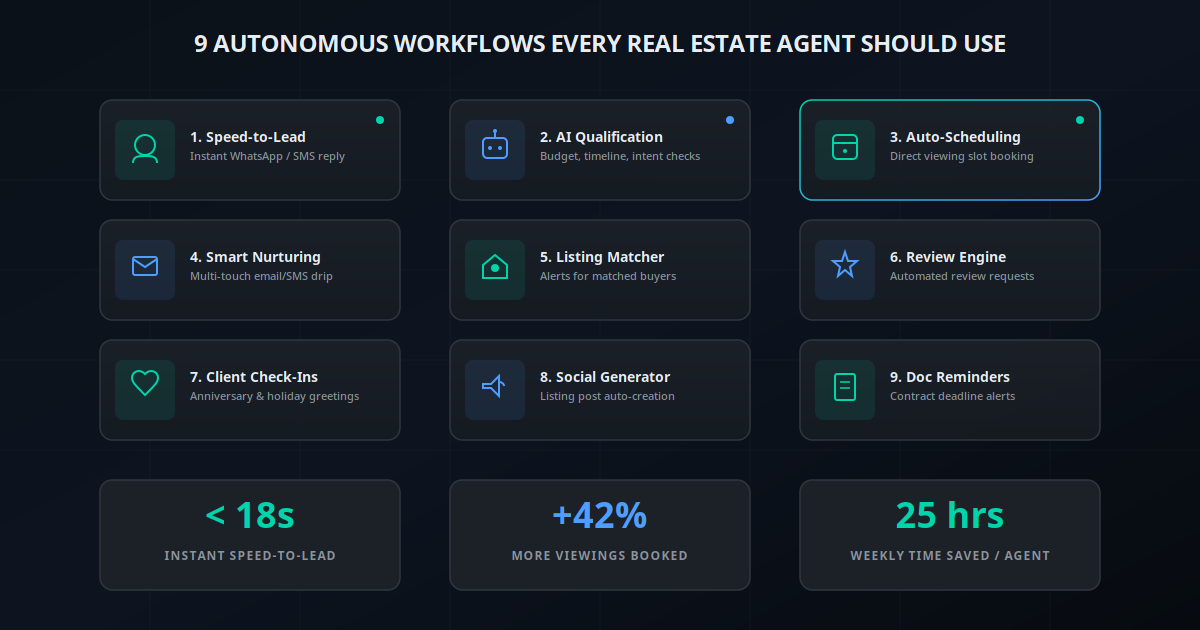
Let's be brutally honest: most real estate agents don't have a lead generation problem. They have an attention deficit problem. In a world where home buyers browse listings at midnight and expect answers in seconds, a human agent simply cannot compete alone.
If you are a solo real estate agent, you are running a multi-department corporation in your spare time. You are the head of marketing, the director of lead intake, the administrative assistant booking calendar slots, the compliance officer keeping up with paperwork, and—occasionally—the salesperson closing deals.
When you are conducting a property walkthrough or negotiating a contract, your lead capture shuts down. If a Zillow or Realtor.com lead inquiries during those hours, it goes cold. Statistics show that responding to a lead in under 60 seconds increases conversion rates by up to 391%. If you wait 30 minutes, your chances of qualifying that prospect drop by 80%.
The answer isn't working 18-hour days or hiring expensive administrative assistants. The answer is building a team of autonomous real estate workflows that act as your 24/7 digital department. Below, we break down the 9 essential workflows you should automate today to reclaim 25+ hours a week and boost showings by 42%.
Why Solo Agents Benefit the Most from AI Automation
Real estate brokerages often have dedicated receptionists, ISA (Inside Sales Agent) teams, and marketing departments. But solo agents are the bottlenecks of their own business. Every minute spent copying lead data from Zillow to Follow Up Boss, drafting listing descriptions, or sending calendar links is a minute not spent building client relationships or showing houses.
By deploying a real estate agent autonomous workflow, you duplicate yourself. An AI assistant never sleeps, never takes a holiday, and processes lead intake instantly. It maintains compliance guidelines, updates your CRM, and schedules appointments while you sleep.
An autonomous workflow is a self-executing software chain. It starts with a Trigger (e.g., a form submission), executes an Action (e.g., qualifying a buyer via WhatsApp AI), syncs with your CRM, and updates your Calendar. No manual copy-pasting required.
The 9 Autonomous Workflows Every Agent Needs
1. Instant Speed-to-Lead Response
When a prospect submits an inquiry on Zillow, Realtor.com, or your personal website, the countdown begins. This workflow intercepts the lead and sends an automated, highly personalized reply within 18 seconds via WhatsApp or SMS.
How it works: The automation fetches the lead name, property address, and contact details from the incoming email parser or API. It immediately drafts an SMS: "Hi Sarah, saw you were looking at 142 Pine St. I'm Chirag's AI assistant. Are you hoping to view it this week?"
2. AI Lead Qualification Agent
Not all leads are created equal. Instead of wasting hours calling cold leads who aren't pre-approved or have a budget of half the listing price, a conversational AI chatbot conducts the initial screening.
How it works: When the prospect replies to the speed-to-lead message, a GPT-4o-powered agent steps in. It asks context-aware questions: "What's your budget range?", "Are you pre-approved for a mortgage?", and "When are you looking to move?" The conversation transcript is formatted and synced directly to the lead's profile in your CRM.
3. Automated Viewing Scheduling
Playing "phone tag" to coordinate showing times is a massive time sink. This workflow automates calendar matching the moment a lead is marked as "Qualified."
How it works: Once the AI Qualification Agent confirms the lead is pre-approved and serious, it shares a dynamic scheduling link (like Calendly or TidyCal). The lead chooses a time. The system automatically books the slot on your calendar, creates a Google Meet link (if virtual), sends an invite, and updates the CRM status to "Showing Scheduled."
4. Follow-Up Drip Sequences
Most leads die in the follow-up phase. If an agent doesn't get an answer on the first attempt, they rarely try a third or fourth time. This workflow executes a systematic, multi-channel nurturing sequence over 30 days.
How it works: If a lead goes quiet after receiving the scheduling link, the workflow triggers a sequence: Day 1 (SMS nudge), Day 3 (helpful home-buying tip email), Day 7 (WhatsApp check-in), Day 14 (market report). The moment the lead replies, the sequence pauses automatically so you can jump in.
5. Smart Listing Alert Matching
Instead of manually searching the MLS and emailing property listings to active buyers, let an AI script match properties with buyers based on their chat transcripts.
How it works: The MLS feed updates. An automation matches new property details (beds, baths, price, location) against buyer requirements stored in your CRM. The matching buyers receive a personalized WhatsApp alert: "Hey Mike, a new 3-bed home just listed in your preferred neighborhood for $620k. Click here to see photos and schedule a slot."
6. Review and Referral Requests
92% of consumers trust recommendations from friends and family over advertising, yet many agents forget to ask for reviews post-close because they are already focusing on their next deal.
How it works: The transaction is marked "Closed" in the CRM. The workflow waits exactly 3 days (after the move-in chaos settles), then triggers a personalized SMS and email from the agent: "It was an honor helping you find your home! Would you mind sharing a quick 1-minute review on Google? [Link]" If positive, it sends a referral request 30 days later.
7. Past-Client Anniversary Check-Ins
Past clients are a goldmine for repeat business and referrals. However, maintaining contact with 100+ past clients is difficult.
How it works: An annual cron job checks transaction closing dates. On the anniversary of their purchase, the system automatically sends a friendly message: "Happy 2-year house anniversary, Sarah! Hard to believe it's been that long. Hope you are loving the kitchen remodels!" This keeps you top-of-mind without manual calendaring.
8. Listing Social Media Generator
Creating flyers, drafting social posts, and resizing images for every new listing takes hours of creative work.
How it works: You upload listing details and photos to a shared folder. An AI agent triggers, processes the images, writes a compelling listing copy suited for Instagram, LinkedIn, and Facebook, and schedules the posts on your social channels automatically.
9. Document Checklist and Deadline Reminders
Missing contract deadlines (escrow, inspection, appraisal) is a liability nightmare. This workflow keeps all parties aligned.
How it works: When a purchase agreement is signed, the key dates are entered. The workflow automatically calculates all deadlines and schedules automated email/SMS reminders for the buyer, seller, escrow officer, and yourself: "Friendly reminder: Home inspection must be booked by Friday at 5:00 PM."
Comparison of the 9 Autonomous Workflows
Here is a breakdown of how these workflows stack up in terms of difficulty, setup cost, time saved, and estimated payback period:
| Workflow | Complexity | Monthly Cost | Hours Saved/Wk | ROI Potential |
|---|---|---|---|---|
| 1. Speed-to-Lead Response | Low | $15 - $30 | 5 hours | High (Instant CTR) |
| 2. AI Qualification Agent | Medium | $40 - $80 | 6 hours | Very High (Filters spam) |
| 3. Auto-Scheduling | Low | $10 - $20 | 4 hours | High (Convenience) |
| 4. Follow-Up Drip Sequences | Medium | $29 - $79 | 3 hours | High (Revives cold leads) |
| 5. Listing Matcher | High | $50 - $120 | 4 hours | High (First to inform) |
| 6. Review Engine | Low | $5 - $15 | 2 hours | Medium (Builds SEO equity) |
| 7. Past Client Check-Ins | Low | $0 - $10 | 2 hours | High (Referrals) |
| 8. Social Media Generator | Medium | $20 - $50 | 3 hours | Medium (Brand awareness) |
| 9. Document Reminders | High | $30 - $60 | 3 hours | Critical (Risk mitigation) |
What Should You Automate First?
If you are overwhelmed, don't try to deploy all 9 workflows this weekend. Start with the "low-hanging fruit" that offers the highest immediate return on investment:
- Step 1: Set up the Speed-to-Lead response (Workflow 1). This immediately prevents lead leakage and ensures you are the first agent to contact new prospects.
- Step 2: Connect Auto-Scheduling (Workflow 3). Add a Calendly or similar link to your email signature and automated replies.
- Step 3: Deploy the AI Lead Qualification Agent (Workflow 2). Use this to handle the initial text-based negotiations and screen prospects before jumping on calls.
"AI won't replace real estate agents, but real estate agents who use AI will replace those who don't."
Want to skip the learning curve? Building these integrations via APIs and webhooks can be tricky if you aren't a developer. Jogi AI builds custom, done-for-you autonomous workflows specifically tailored for real estate agents and brokerages.