AI Employees Are Here: How Autonomous Agents Are Reshaping the Way Businesses Work
While you were in back-to-back meetings today, another company's AI employee answered 600 customer queries, qualified 18 sales leads, processed 24 invoices, and updated the CRM — without a single hour of overtime, a single sick day, or a single salary payment.
This is not a prediction. It is what businesses deploying autonomous AI agents are already doing.
The shift happening right now is not automation in the old sense — scripted bots that break the moment a customer phrases something unexpectedly. It is something fundamentally different: AI systems that can reason, retrieve information, make decisions within defined boundaries, and take action across your business tools. AI employees, in every practical sense of the term.
For business owners and operators still treating AI as a future consideration, the uncomfortable truth is this — the businesses adopting AI agents today are not just becoming more efficient. They are building a structural cost and speed advantage that compounds every month.
What Are AI Employees? A Clear Definition
The term "AI employee" sounds bold, but the concept is precise. An AI employee is an autonomous AI agent configured to own a specific business function — responding to customers, qualifying leads, processing documents, managing internal workflows — and empowered to take action within that function without human involvement for every individual task.
This is distinct from the chatbots and rule-based automations most businesses experimented with five years ago. Those systems were essentially sophisticated telephone menus. An AI agent is closer to a junior employee who can:
- Understand what someone is asking — even when it is phrased in ten different ways
- Look up relevant information from a knowledge base, CRM, or database
- Make a contextual decision based on what it finds
- Take an action — send a reply, update a record, trigger a workflow, escalate to a human
- Learn from the outcome and improve over time
The key word is autonomous. Not fully independent — AI agents operate within the rules and boundaries you set. But autonomous enough to complete end-to-end tasks without a human approving every step.
AI Agents vs Traditional Automation
Traditional automation is rigid: "If X happens, do Y." It works well for predictable, linear processes. It falls apart the moment reality does not cooperate.
AI agents are adaptive: "Given what is happening, figure out the best path to the desired outcome." They handle ambiguity, deal with context, and recover from unexpected inputs — because they understand meaning, not just patterns.
The Mental Model
Think of traditional automation as a conveyor belt — fast and reliable when everything is the same shape. Think of an AI agent as a skilled operator who can handle items of any shape, make judgment calls, and flag anything genuinely unusual for a human to review.
The Roles Businesses Are Already Filling With AI Agents
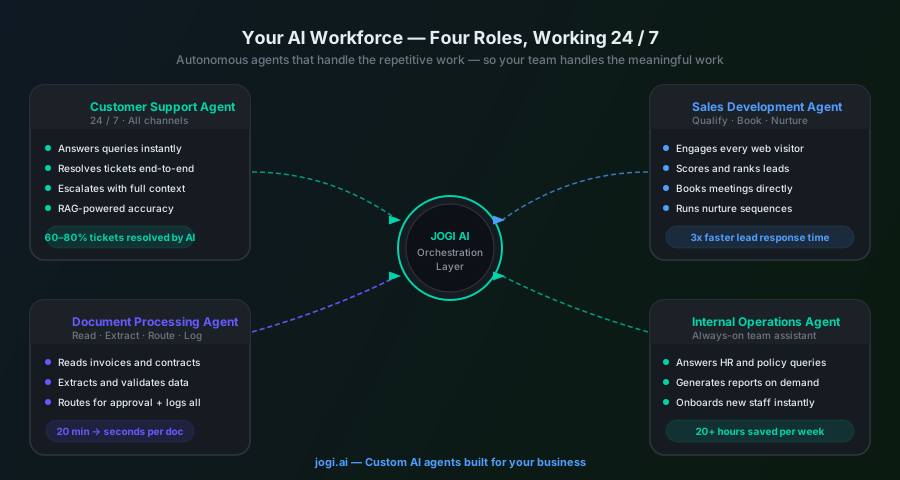
Across industries, four categories of AI employees are delivering the most immediate, measurable impact:
The Customer Support Agent
Handles inbound queries across website chat, WhatsApp, and email — 24 hours a day. Using a RAG-based knowledge system, it retrieves accurate answers from your product documentation, policy guides, and past support tickets. It can process refund requests, check order status, reset account access, and escalate complex issues to a human agent with full context attached. A well-built customer support AI resolves 60–80% of tickets without human involvement.
The Sales Development Agent
Engages every website visitor or inbound enquiry in real time, asks qualifying questions, scores the lead against your ideal customer profile, books meetings directly into your calendar, and enrolls unready prospects into a nurture sequence. It updates your CRM automatically and alerts your sales team the moment a lead's intent signals peak. Your human salespeople only step in when a lead is warm, qualified, and ready to talk.
The Document Processing Agent
Reads, extracts, classifies, and routes documents — invoices, contracts, applications, reports — without manual handling. An invoice arrives by email; the agent extracts the vendor, amount, line items, and due date, matches it against your purchase order system, flags discrepancies, and routes it for approval. What previously took 20 minutes of manual processing per document takes seconds, with higher accuracy and a complete audit trail.
The Internal Operations Agent
Handles the invisible workload that consumes your team's time without adding visible value — scheduling, status updates, report generation, data entry, meeting follow-ups. Employees ask it questions about company policy, submit expense requests, get onboarding guidance, or request status reports — and it responds immediately using your internal knowledge base. It is the always-available assistant your team always wished they had.
Human vs AI Agents: An Honest Comparison
The most important thing to understand about AI agents is where they excel — and where humans remain irreplaceable. This is not a replacement story. It is a redistribution story.
| Task Type | AI Agent | Human |
|---|---|---|
| Repetitive, high-volume queries | Faster, consistent, always available | Prone to fatigue and inconsistency |
| Data entry and CRM updates | Instant, error-free, scalable | Slow, error-prone, resented |
| Complex negotiation | Not suitable — lacks emotional judgment | Essential — relationship-driven |
| 24/7 customer response | Seamless — no overtime cost | Expensive and impractical |
| Creative problem-solving | Limited to known patterns | Strongest where rules break down |
| Empathy and sensitive situations | Can detect tone; escalates appropriately | Critical for trust and resolution |
| Strategy and direction-setting | Can surface data; cannot set vision | Irreplaceable leadership function |
The businesses winning with AI are not those replacing their teams. They are those redeploying their teams — away from the work that drains people, toward the work that actually needs people.
The question is not "Will AI take my team's jobs?" The right question is "What could my team achieve if AI handled everything that isn't worth their time?"
How to Start Building Your AI Workforce
Most businesses overcomplicate this. Start with one agent, one function, and one clear success metric. Here is the practical sequence:
Look at what your team spends the most time on that requires the least judgment. For most businesses, this is customer enquiries, lead follow-up, or data entry. These are your first targets — the places where an AI agent pays for itself fastest.
A customer-facing agent needs a conversational interface, a knowledge base, and channel integrations (WhatsApp, website chat). An internal agent needs access to your SOPs, HR docs, and project tools. A document processing agent needs OCR capability and connections to your ERP or finance system. Matching the agent architecture to the function is where most of the design work happens.
An AI agent is only as good as the information it can access. Before deploying, build a structured knowledge base — your product docs, FAQs, policies, pricing, CRM data, past tickets. For customer-facing agents, this is where RAG systems become critical: the agent retrieves information from your knowledge base before generating every response, ensuring accuracy and preventing hallucinations.
An isolated agent is far less powerful than one integrated with your CRM, helpdesk, calendar, email, and order management system. Integration is where AI agents transform from impressive demos into genuine business assets — because they can not only answer questions but take action within your actual systems.
Launch with clearly defined success metrics — ticket resolution rate, lead qualification speed, processing time per document. Review weekly for the first month. Once the first agent is stable and delivering results, identify the next highest-value function and repeat. Businesses that treat AI agent deployment as a programme — not a one-time project — compound their advantage fastest.
The Technology Behind AI Employees
You do not need to understand the engineering in depth, but understanding the three core components helps you make better decisions about what to build:
- RAG systems (Retrieval-Augmented Generation) — The engine that lets AI agents answer questions from your specific knowledge base, not from generic training data. RAG is what separates an AI that knows your business from one that just sounds confident. Every customer-facing AI employee should be built on a RAG foundation.
- Workflow automation — The layer that connects the AI's decisions to action in your real systems. When the agent decides to update a CRM record, send an email, create a support ticket, or book a meeting — workflow automation is what actually makes that happen. Tools like n8n, Make, and custom API integrations form this layer.
- Orchestration and memory — More advanced agents maintain context across conversations, remember past interactions, and can hand off tasks between multiple sub-agents. This is the architecture behind multi-agent systems — where a lead qualification agent, a support agent, and a CRM agent collaborate seamlessly behind the scenes.
What Is Coming Next: Multi-Agent Systems and AI Teams
The current wave of AI deployment — single agents, single functions — is just the beginning. The architecture emerging in 2026 and beyond is fundamentally more powerful: multi-agent systems, where coordinated teams of AI agents collaborate on complex tasks that span multiple departments and systems.
Consider what this looks like in practice:
- A prospective client fills out a website form. A lead qualification agent scores them and books a discovery call. A research agent builds a brief on their company before the call. A proposal agent drafts a customised proposal based on the call notes. A follow-up agent manages post-call nurture until the deal closes.
- A customer complaint arrives via WhatsApp. A support agent handles the conversation. A sentiment agent flags it as high-risk. A resolution agent processes the refund. A CRM agent logs everything and triggers a retention workflow.
No single human touches any part of these processes unless the system genuinely needs them. Every step is faster, logged, and consistent.
By the end of 2026, forward-looking businesses will not be asking "Should we use AI?" They will be asking "How do we structure our AI workforce?"
Key Takeaway
AI employees do not replace the best parts of your team. They eliminate the worst parts of everyone's week — the repetitive, draining, low-judgment work that costs you money and costs your people motivation. What remains is a leaner, sharper business where humans do what humans are genuinely good at.
Your AI Workforce Starts With One Decision
There is no neutral ground here. Every quarter you operate without AI agents, your competitors who have deployed them are widening their response speed advantage, their cost advantage, and their customer experience advantage.
The barrier to starting is lower than most business owners assume. You do not need to rebuild your technology stack, hire AI engineers, or commit to an enterprise transformation project. A single, well-built AI agent deployed on the right function delivers measurable ROI within weeks.
At Jogi AI, we design and build custom AI agents for businesses across every industry — from the knowledge base and RAG architecture through to CRM integration, workflow automation, and multi-channel deployment. Our approach is always practical: start where the impact is highest, measure it rigorously, and expand from there.
The businesses we work with do not just save time. They build AI infrastructure that compounds — getting smarter, faster, and more capable with every interaction it handles.
Your AI workforce is not a future initiative. It is a decision you can make today.