5 Property Management Tasks You Should Automate Today
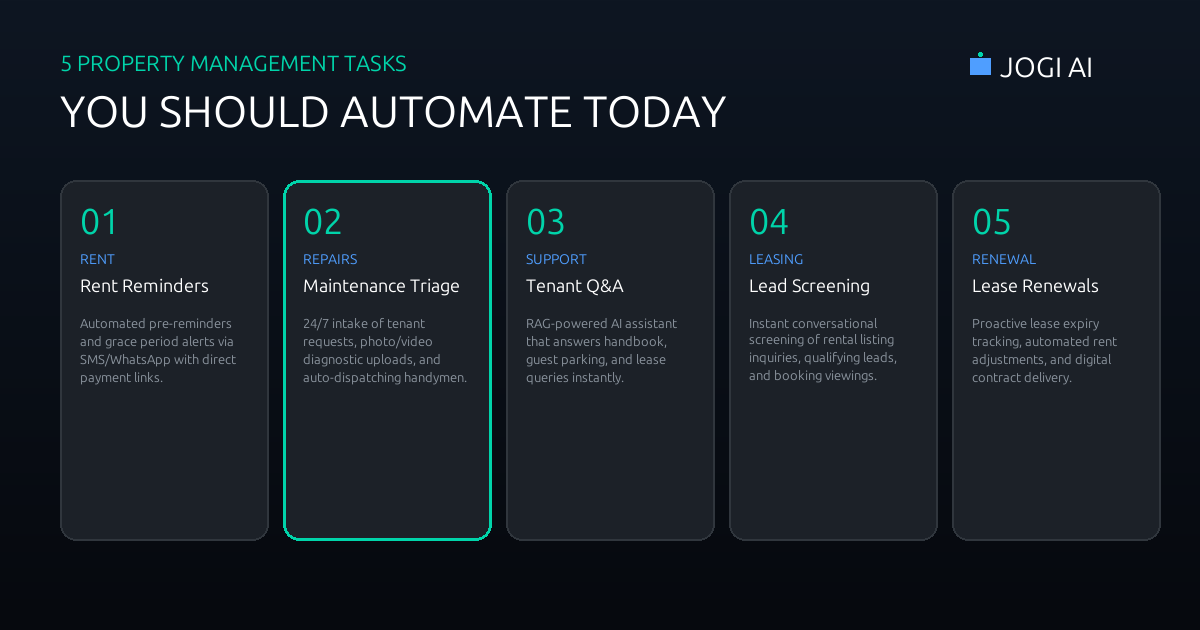
Whether you manage a portfolio of ten single-family homes or coordinate operations for thousands of multi-family apartments, property management is a battle of administrative friction. Between chasing down late rent, logging plumbing issues, pre-screening prospective tenants, and drafting lease renewals, the average property manager spends up to 75% of their working hours on repetitive, manual administration.
This high admin load doesn't just create mental fatigue; it directly impacts your bottom line. Slow response times to leasing leads increase vacancy rates. Delayed maintenance triage escalates minor leaks into costly renovations. Inconsistent rent chasing disrupts cash flow. In 2026, scaling a property management portfolio without hiring a small army of coordinators requires one thing: **autonomous workflows**.
Automating property management tasks does not mean building an impersonal barrier between you and your tenants. By offloading repetitive coordination and FAQs to background software, you actually drop average tenant response times to under two minutes while freeing up your human team to focus on capital inspections, landlord relations, and high-value issues.
Why Repetitive Property Management Tasks Drain Your Time
Every landlord or property manager knows that administrative work multiplies with every door added to your portfolio. The root issue is that property management tasks are highly fragmented. A single maintenance request can generate 10+ back-and-forth communication threads across text, email, phone calls, and resident portals, requiring manual updates at each step.
When you calculate the time spent on these tasks across 100 units, the operational drain is staggering:
- Checking and reconciling ledger accounts for rent payments.
- Chasing tenants who missed the due date with multiple text or email nudges.
- Triaging maintenance issues (e.g., getting tenants to explain the problem clearly, take a photo, and specify their availability).
- Coordinating with third-party vendors, comparing quotes, and verifying job completion.
- Screening rental leads, answering identical pre-qualification questions, and coordinating schedules.
By automating the five highest-frequency administrative touchpoints, property management firms can scale their units-per-manager ratio from a typical 120 doors to over 350 doors without degrading service quality.
1. Automated Rent Reminders and Escalate Sequences
Chasing rent is arguably the most uncomfortable and time-consuming task for property managers. It also critical: cash flow is the lifeblood of real estate operations. A manual reminder process is often delayed, inconsistent, and highly prone to administrative lag.
An automated rent collection workflow coordinates reminders, late fees, and accounting reconciliation completely in the background:
- Friendly Pre-reminders: Three days before rent is due, the workflow pulls due balances from your Property Management System (PMS) and sends a personalized, friendly WhatsApp or SMS notification: "Hi [Name], this is a friendly reminder that rent for [Address] is due on the 1st. Click here to pay securely via ACH/Card: [Payment Link]."
- Grace Period Nudges: If payment is not registered by the 2nd of the month, a gentle reminder goes out, emphasizing payment options.
- Late Notice & Auto Fee Application: If payment is still missing on the 5th (or after your grace period ends), the system automatically applies the late fee inside your accounting software (such as QuickBooks or AppFolio) and fires a compliance-checked text and email notification: "Rent is now past due. A late fee of [Fee] has been applied to your ledger. Please pay here immediately to avoid further actions: [Link]."
- Real-time Accounting Sync: Once the payment clears via Stripe or your bank API, the system automatically marks the invoice as paid, reconciles the ledger, and drafts a receipt to the tenant.
"Moving our rent reminders from manual emails to an automated multi-step WhatsApp sequence recovered 92% of outstanding balances before the late fee cutoff, saving our office staff 12 hours of ledger reviews every single month."
2. Maintenance Request Intake & Vendor Dispatch
Coordinating repairs is the largest operational bottleneck in property management. Tenants often submit incomplete information (e.g., "my heater is broken"), which requires a manager to call back, ask diagnostic questions, and request photos. Then, the manager must call three vendors to check availability, draft a work order, and coordinate a calendar slot with the tenant.
An automated maintenance workflow turns this chaotic process into a self-operating triage line:
Phase A: AI Diagnostic Intake
When a tenant reports a problem via WhatsApp or SMS, a conversational AI agent immediately responds: "I'm sorry to hear that! To help us get the right technician, could you please reply with a 5-second video or photo of the issue?" Once the media is received, a multimodal vision model analyzes the upload, identifying specific problems (e.g., water pooling from a copper valve line under a sink).
Phase B: Emergency Classification
The system runs the description and diagnostics against safety guidelines. If it detects a major leak or a fire hazard, it immediately bypasses standard queues, raises a high-priority alert to the property manager, and sends the tenant an automated safety guide (e.g., how to find and turn off the unit's water valve). If it is a minor issue (e.g., a broken cabinet hinge), it is classified as low priority and queued for routine maintenance.
Phase C: Vendor Dispatch & Tenant Scheduling
For standard repairs, the system checks your pre-approved contractor database and sends the top-ranked plumber a structured job request via text: "New plumbing job at Apt 3B. Estimated rate: $110/hr. Photos attached. Reply 'ACCEPT' to schedule for tomorrow morning." Once accepted, the system matches the contractor's open slot with the tenant's calendar, logs a work order in the PMS, and sends both parties confirmation. No phone calls required.
3. 24/7 Tenant Support and Handbook Q&A
Property managers are constantly bombarded with repetitive logistical questions: "What is the Wi-Fi password for the common room? Where do I drop off large boxes? What are the guest parking rules? When is trash day?" Answering these manually consumes hours of productive work.
By leveraging Retrieval-Augmented Generation (RAG), you can feed your property handbooks, HOA rule sheets, and lease terms into a secure AI knowledge base. When a tenant text comes in with a logistical query, the AI answers instantly and accurately, citing the handbook page.
If the question is complex or relates to something not covered in your files (e.g., a neighbor dispute), the AI agent seamlessly creates a ticket in your team's dashboard: "I've logged this question for my manager, who will follow up with you tomorrow morning." This deflects up to 88% of routine inbound messages while keeping a human safety net in place.
4. Applicant Pre-Screening and Tour Booking
In a hot rental market, a listing can get 50+ inquiries in 24 hours. Sorting through these leads is a massive time sink, especially when many leads do not meet basic criteria like credit score, pet restrictions, or move-in timelines.
An automated leasing workflow connects listing sites like Zillow, apartments.com, or MLS directly to your team's calendar:
- Instant Response: The second a prospect submits an inquiry, the system replies via SMS or WhatsApp: "Thanks for inquiring about 124 Oak St! To help us schedule a viewing, could you please answer 3 quick questions?"
- Conversational Screening: The bot asks: "What is your target move-in date? Do you have pets? Is your gross monthly income at least 3x the rent?"
- Automated Scheduling: Prospects who meet the criteria are instantly sent a calendar booking link (e.g., Calendly or your PMS calendar API) to select a viewing slot. Unqualified candidates are politely rejected: "Unfortunately, we cannot accommodate pets at this property. If you'd like, I can notify you when matching properties become available."
- CRM Sync: All qualified applicant information is logged under a prospect profile in your leasing CRM, ready for your showing agent.
5. Proactive Lease Renewal Reminders
Losing track of lease expiration dates leads to properties rolling over to month-to-month terms without rent adjustments, costing landlords thousands in lost revenue. However, manually tracking dates, calculating market-rate adjustments, and drafting new leases is a tedious administrative process.
An automated lease renewal workflow handles this on a rolling cycle:
- The 90-Day Trigger: Ninety days before a lease expires, the system triggers a background task that calculates a pre-defined rent adjustment (e.g., +3% or aligned with local market rental index APIs).
- The Offer Nudge: The tenant is automatically emailed a renewal offer: "We'd love to have you stay! Your lease expires on [Date]. We can offer a 12-month renewal at [New Rate]. Click here to accept this offer."
- Follow-up & Escalation: If the tenant doesn't respond, automated reminders are scheduled at the 75-day and 60-day marks. If still unanswered by day 45, the task is escalated to the manager to call the tenant.
- Document Delivery: Once accepted, the system generates the lease addendum from a template, pre-populates the new terms, and sends it out for digital signature via DocuSign or PandaDoc. Once signed, the PMS is updated with the new expiration date and rent amount.
Automation Tools & Complexity Breakdown
Before building your property automation system, it is helpful to look at the tools, setup effort, and estimated time savings for each task:
| Workflow | Primary Tools | Setup Effort | Est. Time Saved (per 100 units) |
|---|---|---|---|
| Rent Reminders | Make.com, Twilio, Stripe, QuickBooks | Low (2-4 days) | 10-15 hours / month |
| Maintenance Triage | Make.com, WhatsApp Business API, AppFolio/Yardi | High (2-3 weeks) | 25-30 hours / month |
| Tenant Handbook Q&A | Chatbase, Twilio, OpenAI API | Medium (5-7 days) | 15-20 hours / month |
| Applicant Screening | Zapier, Calendly, Zillow API, RentCheck | Medium (1 week) | 20-25 hours / month |
| Lease Renewals | Make.com, DocuSign API, Google Sheets | Medium (5 days) | 8-10 hours / month |
Avoiding the "Cold Bot" Trap: Keep the Tenant Experience Warm
The biggest risk in property automation is making your tenants feel like numbers in a database. When a tenant is dealing with a stressful issue—like a broken air conditioner in the summer heat—a robotic, unhelpful bot will trigger immediate frustration.
To avoid this, build empathy and clear boundaries directly into your workflows:
- Adopt a natural tone: Avoid overly technical or robotic language. Use warm, human phrasing: "Let me get a technician on this right away for you," rather than "Ticket #4852 generated."
- Maintain a clear human escape valve: Always provide a simple path to speak to a person. At any point, if a tenant types "help" or "speak to manager," the AI should instantly transfer the conversation and notify your office staff: "Sure, I'll pass this thread over to our manager now. They will receive our chat history."
- Personalize context: Ensure your workflows look up the tenant's first name, property address, and previous issues so they never have to repeat basic details.
Compliance and Auditing in Property Automation
Property management is a highly regulated industry. Eviction notices, late fees, rent increases, and lease renewals must adhere strictly to local landlord-tenant laws. When automating communications, ensure that:
- Every notification is logged: All outbound SMS, emails, and WhatsApp threads must be archived in your CRM or PMS as a permanent audit trail. If a tenant claims they never received a late rent notice, your system must show time-stamped delivery logs.
- Rent increases match local caps: If your properties are subject to rent control, write rules into your renewal calculator that cap increases at the legally permitted maximum.
- Approved notice templates: Ensure all formal notice templates are reviewed by local real estate counsel before uploading them to your automated triggers.
How to Start: The Crawl-Walk-Run Roadmap
Trying to automate all five workflows simultaneously is a recipe for system bugs and staff confusion. Instead, take a staged approach:
Phase 1: Crawl
Set up automated rent reminders and a tenant Q&A bot. These require zero direct connections to your property software and immediately reclaim 15+ admin hours per month.
Phase 2: Walk
Integrate listing sites with an AI screening assistant and booking link. Automate your lease renewal reminders based on lease expiration dates in your database.
Phase 3: Run
Build the full maintenance diagnostic triage and vendor dispatch loop, connecting directly with your Yardi/AppFolio work order endpoints via APIs.
Measuring Your Success
To evaluate if your property management automation is working, track these four performance indicators:
- Vacancy Rate (Days on Market): Does automated lead response reduce the time it takes to sign a new tenant?
- Average Maintenance Cycle Time: The time elapsed from a tenant reporting a leak to the plumber marking the work order complete.
- On-Time Payment Rate: The percentage of rent received before grace periods expire.
- Staff Hours per Unit: The total admin hours spent managing your portfolio divided by the number of units. Your goal should be to scale your doors without increasing staff hours.