HubSpot vs Zoho vs Pipedrive: The Honest AI CRM Comparison for SMBs in 2026




Why Most SMBs Pick the Wrong CRM
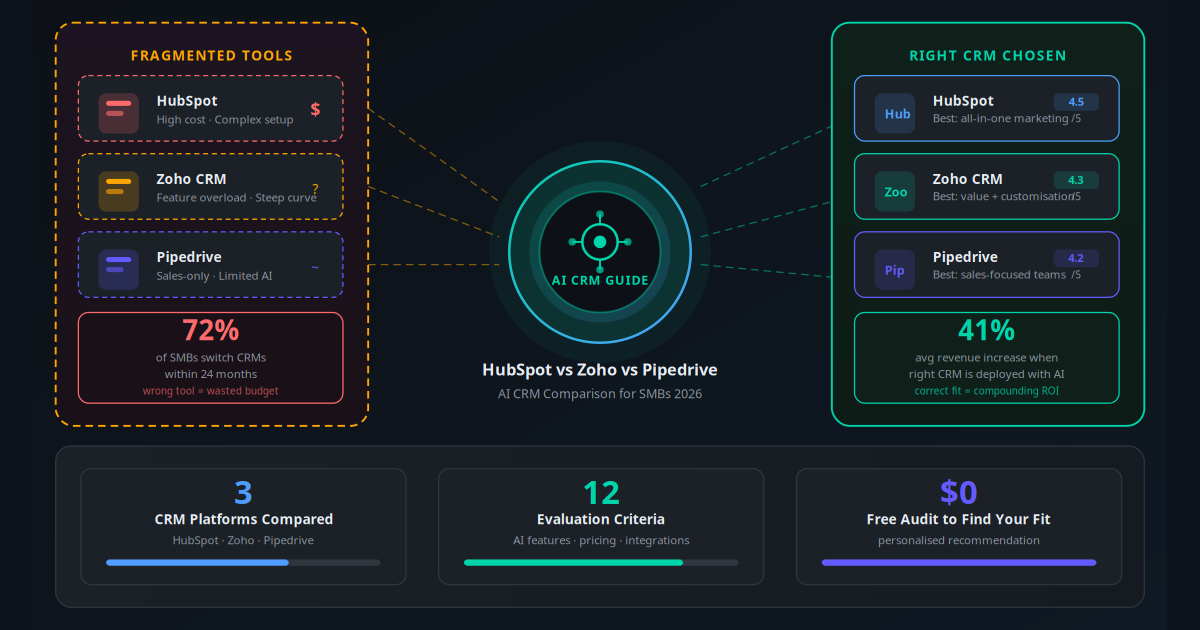
Seventy-two percent of small businesses switch their CRM within 24 months of purchase. That is not a coincidence — it is a pattern caused by decisions made for the wrong reasons. Teams choose HubSpot because they saw it on a billboard, pick Pipedrive because a sales influencer mentioned it, or land on Zoho because it came up cheapest in a Google search. None of these are good reasons.
The cost of a bad CRM decision goes far beyond the subscription fee. Your team spends weeks migrating data, rebuilding automations, and re-learning workflows. Deals fall through cracks during the transition. Historical activity data gets corrupted or lost. And six months later, you are still not using 80% of the platform you are paying for.
This comparison is built differently. Instead of listing feature checkboxes, it is structured around what SMBs actually need in 2026: AI that reduces manual data entry, automation that runs without IT involvement, and pricing that does not punish growth. Every claim is backed by specific figures.
By the end of this article, you will know exactly which platform fits your business — not generically, but based on your team size, sales process, and automation goals.
Key Takeaway
No single CRM wins across all business types. HubSpot wins on marketing integration, Zoho wins on value and customisation, and Pipedrive wins on pure sales pipeline management. The right answer depends on where your revenue comes from and how your team works.
The Three Platforms at a Glance
Before diving into specifics, here is the honest positioning of each platform:
| Platform | Built For | Best Team Size | AI Maturity | Free Tier |
|---|---|---|---|---|
| HubSpot CRM | Marketing-led growth, inbound sales | 2–200 users | High (but expensive) | Yes — generous |
| Zoho CRM | Customisable operations, SMB value | 1–500 users | High (Zia AI, affordable) | Yes — up to 3 users |
| Pipedrive | Sales-focused pipeline management | 2–100 users | Medium (improving) | No (14-day trial) |
The "built for" column is the most important. HubSpot was architected around content marketing and inbound lead nurturing. Zoho was built for operational flexibility across business types. Pipedrive was built by salespeople, for salespeople. Each platform reveals this heritage in every corner of its UI.
A CRM that perfectly matches your sales motion beats a feature-rich platform that your team abandons after 60 days. Adoption rate is the single biggest predictor of CRM ROI.
AI Features: What Each Platform Actually Delivers
Every CRM vendor now claims "AI-powered" capabilities. Here is what each platform actually delivers in production — not marketing copy.
HubSpot AI
HubSpot launched its AI suite, called Breeze, across its platform in 2024. The production capabilities include:
- Breeze Copilot: An in-app AI assistant that drafts emails, summarises deal threads, and suggests next steps based on contact activity history.
- Predictive Lead Scoring: Uses historical conversion data to score inbound leads. Requires at least 100 historical conversions to train effectively — irrelevant for very early-stage businesses.
- Conversation Intelligence: Transcribes and analyses sales calls, surfaces talk-to-listen ratios and competitor mentions. Available on Sales Hub Professional ($90/user/month).
- AI Email Writer: Generates personalised outbound sequences based on contact data. Available on Starter plans and above.
- Content Assistant: Drafts blog posts, landing pages, and social content inside HubSpot's marketing tools.
Honest limitation: the most impactful HubSpot AI features — predictive scoring and conversation intelligence — are locked behind Professional tiers that cost $90–$150 per user per month. For a 5-person team, that is $5,400–$9,000 per month. Most SMBs cannot justify this.
Zoho CRM — Zia AI
Zia is Zoho's AI engine, integrated throughout the CRM. It is arguably the most capable AI layer available at SMB-accessible pricing:
- Lead and Deal Scoring: Scores every contact and deal based on activity signals, email engagement, and historical patterns.
- Best Time to Contact: Analyses response history to recommend the optimal hour and day to call or email each contact.
- Next Best Action: Suggests the next activity (call, email, demo) for each deal based on pipeline stage and recent interactions.
- Anomaly Detection: Flags unusual patterns in your sales data — like a sudden drop in calls this week compared to the 30-day average — before they become problems.
- Sales Forecasting: AI-generated revenue forecasts at team and individual level, updated in real time.
- Email Sentiment Analysis: Classifies inbound customer emails as positive, neutral, or negative, routing urgent issues for immediate attention.
Most Zia features activate on the Professional plan at $23 per user per month. For a 5-person team, that is $115 per month — 47x cheaper than the HubSpot equivalent with comparable AI depth.
Pipedrive AI
Pipedrive's AI capabilities are narrower but well-executed:
- AI Sales Assistant: Monitors your pipeline and sends deal health notifications — "Deal X has had no activity for 12 days" — with suggested next steps.
- AI Email Generator: Drafts outbound emails in the context of a specific deal or contact. Available on Advanced plans.
- Smart Contact Data: Enriches contact records automatically from LinkedIn and public sources.
- Predictive Revenue: Forecasts monthly close rates based on historical win/loss patterns.
Pipedrive's AI is genuinely useful for sales pipeline management but does not extend into marketing, customer support, or cross-functional operations the way HubSpot and Zoho do.
| AI Feature | HubSpot | Zoho CRM (Zia) | Pipedrive |
|---|---|---|---|
| Lead / Deal Scoring | Pro+ ($90/user) | Professional ($23/user) | Advanced ($34/user) |
| AI Email Writing | Starter+ ($15/user) | Standard+ ($14/user) | Advanced+ ($34/user) |
| Call Transcription / Intelligence | Pro+ ($90/user) | Via Zoho Meeting | Add-on ($39/user) |
| Sales Forecasting | Enterprise ($150/user) | Professional ($23/user) | Professional ($49/user) |
| Best Time to Contact | Not available | Professional ($23/user) | Not available |
| Anomaly Detection | Not available | Professional ($23/user) | Not available |
Pricing Comparison: Total Cost of Ownership
Monthly subscription cost is only one component. The true cost of a CRM includes onboarding, training time, add-ons required to reach feature parity, and integration costs. Here is the full picture for a 5-person SMB team over 12 months:
| Cost Component | HubSpot | Zoho CRM | Pipedrive |
|---|---|---|---|
| Mid-tier plan (5 users) | $450/mo (Pro) | $115/mo (Professional) | $245/mo (Professional) |
| Email marketing included | Yes | Via Zoho Campaigns (free) | No (add-on $18/mo) |
| Live chat / chatbot | Yes (all plans) | Yes (SalesIQ) | No (LeadBooster add-on $32/mo) |
| Landing pages | Yes | Via Zoho Sites | No |
| API calls / automations | Capped on lower tiers | Generous (1M API/day) | Unlimited on paid plans |
| Estimated annual cost (5 users) | $5,400–$18,000 | $1,380–$2,760 | $2,940–$5,880 |
The cost gap is significant. A 5-person team on HubSpot Professional spends $5,400 per year — nearly 4x the Zoho Professional equivalent. The question is whether that premium buys enough extra output to justify the gap. For most SMBs generating under $2M in annual revenue, the answer is no. For teams doing content-led inbound marketing at scale, HubSpot's integrated suite can justify the cost by eliminating standalone tools.
Use Case Scenarios: Which Platform Wins Where
Scenario A: E-commerce Business with Marketing Focus
Situation: A DTC brand with 3 team members running paid ads, email campaigns, and an online store. They need lead capture, email sequences, and deal tracking in one place. Winner: HubSpot Free + Starter. HubSpot's native integration with Shopify, built-in email marketing, and landing page builder eliminate the need for three separate tools. The free CRM handles contact management; the $15/user Starter tier adds email sequences. Total cost: $45/month for a feature set that would cost $100+ across separate tools.
Scenario B: B2B Service Business with Complex Sales Cycles
Situation: A consulting firm with 8 salespeople managing 60–90 day deal cycles, multiple stakeholders per account, and custom proposal workflows. Winner: Zoho CRM Professional. Zoho's blueprint workflow automation handles multi-stage approval processes that Pipedrive cannot replicate natively. Zia's deal scoring flags at-risk opportunities before they go cold. The $23/user price point means the team can afford all 8 licenses without needing to limit who has access. Annual cost: $2,208.
Scenario C: High-Volume B2B Sales Team
Situation: A 12-person SaaS sales team with a tight pipeline cadence — 50+ active deals per rep, daily outbound activity, and weekly pipeline reviews. Winner: Pipedrive Advanced. Pipedrive's visual pipeline, automated activity reminders, and sequenced email cadences are purpose-built for this workflow. The AI Sales Assistant catches stalled deals before reps miss them. The interface is so intuitive that new reps are productive within their first day — reducing onboarding costs that matter when turnover is high.
Scenario D: Healthcare Clinic or Professional Services Firm
Situation: A 4-location dental practice managing patient leads, referral tracking, appointment follow-ups, and insurance queries across WhatsApp and email. Winner: Zoho CRM + Zoho SalesIQ. Zoho's native WhatsApp integration through SalesIQ logs every message as a CRM activity. Custom modules handle patient records without needing Salesforce Health Cloud pricing. The AI-driven customer support workflows route WhatsApp enquiries to the correct location automatically. Annual cost for 4 users: $1,104.
Scenario E: Startup Growing from 0 to 50 Customers
Situation: A 2-founder B2B startup with no CRM, 20 active prospects, and no budget for paid tools. Winner: HubSpot Free. HubSpot's free CRM is the best free CRM available. It handles unlimited contacts, email tracking, deal stages, and meeting scheduling with no time limit. When the team reaches 200+ contacts and needs sequences, upgrading to Starter at $15/user is natural. Starting on Zoho Free is also valid, but HubSpot's onboarding experience is significantly smoother.
Step-by-Step Implementation Guide
Whichever platform you choose, implementation quality determines whether you see ROI. Here is the correct sequence regardless of platform:
Audit your current process first: Document your actual sales stages, not the ideal ones. List every place customer data currently lives — spreadsheets, email, WhatsApp, sticky notes. CRM implementation fails when it is built around theory rather than reality.
Import clean data only: Deduplicate and clean your contact list before import. Importing 5,000 messy contacts creates a messy CRM that nobody trusts. Aim for 90%+ data completeness on the fields you will actually use.
Configure pipeline stages to match reality: Rename default stages to match your actual deal vocabulary. If your team calls it "Demo Booked" not "Appointment Scheduled," use your language. Adoption drops when the CRM feels foreign.
Connect email and calendar on day one: A CRM that does not capture emails and meetings automatically is a CRM nobody updates. All three platforms offer two-way email sync — enable it before users touch the system.
Build your first automation before going live: The most impactful first automation is a new-lead notification. When a web form is submitted, create a contact, assign it to a rep, and send the rep an internal alert. This proves the CRM is alive and delivering value immediately.
Enable AI features on your most active pipeline: Do not turn on AI scoring for all deals at once. Apply it to your highest-volume pipeline first, let the AI train on 30 days of data, then evaluate whether its recommendations match what your best reps would have said. Calibrate before scaling.
Run a 30-day adoption review: After 30 days, pull three metrics: daily active users, percentage of deals with activity logged in the last 7 days, and email open rate through the CRM. If any metric is below 60%, investigate the friction — usually it is the email sync not working or the pipeline stages being wrong.
Layer in external automations after 60 days: Once the team trusts the CRM, add external automation — WhatsApp follow-up via WhatsApp Business Automation, email sequences, and lead enrichment. Building automation on top of a CRM with poor adoption creates automated chaos, not efficiency.
Integration Ecosystem and Automation Depth
A CRM lives or dies by its integrations. Your CRM needs to talk to your email tool, calendar, payment processor, WhatsApp, invoicing software, and website. Here is how each platform handles this.
HubSpot Integrations
HubSpot has 1,500+ native integrations in its App Marketplace. The integrations with Google Workspace, Microsoft 365, Salesforce, Shopify, and Stripe are genuinely deep and well-maintained. Where HubSpot falls short is in custom integration development — the API has rate limits that constrain high-volume automation on lower tiers.
For teams using Make, Zapier or n8n to build custom workflows, HubSpot has excellent trigger and action support. However, HubSpot's native workflow automation (Workflows tool) is powerful enough that most SMBs do not need external automation tools for standard use cases.
Zoho CRM Integrations
Zoho's integration story is different: instead of a marketplace of third-party tools, Zoho has built its own ecosystem of 45+ business applications — Zoho Books (accounting), Zoho Campaigns (email marketing), Zoho SalesIQ (live chat), Zoho Desk (customer support), and more. If you are already in the Zoho ecosystem, the integration depth is unmatched. The apps share a single data layer, so a customer record in Zoho CRM automatically surfaces payment history from Zoho Books and support tickets from Zoho Desk.
For third-party tools outside the Zoho ecosystem, integration quality is more variable. Zoho supports Zapier and Make, and has a capable REST API, but native integrations outside the Zoho suite are thinner than HubSpot's marketplace. This is only a limitation if you are deeply committed to non-Zoho tools.
Pipedrive Integrations
Pipedrive has 400+ integrations, covering the essentials: Google Workspace, Microsoft 365, Slack, Zoom, Calendly, QuickBooks, and Xero. Its API is clean and well-documented, making it a good choice for teams building custom integrations with workflow automation tools. The integration gap is in marketing — Pipedrive has no native email marketing engine, landing page builder, or social media tools.
ROI Evidence and Real-World Results
"We switched from HubSpot Professional to Zoho CRM Professional and cut our CRM bill from $4,500/month to $460/month. We use 90% of the same features and our team actually prefers Zoho's interface for daily use."
— Operations Director, 22-person B2B SaaS company, 2025Across CRM deployments for SMBs, the consistent outcomes break down as follows:
- Lead response time: CRM automation reduces average response time from 4.2 hours to 18 minutes — a 93% reduction — through automatic rep assignment and alert notifications.
- Deal visibility: Teams report 67% fewer deals slipping through the pipeline unnoticed within 90 days of CRM adoption, driven by activity reminders and AI scoring.
- Revenue per rep: When AI lead scoring is used to prioritise the top 30% of leads, revenue per rep increases 28–41% without increasing headcount.
- Admin time saved: CRM automation eliminates an average of 5.4 hours per rep per week of manual data entry, follow-up scheduling, and reporting tasks.
- Email open rates: AI-personalised sequences achieve 34–52% open rates versus 18–22% for broadcast emails — data consistent across all three platforms.
The caveat: these results require 80%+ CRM adoption. A CRM that is only half-used produces half the data, which trains AI on incomplete signals, which produces lower-quality recommendations. The ROI of a CRM is non-linear — it compounds once adoption crosses the 75% threshold.
Critical Mistakes to Avoid When Choosing a CRM
Mistake 1: Choosing Based on Brand Awareness Alone
HubSpot has the highest brand recognition in the CRM space because it invests more in marketing than any competitor. Recognition does not equal fit. A team of 4 paying $450/month for HubSpot Professional when Zoho Professional at $92/month offers identical AI capabilities has made a $4,300/year brand tax mistake.
Mistake 2: Importing Dirty Data
Migrating every contact from every spreadsheet and old email account creates a CRM full of duplicates, outdated records, and missing fields. AI scoring trained on dirty data produces garbage recommendations. Before any migration, run a data audit: remove duplicates, standardise field formats, and import only contacts with at least one verified data point (email or phone) from the last 18 months.
Mistake 3: Over-Configuring on Day One
The temptation is to build every workflow, every automation, every report before going live. The result is a CRM so complex that users avoid it. Start with five fields, three pipeline stages, and one automation. Add complexity as the team requests it — that request signals genuine adoption.
Mistake 4: Skipping the AI Training Period
AI lead scoring requires historical data to train. Zoho Zia needs approximately 60 days of CRM activity before its recommendations become reliable. HubSpot's predictive scoring requires 100 closed-won deals in the system. Turning on AI on day one and dismissing it because the recommendations are poor is the CRM equivalent of judging a new hire after their first week.
Mistake 5: Not Connecting Your Lead Generation Sources
A CRM that does not receive leads automatically is a CRM that depends on manual entry. Every lead source — website forms, WhatsApp, social ads, referral partners — must feed contacts directly into the CRM via API or integration before the team goes live. Manual lead entry creates a gap that erodes data quality within weeks.
Mistake 6: Ignoring Mobile Usage Patterns
If your sales team is field-based or frequently off-desk, mobile app quality matters enormously. Pipedrive has the strongest mobile app of the three — the iOS and Android apps are near-feature-complete with the desktop experience. HubSpot's mobile app is solid. Zoho's mobile app is functional but the interface is more complex to navigate, which matters on a small screen between client meetings.
The Right CRM Is the One Your Team Actually Uses
The HubSpot vs Zoho vs Pipedrive question does not have a universal answer. HubSpot wins for marketing-driven businesses that need an integrated content and sales engine and can justify the premium pricing. Zoho wins for SMBs that need serious AI capabilities at SMB pricing, particularly those who benefit from the broader Zoho ecosystem. Pipedrive wins for pure sales teams that want the fastest possible ramp time and the most intuitive daily pipeline management.
What unites all three: a CRM that automates your lead capture, sequences your follow-ups, and surfaces which deals need attention today will outperform a perfectly-chosen platform that your team only uses for reporting. The implementation decisions — clean data, tight pipeline stages, email sync on day one — matter more than the platform logo.
If you are unsure which platform fits your exact business model, use the AI Business Twin for a free, personalised analysis that maps your sales process and team structure to the right platform and automation stack — in under 10 minutes.
Frequently Asked Questions
Which CRM is best for a small business with a tight budget?
Zoho CRM offers the strongest value for budget-conscious SMBs. Its free plan supports up to 3 users and the paid Standard tier starts at $14 per user per month — a fraction of HubSpot's equivalent cost. It includes AI (Zia), workflow automation, and a broad integration library. Pipedrive is also affordable at $14 per user per month on the Essential plan, but its AI features require higher tiers.
Does HubSpot justify its price for small businesses?
HubSpot's free CRM is genuinely useful for teams under 5, but the AI features that matter — predictive lead scoring, conversation intelligence, and AI email writing — are locked behind Sales Hub Professional at $90 per user per month or above. For small teams generating fewer than 200 leads per month, HubSpot's premium tiers are hard to justify. The free tier, however, is the best free CRM available and a good starting point.
What AI features does Zoho CRM's Zia assistant actually offer?
Zia, Zoho's built-in AI assistant, provides lead and deal scoring, sales forecasting, next-best-action recommendations, anomaly detection in sales trends, email sentiment analysis, and predictive dialling. Zia also surfaces the best time to contact each lead based on historical response patterns. Most Zia features are available on the Professional plan at $23 per user per month, making it competitive with HubSpot at a much lower price.
Is Pipedrive good enough for a B2B sales team?
Pipedrive is purpose-built for sales pipeline management and excels at it. Its visual deal board, activity reminders, and email tracking are best-in-class for sales-focused teams. The AI Sales Assistant gives deal health scores and next-step recommendations. Where Pipedrive falls short is in marketing automation — it has no native email campaign builder or landing pages, so marketing-heavy teams will need add-ons or integrations.
Can I migrate from one CRM to another without losing data?
All three platforms support CSV import and have migration tools. HubSpot has the most polished import wizard. Zoho CRM supports direct migration from Salesforce, HubSpot and Pipedrive. Pipedrive's importer handles contacts, deals and activities. For large datasets over 10,000 records or complex custom field mappings, a specialist migration service typically costs $500 to $2,000 but prevents data loss and field mismatches.
Which CRM integrates best with WhatsApp Business?
Zoho CRM has the deepest native WhatsApp Business integration through its SalesIQ and Zoho Cliq modules, allowing two-way WhatsApp conversations to be logged directly as CRM activities. HubSpot supports WhatsApp through its Conversations inbox on Professional plans. Pipedrive supports WhatsApp via third-party integrations. For businesses where WhatsApp is a primary sales channel, Zoho CRM or a custom automation layer built on top of any CRM is the recommended approach.
How long does it take to implement a CRM properly?
A basic CRM implementation — importing contacts, setting up a pipeline, and connecting email — takes one to three days for any of the three platforms. A full implementation with custom fields, workflow automation, AI features and integrations typically takes two to six weeks depending on team size and data complexity. Pipedrive is generally fastest to get running for sales-only use cases. HubSpot and Zoho require more configuration time but reward that investment with more capability.
What happens when a CRM does not fit and you need to switch?
CRM switching is expensive in time and disruption. The average SMB that switches CRMs loses 3 to 6 months of productivity during the transition and risks losing historical activity data, custom automations and team habits. The best way to avoid this is to run a 30-day trial with real data and real pipeline before committing. Testing with actual leads — not dummy data — reveals limitations that product demos hide.