AI Email Management: Auto-Triage, Draft & Route Your Business Inbox




The Inbox Tax Nobody Puts on the Books
Open the shared support inbox of almost any small business and you will see the same scene: hundreds of unread threads, a customer complaint buried under three newsletters, a hot sales lead from Tuesday that nobody replied to, and an invoice query that has been forwarded between two people who each assumed the other had it.
Email feels free. It is not. The average professional spends roughly 28% of the workweek reading and answering email — over eleven hours every week per person. For a five-person team, that is more than a full-time role spent not on the work itself, but on sorting, forwarding, copy-pasting, and chasing. None of it shows up as a line item, which is exactly why it never gets fixed.
The damage is not only time. It is the lead that went cold because the reply took two days. It is the angry customer who churned because their email sat unread over the weekend. Research on lead response consistently shows that replying within five minutes versus thirty minutes can change conversion by an order of magnitude — and a shared inbox almost never replies in five minutes.
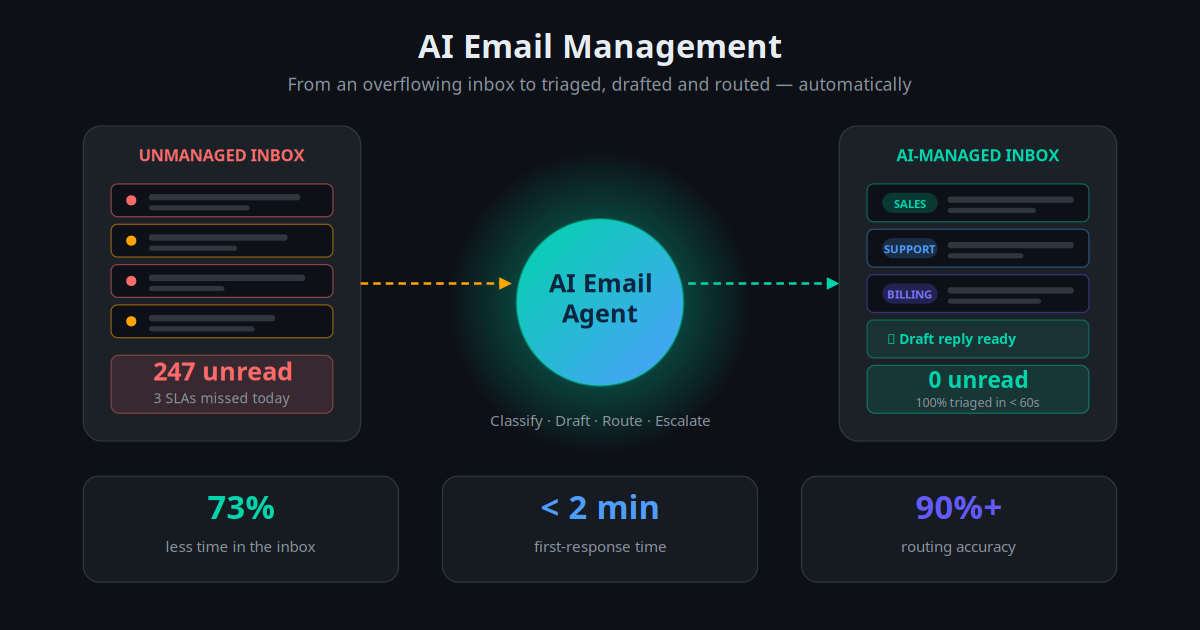
AI email management fixes this at the root. Instead of a human triaging every message, an AI agent reads each email the moment it arrives, understands what it is, drafts the right response, routes it to the right place, and updates your systems — leaving people to handle only the small slice that genuinely needs human judgement.
What AI Email Management Actually Is
AI email management is a system that sits on top of your existing mailbox and turns inbound email into structured, actioned work automatically. It is not a smarter spam filter, and it is not the keyword rules you set up in 2015. Those match strings. This understands meaning.
When an email arrives, a language model reads the full message in context — the subject, the body, the thread history, and who the sender is — and decides four things: what this email is about, how urgent it is, what should happen next, and whether a human needs to be involved. From that single decision, it can label and prioritise the message, draft a reply in your brand voice, extract key data into your CRM or helpdesk, trigger a workflow, and escalate anything sensitive to the right person.
This is the same shift described in the move from automation to agentic AI: older email automation followed rigid if-this-then-that rules and broke the moment a message was phrased unexpectedly. An AI email agent reasons about intent, so "my card got declined again" and "payment isn't going through" both route to billing without anyone writing a rule for either phrase.
Key Takeaway
AI email management is not filtering — it is understanding. The agent reads each message the way a sharp assistant would, then triages, drafts, routes and logs it, so people only touch the email that truly needs them.
The Real Cost of an Unmanaged Inbox
Before looking at the solution, it is worth seeing the size of the problem in numbers. Here is what a typical unmanaged shared inbox costs a small business, and what changes when an AI agent handles the first pass.
| Metric | Unmanaged Inbox | AI-Managed Inbox |
|---|---|---|
| Time spent triaging & sorting | 8–12 hrs / person / week | 1–3 hrs / person / week |
| First-response time (business hours) | 3–9 hours | Under 2 minutes |
| After-hours / weekend response | Next business day | Immediate acknowledgement |
| Misrouted or dropped emails | 5–15% of volume | Under 2% (with fallback) |
| Sales lead follow-up | Often hours or missed | Instant, every time |
| CRM / helpdesk data entry | Manual, inconsistent | Automatic, structured |
The single most expensive row is first-response time. Every hour a sales enquiry sits unanswered, the probability of winning it falls. Every hour a complaint sits unread, the probability of a public review or a refund rises. An unmanaged inbox is not a neutral cost — it actively leaks revenue while looking like nothing is wrong.
A team of five spending ten hours each per week in a shared inbox is burning roughly 2,600 hours a year — the equivalent of a full-time employee whose entire job is sorting and forwarding email.
What an AI Email Agent Can Do
"Email automation" is a broad term. To be useful, an AI email agent has to do specific, concrete jobs. Here are the core capabilities that matter for a real business.
1. Classify and Prioritise Every Message
The agent reads each incoming email and assigns it an intent — sales enquiry, support request, billing question, partnership, recruitment, vendor, spam — plus an urgency level. A frustrated customer using words like "cancel" or "unacceptable" is flagged high priority and pushed to the top, not left in arrival order behind a press release.
2. Draft Context-Aware Replies
For common questions, the agent writes a complete reply in your brand voice, using your knowledge base, pricing, policies, and the customer's history. This is the same retrieval approach behind a company-data RAG chatbot — the model answers from your real documents instead of guessing. The draft lands ready to send or auto-sends for low-risk categories you approve.
3. Route to the Right Person or System
Instead of an email being forwarded three times, the agent sends it straight to the right destination on the first pass: the sales owner for that region, the support queue, the finance team, or a Slack or WhatsApp channel for urgent items. Routing is based on meaning, not on the subject line.
4. Extract Data and Update Your Systems
The agent pulls structured information out of unstructured email — names, order numbers, dates, requested actions — and writes it into your CRM or helpdesk automatically. This is where it connects to your wider CRM automation, so an enquiry email becomes a clean lead record without anyone retyping anything.
5. Trigger Workflows and Follow-Ups
An email is rarely the end of the task. The agent can kick off a workflow: create a ticket, schedule a callback, send a quote, start a sequence, or chase a non-reply after two days. This is how email connects to your broader email automation and follow-up systems instead of being a dead end.
6. Escalate Cleanly to a Human
The most important capability is knowing when to stop. When the agent is unsure, when the email is sensitive, or when the value is high, it routes to a named human with a short summary and its suggested next step — so the handoff is fast and the person is not starting from a cold thread.
Real Business Use Cases
E-commerce: Order & WISMO Email Deflection
An online store's inbox is dominated by "where is my order?" emails. The AI agent reads each one, looks up the order via the store API, and replies with the live tracking status and delivery date automatically. Roughly 70% of inbound email is resolved with zero human touch, and the team focuses on genuine problems. It pairs naturally with systems that recover abandoned carts.
Professional Services: Lead Triage and Instant Reply
A consultancy's enquiries arrive mixed in with vendor pitches and admin. The agent identifies real prospects in seconds, replies instantly with availability and a booking link, and creates the lead in the CRM with notes — feeding directly into the firm's lead generation funnel. Speed-to-lead went from hours to under two minutes.
SaaS Support: First-Line Resolution
A software company's support inbox handles password resets, billing questions, and how-to requests. The AI agent resolves tier-one issues from the help docs, drafts replies for tier-two for an agent to approve, and escalates bugs to engineering with a structured summary. It works alongside the company's AI-driven support workflows to cut average handle time by half.
Real Estate: Enquiry Qualification
A property agency receives portal enquiries by email all day and night. The agent qualifies each one — buyer or renter, budget, area, timeline — replies with matching listings, books a viewing, and assigns the right agent. After-hours enquiries get an instant, useful response instead of waiting until morning when the lead has already contacted three competitors.
Operations: Vendor and Invoice Inbox
A finance shared inbox receives invoices, statements, and supplier queries. The agent extracts invoice numbers and amounts, files attachments, routes approvals to the right manager, and flags anything outside policy. Combined with automated invoicing workflows, the manual data entry that used to take a day a week largely disappears.
How to Deploy Your First AI Email Agent
You do not need to automate the whole inbox on day one. The reliable path is to start narrow, prove accuracy, then widen. Here is the sequence that works.
Pick one mailbox and one job: Start with a shared functional inbox — support@ or sales@ — not personal email. Choose a single job first, usually triage and draft, not auto-send.
Define your categories: List the 5–8 intents that cover most of your volume (sales, support, billing, spam, partnership, etc.) and write 3–5 real example emails for each. Clear categories drive accurate routing.
Connect the knowledge source: Point the agent at your FAQ, pricing, policies, and product docs so drafted replies are grounded in real, current information rather than guesses.
Start in draft-only mode: Let the agent classify, route, and write replies — but a human approves every send for the first two to four weeks. This builds trust and surfaces edge cases safely.
Measure on real email: Track routing accuracy, draft acceptance rate, and false escalations on a sample of real messages. Tune categories and prompts until accuracy is consistently above 90%.
Enable auto-send by category: Turn on full automation only for low-risk, high-volume intents — order status, FAQs, booking confirmations — while keeping complaints, refunds, and contracts in human review.
Connect downstream systems: Wire the agent into your CRM, helpdesk, and calendar so it does not just reply but creates records, tickets, and bookings as part of the same flow.
Review weekly and expand: Read every escalated and low-confidence email weekly for the first month. Each one is a lesson that improves the agent. Then roll it out to the next inbox.
The whole first deployment, for a focused use case, typically takes one to two weeks of part-time effort — most of which is defining categories and reviewing drafts, not engineering.
Tools and Platforms Worth Knowing in 2026
There are three broad approaches to building AI email management, depending on how much control and integration you need.
| Approach | Best For | Pricing (approx.) | Control |
|---|---|---|---|
| Built-in AI in Gmail / Outlook | Individual productivity, basic sorting | Bundled / per seat | Low |
| No-code email AI tools | Small teams, support & sales triage | $30–$80 / mailbox / mo | Medium |
| Helpdesk AI add-ons | Teams already on a helpdesk | Add-on to existing plan | Medium |
| Workflow platform + LLM | Custom routing & CRM integration | $150–$600 / mo | High |
| Custom agent build | Complex, multi-system operations | Project + run cost | Full |
Most small businesses get the best result from the middle and fourth rows: a workflow platform connected to a language model, because that is where email management can be wired into the rest of the business — CRM, calendar, billing — instead of staying a standalone inbox tool. If you already run multiple connected automations, an email agent slots naturally into a broader AI workflow setup.
The ROI: What Businesses Actually See
"We went from a 200-email backlog every Monday to inbox zero by 10am. The AI drafts 80% of our replies and we just approve. It gave us back a person."
— Operations lead, 14-person services companyAcross businesses deploying AI email management in 2026, the pattern of results is consistent:
- Time in the inbox: 60–75% reduction in time spent triaging and sorting
- First-response time: From several hours to under two minutes, including after hours
- Auto-resolution rate: 50–70% of routine email handled with no human touch
- Routing accuracy: 90%+ once categories are tuned, with a human fallback for the rest
- Lead conversion: Measurable lift from replying in minutes instead of hours
- Payback period: Most teams recover the cost within the first month
The ROI math is simple. If an AI email agent saves a five-person team eight hours each per week, that is 40 hours weekly returned to actual work — at a running cost that is a small fraction of one salary. The gain is not only the hours saved; it is the revenue retained because nothing slips through anymore.
Mistakes to Avoid
AI email management works well, but a few predictable mistakes cause most failed rollouts. Avoid these.
Going Straight to Auto-Send
The fastest way to lose trust is to let the AI send replies on day one with no human review. Start in draft mode, prove accuracy by category, and only then enable auto-send for the safe, high-volume intents. Trust is earned per category, not granted globally.
Vague or Overlapping Categories
If "support" and "billing" overlap, routing accuracy collapses. Define a small set of distinct intents with clear example emails. Most routing problems are category-definition problems, not model problems.
No Low-Confidence Fallback
Every agent will hit emails it is unsure about. Without a rule that sends low-confidence messages to a human, the agent will guess — and a confident wrong answer is worse than a quick handoff. Always build the fallback first.
Automating the Sensitive 20%
Complaints, legal matters, refunds, and key accounts should route to a human fast, not get an automated reply. The goal is to automate the repetitive 80%, not to remove humans from the conversations where tone and judgement decide the outcome.
Ignoring Security and Scope
Connecting an agent with full admin access to every mailbox is a real risk. Use narrowly scoped OAuth access, a clear audit log, and providers that do not train on your content. Treat email access with the same care as any other sensitive system, much like the principles in safe AI automation.
Conclusion: The Inbox Should Work for You, Not the Other Way Around
The shared inbox has quietly become one of the most expensive, least examined costs in small business. It consumes the equivalent of a full-time role, slows every response, and lets real revenue slip through unnoticed — all while looking like normal work.
AI email management changes the default. Instead of people processing email, an agent reads, triages, drafts, routes, and logs every message the moment it arrives, escalating only what genuinely needs a human. The technology is mature, the deployment path is low-risk when you start narrow, and the payback shows up within weeks, not quarters.
The businesses that win the next few years will not be the ones with the biggest teams. They will be the ones whose teams spend their hours on customers and growth instead of sorting an inbox a machine should be handling.
To see exactly which of your email types could be automated, how many hours it would return, and what it would cost for your specific setup, use the AI Business Twin for a free personalised analysis in under 10 minutes.
Frequently Asked Questions
What is AI email management?
AI email management is a system that reads incoming email, understands what each message is about, and takes action automatically. It classifies and prioritises messages, drafts context-aware replies, routes emails to the right person or system, extracts data into your CRM or helpdesk, and escalates anything that needs a human. It is different from old mailbox rules because it understands meaning and intent, not just keywords.
Will an AI email agent send replies without a human checking them?
That is a choice you control. Most businesses start in draft-only mode, where the AI writes the reply and a person approves it with one click. As accuracy proves out on low-risk categories such as order status, FAQs, and appointment confirmations, you can enable auto-send for those specific intents while keeping sensitive emails like complaints, refunds, and contracts in human review. You set the boundary, not the model.
How accurate is AI at sorting and routing email?
For well-defined categories with clear examples, modern language models classify and route business email with 90 to 97 percent accuracy after a short tuning period. Accuracy depends on how distinct your categories are and how good your examples are. The practical approach is to measure routing accuracy on a sample of real emails before going live and to keep a low-confidence fallback that sends uncertain messages to a human.
Is it safe to connect AI to my company email?
It can be, if you set it up correctly. Use OAuth scopes limited to the specific mailboxes the agent needs, never share full admin credentials, keep an audit log of every action the agent takes, and start with a shared functional inbox such as support or sales rather than personal mailboxes. Choose providers that do not train their models on your email content and that meet your regions data and privacy requirements.
How much does AI email management cost for a small business?
No-code tools that triage and draft replies start around 30 to 80 dollars per month per mailbox. A custom AI email agent built on a workflow platform with model usage typically runs 150 to 600 dollars per month depending on volume. Compare that to the cost of the time it replaces: a team spending ten hours a week in shared inboxes is often spending the equivalent of a part-time salary just sorting and forwarding messages.
What types of email should not be automated?
Keep a human in the loop for legal and contract matters, formal complaints and anything that could escalate, refunds or billing disputes above a threshold you set, sensitive HR and personal data, and high-value relationship accounts where tone matters. The right model is automation for the high-volume, repetitive 80 percent and fast human routing for the sensitive 20 percent.