AI Memory in 2026: How Persistent Agents Transform Small Business




The Goldfish Problem — Why Most AI Still Forgets You
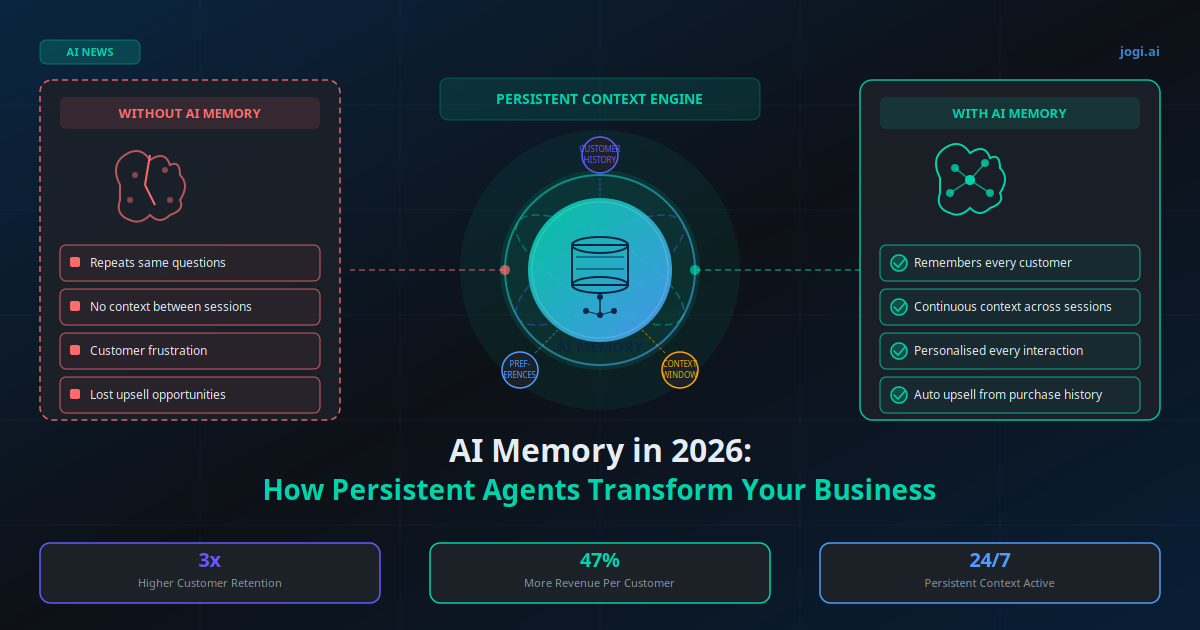
A customer contacts your support chatbot to ask about a delayed order. The AI resolves it. Two weeks later, the same customer returns with a follow-up question about the replacement. Your AI greets them like a complete stranger and asks them to explain everything from scratch.
That is the goldfish problem — and it is costing businesses far more than they realise. According to Salesforce's 2026 State of the Connected Customer report, 76% of customers expect AI to know their history and context on every interaction. When it does not, 52% say it makes them feel like the company does not value them. That sentiment directly drives churn.
The good news: the goldfish era is ending. In 2026, persistent AI memory — the ability of an AI agent to retain and recall context across sessions, over days, weeks, and months — has moved from research novelty to production-ready capability. The tools exist. The cost is accessible for SMBs. The only remaining question is whether you build this into your customer experience before your competitors do.
This article covers what AI memory actually is, which types matter for your business, how to deploy it, and what ROI you should expect — with real numbers from businesses already running it.
Key Takeaway
AI memory in 2026 is not a research concept — it is a production capability that lets your agents remember customers, preferences, and history across every session. Businesses using it report 47% higher revenue per customer and 3x better retention versus those running stateless AI.
What AI Memory Actually Means in 2026
When most people hear "AI memory," they think of a chatbot that remembers your name. That is version 0.1. Production AI memory in 2026 is a structured system that lets an AI agent query and update a persistent knowledge store before, during, and after every customer interaction.
The technical architecture is straightforward. Before your AI starts a conversation, it queries a memory store — typically a vector database (Pinecone, Qdrant, Weaviate) or a structured key-value store — using the customer's identifier (phone number, email, user ID). It retrieves relevant context: past purchases, stated preferences, unresolved complaints, communication style notes, last interaction summary. That context is injected into the AI's system prompt. The AI then responds as if it has known this customer for years — because, functionally, it has.
After the conversation ends, the AI writes a summary of what was learned back to the memory store. Over time, the customer profile grows richer. The AI gets better at serving them with every interaction. This is the compound interest of AI: the longer you run it, the more valuable it becomes.
"The difference between a stateless AI and a memory-enabled one is the difference between a vending machine and a trusted advisor. One dispenses answers. The other knows you."
The Three Types of AI Memory Your Business Needs
Not all memory is the same. For practical SMB deployment, there are three distinct layers — and each serves a different purpose in your customer support and service workflows.
1. Episodic Memory — The Conversation Log
This is the simplest form: a stored summary of each past conversation. Your AI recalls that on March 14, the customer complained about slow delivery. On April 2, they asked about your premium plan. On May 18, they nearly churned but were retained with a discount. Each interaction builds a timeline the AI can reference. Episodic memory is the foundation — without it, the other layers have nothing to build on.
2. Semantic Memory — The Preference Profile
Semantic memory is extracted from episodic logs and structured into a customer profile. It stores facts and preferences: "prefers email over phone," "always buys in bulk during Q4," "has two children under 10," "is price-sensitive but responds to quality arguments." This is the layer that enables genuine personalisation. When your AI knows these attributes, it adjusts every interaction — product recommendations, tone, offer timing — to match the specific customer.
3. Procedural Memory — The Business Rules Layer
Procedural memory stores how the AI should handle specific situations based on past outcomes. If a customer escalated three times before and was only retained by a senior agent, the AI flags that pattern and routes proactively. If a customer has a specific payment arrangement, procedural memory ensures the AI never accidentally contradicts it. This layer is what separates a personalised AI from a truly intelligent one.
Real-World Use Cases for SMBs
E-commerce: Purchase History-Driven Upsells
An online supplement retailer integrated AI memory into their support chatbot. When a returning customer contacts support about a protein powder reorder, the AI surfaces a relevant bundle based on their purchase history — "You bought magnesium last time. Customers who combine this with creatine see 2x better results." Upsell conversion from support chats increased 38% within 90 days. Revenue per support ticket went from $0 to $26 average.
Healthcare Clinic: Continuity of Care Without Staff Overhead
A multi-location physiotherapy clinic deployed persistent memory across their booking and follow-up agents. The AI remembers each patient's injury history, treatment protocols, and cancellation patterns. When a patient calls to rebook after a gap, the AI says: "Welcome back — it looks like you last came in for your lower back in October. Would you like to continue with Dr. Patel?" Rebooking conversion after a gap increased from 41% to 67%. No additional staff required.
Professional Services: Client Brief Memory Across Engagements
A 4-person marketing agency built AI memory into their client onboarding and communication flow. Every client briefing, feedback note, and preference is stored. When a client emails asking to revisit a previous campaign concept, the AI retrieves the original brief, the feedback given, and the version history — and drafts a contextual response in the agency's voice. The owner estimates saving 6 hours per week previously spent searching email threads and shared drives for client history.
Retail: Personalised WhatsApp Follow-Ups at Scale
A boutique clothing retailer with 3,800 active customers uses AI memory in their WhatsApp Business automation. The AI remembers each customer's size, colour preferences, past purchases, and response history. Re-engagement messages reference specific past purchases: "We just got the navy version of the blazer you loved in green — only 12 in stock." Open rate for personalised memory-driven messages: 74%. Generic broadcast open rate: 18%. Revenue per campaign: 4.1x higher.
Tools and Platforms Worth Knowing in 2026
The memory tooling landscape has matured significantly. Here are the platforms that SMBs are actually using in production — and what each is best suited for.
| Tool | Type | Best For | Starting Cost |
|---|---|---|---|
| Mem0 | Managed memory layer | Drop-in memory for any LLM app | $49/month |
| Qdrant (self-hosted) | Vector database | Custom builds, full data control | ~$20/month (VPS) |
| Pinecone | Managed vector DB | Scale, no infra management | Free tier + $70/month |
| OpenAI Memory API | Platform-native | ChatGPT-based workflows | Usage-based (API) |
| LangChain Memory Modules | Open-source framework | Developer-led custom agents | Free (infra costs only) |
For most SMBs starting out, the practical recommendation is Mem0 for managed simplicity or Qdrant on a VPS for data sovereignty. If you are already using Make.com or n8n for workflow automation, you can build a lightweight memory layer by reading and writing customer profiles to Airtable or a simple database before each AI call — no dedicated memory infrastructure needed at low volume.
How to Deploy AI Memory: Step-by-Step
The deployment sequence below works for businesses adding memory to an existing AI workflow or chatbot — without rebuilding from scratch.
Audit your existing AI touchpoints: List every AI agent, chatbot, or automated workflow that currently touches customers. Identify which ones would benefit most from persistent context — typically support, onboarding, and retention workflows first.
Choose your memory store: For under 5,000 customers, Airtable or a simple database with structured JSON profiles works fine. For larger volumes or semantic search needs, set up Mem0 (managed) or Qdrant (self-hosted). Match your choice to your team's technical capability.
Define what to remember: Build a customer memory schema — the specific fields your AI should store and retrieve. Include: last interaction summary, purchase history summary, stated preferences, flagged issues, preferred contact channel, and relationship stage. Start with 6–10 fields and expand as you learn what the AI actually uses.
Build the pre-conversation retrieval step: Before each AI session starts, trigger a lookup using the customer's identifier. Retrieve their memory profile and inject it into the AI system prompt in a structured format: "Customer context: [last purchase: April 12], [preference: email over WhatsApp], [open issue: tracking query from May 4]."
Build the post-conversation write step: After each session, have the AI generate a 2–3 sentence summary of what happened and any new preferences or facts learned. Append this to the customer's memory profile. This is how the profile grows over time without manual effort.
Test, monitor, and refine: Run 50 test conversations across your customer base. Review whether the AI is using memory appropriately — not surfacing irrelevant old context, not missing critical recent context. Adjust the retrieval prompt and memory schema based on what you observe in real conversations.
Total implementation time for a developer-familiar team: 2–4 days. For a no-code stack using Make.com + Airtable + an LLM: 1–2 days. The investment is modest. The compound return is not.
The ROI Numbers — What Businesses Are Seeing
"Our chatbot went from a cost centre to a revenue driver the week we added memory. It knows our customers better than most of our staff do — and it never forgets."
— Director, e-commerce supplement brand, 12,000 active customersThe results from businesses running persistent AI memory in 2026 cluster around three consistent outcomes:
- Customer satisfaction (CSAT): Average 28% improvement in CSAT scores. The primary driver is elimination of repeat-yourself friction — customers feel recognised and valued from the first message of every session.
- Revenue per customer: 47% increase on average for e-commerce and service businesses. The AI surfaces contextually relevant upsells and cross-sells at precisely the right moment — during a conversation where the customer is already engaged and the context is warm.
- Support resolution time: 41% reduction. When the AI already knows the customer's history and has the context of prior interactions, it resolves issues on the first contact rather than spending 3–4 messages establishing who the customer is and what happened previously.
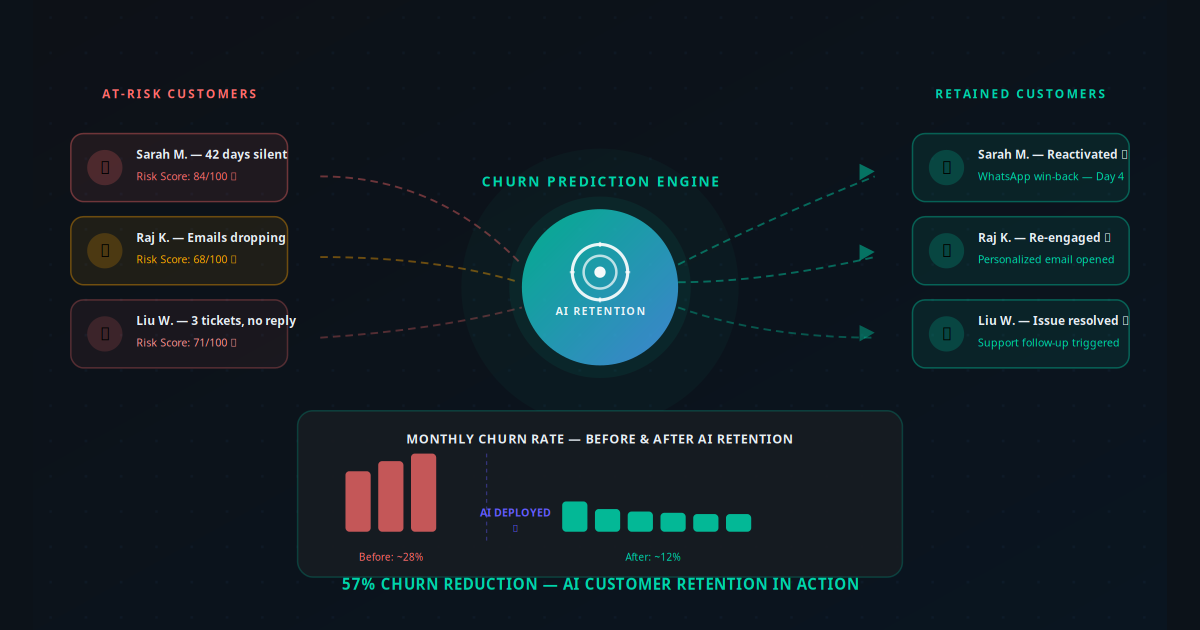
- Churn reduction: Businesses tracking cohort-level churn report 18–35% reduction in 6-month churn for customers interacting with memory-enabled agents versus those handled by stateless AI.
For a service business with 500 active customers spending $200 per year each, a 35% churn reduction and 47% revenue-per-customer increase translates to roughly $84,000 in additional annual revenue — against an implementation cost of under $5,000 including tools and development.
AI memory pairs especially well with AI-powered customer retention workflows and email automation sequences that reference customer history for deeply personalised outreach.
Risks and Pitfalls to Avoid
Persistent AI memory is powerful, but it introduces risks that stateless AI does not have. Be clear-eyed about these before you deploy.
Stale Context Problem
Memory that is never pruned becomes a liability. If your AI remembers a complaint from 18 months ago that was fully resolved, but surfaces it in the current conversation, the customer experience degrades sharply. Build a memory expiry policy: episodic summaries older than 12 months are archived or summarised at a higher level, not retrieved verbatim. Recent interactions carry higher retrieval weight than old ones.
Over-Personalisation Creep
Some customers find it unsettling when an AI references details they did not consciously share — for example, noting a product preference inferred from browsing history. This is especially true in sensitive sectors like healthcare or finance. Set clear internal rules on what the AI may surface proactively versus what it only uses passively to shape its tone and recommendations.
Data Sovereignty and Compliance
If your customers are in the EU, GDPR applies to AI memory stores just as it does to any personal data processing. Customers have the right to access their stored profile, correct it, and request deletion. Build these operations into your system from day one — not as an afterthought. For healthcare businesses, HIPAA-equivalent rules apply to patient-related memory in any jurisdiction.
Hallucinated Memory
LLMs can sometimes "recall" things that were never actually stored — fabricating plausible-sounding customer history from training data patterns. Mitigate this by designing your system prompt to explicitly limit the AI to only referencing facts in the injected memory profile, and by structuring retrieved memory as factual records rather than narrative prose that the LLM might embellish.
The Businesses That Remember Will Win
AI memory is the infrastructure layer that turns a transactional AI tool into a relationship-building asset. Every customer who feels remembered and understood by your business is a customer who stays longer, spends more, and refers others. Every customer who has to explain themselves again from scratch is a customer evaluating your competitors.
In 2026, the cost of deploying persistent AI memory has dropped to the point where any business running an agentic AI system or AI customer support workflow can afford to add it. The competitive moat it builds — a continuously improving, deeply personalised customer experience that runs without staff overhead — compounds in value every month.
The question is not whether AI memory will become standard. It will. The question is whether you are building it now while competitors are still running goldfish AI — or later, after they have already used it to pull customers away from you. Use the AI Business Twin for a free personalised analysis of where AI memory fits in your specific business and what ROI to expect.
Frequently Asked Questions
What is AI memory and how does it work for small businesses?
AI memory is the ability of an AI agent to retain information about customers, conversations, and context across multiple sessions over time. For small businesses, this means your AI chatbot, voice agent, or support assistant can remember a customer's purchase history, preferences, past complaints, and communication style — and use that context to personalise every future interaction without the customer having to repeat themselves. It is implemented using vector databases or structured memory stores that the AI queries before each conversation.
How is AI memory different from a regular CRM?
A CRM stores structured data — contact details, deal stages, call logs — that humans look up and act on. AI memory is a layer that sits on top of your CRM and other data sources, making that context instantly available to an AI agent during a live conversation. The AI does not just retrieve a record; it synthesises relevant history and uses it to shape its response in real time. AI memory also captures unstructured signals — tone of previous conversations, implicit preferences, objections raised — that a CRM does not model.
Which AI tools support persistent memory for business use in 2026?
Several production-ready tools support persistent memory in 2026. OpenAI's platform now supports persistent memory across ChatGPT and API calls. Mem0 is a purpose-built AI memory layer that connects to any LLM. LangChain and LlamaIndex both have memory modules for custom agent builds. For SMBs using no-code stacks, Make.com and n8n workflows can persist context by reading and writing customer profiles to Airtable or a vector database before each AI interaction.
Is AI memory safe? What happens to customer data?
AI memory safety depends entirely on how you implement it. For business use, you should store memory data in your own infrastructure — not inside the AI provider's servers. Use a self-hosted vector database like Qdrant or Weaviate, or store structured memory in your existing CRM. Customers have a right to request deletion of their data under GDPR and similar laws, so your memory system must support deletion by customer ID. Never store payment card data, health records, or sensitive identifiers in unencrypted AI memory stores.
How much does it cost to add AI memory to an existing chatbot?
Adding a memory layer to an existing AI chatbot typically costs $50–$300 per month depending on the volume of customers and the tools used. Mem0's hosted service starts at around $49 per month for SMB workloads. A self-hosted Qdrant vector database runs on a $20–$50 per month VPS for most small business volumes. The engineering time to integrate memory into an existing workflow is typically 4–8 hours for a developer-familiar setup, or 1–2 days for a custom build with full CRM synchronisation.
What business results should I expect from deploying AI memory?
Businesses deploying persistent AI memory consistently report three measurable outcomes: first, customer satisfaction scores improve by 20–40% because customers no longer repeat themselves; second, upsell and cross-sell conversion rates increase by 30–50% because the AI surfaces relevant offers based on actual purchase history; third, support ticket resolution time drops by 35–60% because the AI resolves issues on the first contact using full context. The ROI typically becomes positive within 60 days for service businesses with repeat customer bases.