AI for Accountants & CPAs: Automate Bookkeeping, Tax Prep & Client Work in 2026




Why Accounting Firms Cannot Hire Their Way Out of 2026
Talk to any partner running a small or mid-size accounting practice this year, and you will hear the same three sentences. "We have more work than we can take." "We cannot find good staff." "Busy season nearly broke us." The economics behind those sentences are now structural, not cyclical. The AICPA's pipeline data shows roughly a third fewer new CPAs entering the profession compared to a decade ago, while demand for assurance, tax, and advisory keeps rising. Firms are running hotter every year, on smaller teams, with more compliance complexity.
In that gap, partners default to the only lever they know — hire harder, raise fees, work longer. None of those scale. You cannot hire people who do not exist. You cannot raise fees fast enough to outrun rising client expectations. And the 70-hour tax season is exactly why the next generation is leaving. The real lever is the one most firms have not pulled yet: take the repetitive, non-judgement work off your team entirely and give it to AI.
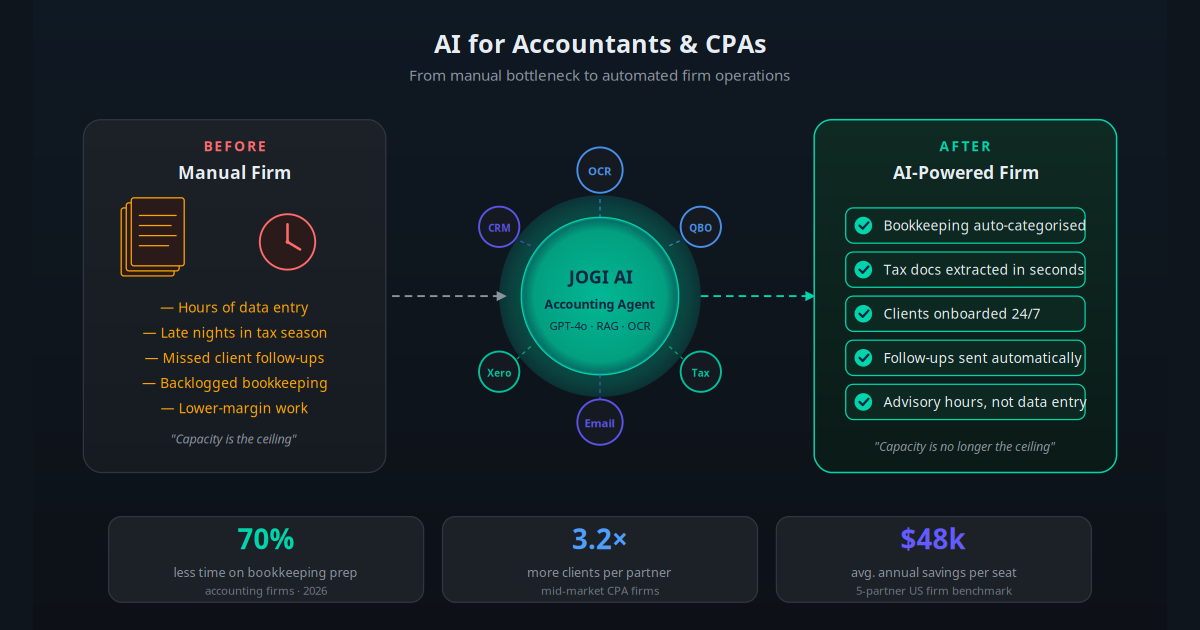
This is not theoretical. In 2026, AI tools for accounting firms have matured to the point where bookkeeping prep, document extraction, client onboarding, and the daily inbox can all run with minimal human touch. The firms that have moved early are not laying people off — they are taking on more clients per partner, raising margins, and turning advisory work into the core offer instead of a side hustle.
This guide walks through exactly what works in 2026: what to automate, in what order, with which tools, and what realistic ROI looks like. It is written for the partner or operations lead at a one-to-fifty-seat firm who has heard enough about AI and wants a practical plan.
What "AI for Accountants" Actually Means
"AI" inside an accounting firm in 2026 is not a single product. It is a stack of capabilities that, taken together, run most of the work that used to require a junior staff member or a partner's evening hours. Understanding the stack matters, because vendors mix and match these layers under different marketing names.
- Document AI (OCR plus LLM): Reads receipts, invoices, bank statements, tax forms, and engagement documents. Extracts vendor, date, amount, tax codes, GL coding suggestions, and matches them to existing rules in your ledger. Accuracy on standard formats in 2026 is 96 to 99 percent.
- Large language models: The brain layer. GPT-4o, Claude, and Gemini handle every task that involves understanding a question, drafting a response, summarising a document, or making a coding decision under uncertainty.
- Retrieval-Augmented Generation (RAG): Connects the LLM to your firm's specific knowledge — engagement letters, fee schedules, internal playbooks, the IRC, state tax codes, your client files. Read how a custom AI chatbot uses your firm's data for the technical detail.
- Action layer: The piece that actually does the work — posts the journal entry to QuickBooks, files the document to the client folder, sends the follow-up email, updates the CRM. Without this, AI just makes suggestions for someone else to execute.
- Orchestration: The workflow engine (Make, n8n, Zapier, or a purpose-built agent platform) that triggers the steps in order, handles errors, and escalates to a human when confidence is low.
The accountants who have rolled out AI successfully describe it the same way: not a tool you log into, but a layer of automated co-workers handling the tasks you used to dread. They show up at 6am, they do not get sick during tax season, and they do not quit when the work gets boring.
Key Takeaway
AI for accountants is not one product. It is a stack — document AI, language models, RAG over your firm's data, action APIs into QuickBooks or Xero, and orchestration. The firms that win in 2026 buy the stack as a single workflow, not as five disconnected tools.
Where AI Saves the Most Time in a Firm
Before picking tools, look at where the hours actually go. Time-tracking data from US small-firm practice management vendors in 2025 and early 2026 gives a clear picture of where AI saves the most against where partners assume it will.
| Workflow | Typical hours/week per fee-earner | AI time reduction | Realistic in 90 days? |
|---|---|---|---|
| Bookkeeping transaction coding | 8–12 | 70–85% | Yes |
| Source document collection & extraction | 4–7 | 80–90% | Yes |
| Client email and follow-up | 5–9 | 60–75% | Yes |
| Client onboarding & KYC | 2–4 | 70–80% | Yes |
| Tax workpaper preparation | 6–14 (seasonal) | 40–55% | Partial |
| Advisory report drafting | 2–5 | 50–65% | Yes |
| Final review & sign-off | 3–6 | 10–20% | Limited |
| Client meetings & advisory calls | 5–10 | 5–10% | No |
Two patterns matter here. First, the biggest savings are in the bottom-of-the-stack work: coding, document handling, follow-up. That is where 70 to 90 percent reductions are real. Second, the higher-judgement work — final review, advisory, client relationships — is exactly what AI is bad at, and exactly what your fees pay for. AI is not a threat to that work. It is what frees up the hours to do more of it.
Five Workflows Every Firm Should Automate First
The fastest path to ROI is to deploy five workflows in sequence, not in parallel. Each builds on the last, and each pays for the tooling of the next.
1. Bookkeeping Categorisation and Rules
An AI categorisation engine reads each transaction in your ledger, suggests a GL code with confidence score, applies existing rules, learns from corrections, and posts entries automatically above a confidence threshold. Anything below threshold is queued for human review. Done correctly, this takes 8 to 12 hours of weekly transaction coding down to under two. Pair it with proper CRM automation on the client side so every new transaction is tied to the right client record without manual matching.
2. Source Document Extraction
Clients drop receipts, invoices, and bank statements into a portal or email inbox. The AI reads each one, extracts vendor, date, amount, tax codes, and category, attaches the document to the right transaction, and flags anything missing. Document AI in 2026 handles handwritten receipts, multi-page invoices, and non-English documents with near-human accuracy. This is the single highest-leverage automation for a firm with high client document volume.
3. Client Communication and Follow-Up
Every firm has a pile of overdue document requests, unanswered client questions, and "did you remember to send..." emails. An AI email agent reads incoming client mail, drafts replies in the partner's voice, sends polite follow-ups on outstanding items, and only escalates messages that need judgement. The framework is the same as in our email automation guide — applied with accounting-specific templates and the rule library your firm already uses.
4. Client Onboarding and Document Collection
New client signs the engagement letter. The AI agent immediately sends the document checklist, monitors which items have come in, follows up on missing items every three days, and only pings the human partner when something genuinely needs a decision. The same logic runs every January for tax document collection — the most predictable, most painful, most automatable workflow in the entire firm.
5. Internal Firm Knowledge Chatbot
Trained on your engagement letters, fee schedules, state-by-state rules, internal playbooks, and prior client correspondence. Staff ask it questions instead of partners ("what fee did we quote ABC Co. in March?", "what is our policy on 1099 reissues?"). New hires ramp in weeks, not months. Senior staff stop being the bottleneck for every basic question. The architecture is straightforward RAG over your firm's drive and practice-management data.
Real Use Cases by Firm Type
Solo Practitioner: Reclaiming Evenings
A solo CPA with 60 SMB clients deploys AI bookkeeping coding plus a document-extraction inbox. Weekly catch-up bookkeeping drops from 14 hours to 3. The CPA stops working Saturdays. Client capacity rises from 60 to 95 inside one fiscal year — no new hires, fees unchanged, margin up roughly 40 percent.
Five-Partner Tax Practice: Surviving Busy Season
A five-partner US tax firm with 1,200 individual and 280 entity returns rolls out AI document extraction, automated client chase-up, and an internal RAG chatbot trained on its tax memos. Average hours per return drops 31 percent. Two partners take real holidays in March for the first time in seven years. The firm absorbs a 15 percent client growth without adding seasonal staff.
Mid-Market CPA: Moving Into Advisory
A 38-seat firm uses AI to fully automate bookkeeping and source-document workflows. Junior staff time saved is redeployed to client advisory services billed at 2.4× the bookkeeping rate. Within 12 months, advisory revenue grows from 8 percent to 27 percent of total fees, while compliance revenue holds steady — net practice revenue up 24 percent.
Bookkeeping Firm: Pure Capacity Play
A bookkeeping-only firm with 220 clients deploys AI categorisation and OCR across QuickBooks Online and Xero. Bookkeepers move from running 12–15 clients each to 32–38 each. The firm absorbs the equivalent of 6 new FTE in pure capacity without changing headcount.
Niche Firm: AI Voice Agent for Inbound Calls
A regional firm specialising in dental and medical practices deploys an inbound voice AI agent to handle "where's my refund?", appointment requests, and document-status questions. Front-desk call volume drops 64 percent, clients get answers in seconds, and senior staff are no longer pulled out of focused work for 90-second status checks.
A 90-Day Implementation Plan
The biggest mistake in firm AI rollouts is trying to do everything in month one. Here is the sequencing that actually works.
Days 1–10 — Workflow audit: Time-track or self-report 10 days across your team. Identify the three workflows eating the most hours. Almost always: bookkeeping coding, document chasing, and client email.
Days 11–20 — Vendor selection: Pick one document-AI tool, one ledger-AI tool, and one orchestration platform. Demo three vendors each. Choose for API depth and SOC 2 status, not for the prettiest UI.
Days 21–30 — Pilot one workflow: Roll out document extraction to a friendly 10-client cohort. Measure accuracy, hours saved, and exceptions per 100 documents. Tune rules.
Days 31–45 — Expand to bookkeeping: Activate AI categorisation across your full QuickBooks and Xero base. Train the model on three months of corrections per client.
Days 46–60 — Client communication agent: Connect an AI email agent to a single shared inbox first (not partner inboxes yet). Use it for routine document chases. Approve every outgoing message for the first two weeks.
Days 61–75 — Internal firm chatbot: Index your engagement letters, fee schedule, internal SOPs, and last 18 months of client correspondence into a RAG chatbot. Roll out to staff. Track query volume to find missing knowledge.
Days 76–85 — Onboarding automation: Wire the AI agent into your engagement-signing flow. Every new engagement triggers the document checklist, three follow-ups on a five-day cadence, and a partner alert when stalled.
Days 86–90 — Measure and recommit: Compare hours-per-client and exceptions-per-100 against your day-zero baseline. Document the wins, the failures, and the next quarter's targets. Commit a budget and a sponsor for round two.
By the end of 90 days, a typical firm has automated 50 to 65 percent of routine workflow time. That is enough to either grow client load without hiring, take a real holiday between tax seasons, or start meaningfully repositioning the firm toward advisory work.
AI Tools and Platforms for Firms in 2026
The vendor landscape changes monthly. Below is a snapshot of the categories worth knowing in 2026, with the platforms that consistently show up in production at small and mid-size firms.
| Category | Platforms worth evaluating | Typical cost | Best for |
|---|---|---|---|
| Bookkeeping AI (in-ledger) | QuickBooks Intuit Assist, Xero Just Ask, Sage Copilot | Included with subscription | First-line categorisation, native integration |
| Bookkeeping AI (standalone) | Botkeeper, Booke, Keeper, LiveFlow | $15–$80 per client/month | Multi-client firms, rules across many ledgers |
| Document AI / OCR | Dext, Hubdoc, AutoEntry, Docyt | $20–$60/month per firm seat | Receipts, invoices, bank statements |
| Tax workpaper AI | TaxGPT, BlueJ Tax, Mindbridge AI | $80–$300/seat/month | Workpaper prep, anomaly detection, research |
| Client communication AI | Custom GPT-4o / Claude on Make or n8n | $30–$150/month per inbox | Drafting, triage, follow-up cadence |
| Firm knowledge chatbot | Custom RAG (OpenAI, Anthropic) or Glean | $40–$200/seat/month | Internal Q&A, new-hire ramp |
| Orchestration | Make, n8n, Zapier | $25–$200/month | Tying tools together — read our comparison |
| Voice AI for inbound | Retell AI, Vapi, Synthflow | $0.05–$0.12/min | Front-desk calls, status questions |
Whatever you choose, the integration that matters most is the one into your practice-management system and your ledger. A best-of-breed tool that does not write back into your system of record will just create another spreadsheet for someone to reconcile.
The ROI: What Firms Are Actually Seeing
"We finished tax season without anyone working a Saturday. Three years ago I would not have believed that sentence. The AI agents handled the document chase, the categorisation, and most of the client emails. We did the judgement."
— Managing partner, 12-seat CPA firm, US MidwestAcross the firms we have worked with and the public case studies from major accounting platforms in 2026, the numbers cluster tightly:
- Hours saved per fee-earner per week: 15 to 25, with the heaviest savings during the first quarter of the calendar year.
- Client capacity per seat: 2.5× to 3.5× for bookkeeping practices, 1.4× to 1.8× for full-service CPA firms.
- Net practice margin improvement: 12 to 22 percentage points within the first 12 months, depending on how aggressively advisory pricing is repositioned.
- Average annual savings per seat: $40,000 to $55,000 in the US, less in lower-wage markets but in similar proportion.
- Payback period on tooling spend: 30 to 75 days for firms that focus on the top three workflows first.
- Staff retention: Net-promoter-style internal surveys consistently show staff happiness rises after AI rollout — they spend their day on the work they actually trained for, not on data entry.
The compounding effect is what makes the numbers larger over time. Year one is hours saved. Year two is repositioning toward advisory. Year three is a fundamentally different business — same brand, twice the revenue per partner, half the busy-season hours.
Mistakes That Will Sink Your AI Rollout
The same five mistakes show up at almost every firm that fails its first AI rollout. Avoiding them is most of the battle.
1. Buying Tools Before Mapping Workflows
Firms see a slick vendor demo and sign up before they have measured where the hours actually go. The result is a tool that solves a problem the firm did not have. Always do the workflow audit first.
2. Automating Everything at Once
"Let's roll AI across the whole firm in 30 days" is the fastest way to roll it back across the whole firm in 31 days. Pick one workflow, get it right, ship it, then move to the next.
3. Skipping the Action Layer
A surprising number of firms deploy "AI" that ends in a suggestion — a categorisation a human still has to approve, a draft email a human still has to send. That is not automation, that is a second review step. Make sure the AI executes inside your ledger and inbox, with a confidence threshold above which it acts without asking.
4. Ignoring Data Security and Compliance
Client financial data is regulated. Send it to a vendor that uses prompts for training the public model, and you have a problem with the IRS, with state boards, and with your clients. Demand SOC 2 Type II, data-residency commitments, and a written confirmation that your data is not used for model training. The same standards apply to any AI tool that touches your firm's data — see our piece on whether AI automation is safe for the broader framework.
5. Treating It as an IT Project, Not an Operating Model Change
AI rollout is not "the IT person installs some software." It changes who does what, how junior staff learn, how engagements are scoped, and how fees are quoted. If a partner is not the sponsor, the rollout will stall the moment the first awkward case shows up. Treat it as a strategic shift, not a tooling upgrade.
Want to go deeper on how AI agents handle complex multi-step work autonomously? Read our breakdown of AI employees and autonomous agents.
Conclusion: The Two Firms in 2030
In four years, the accounting profession will have split cleanly into two camps. The first will be the firms that kept doing what they had always done — billing time on data entry, chasing documents by hand, working through busy season on adrenaline. They will be smaller, older, and squeezed by clients who can see that the same work is being done elsewhere for less.
The second camp will be the firms that absorbed AI into their operating model between 2025 and 2027. They will run leaner, charge more for advisory, retain staff better, and grow without the staffing crisis the rest of the industry is still in. Their partners will work less in March than they did in November.
The difference between the two camps is not technical sophistication or budget. It is whether the partner team decided, this year, that the next 12 months would be the one in which the firm stopped doing work that machines now do better. The technology is ready. The tooling is affordable. The case studies are public. The only remaining variable is the decision.
To see exactly which workflows in your firm would benefit most from AI, with hours saved and projected ROI for your specific client mix, use the AI Business Twin for a free personalised analysis in under 10 minutes.
Frequently Asked Questions
What is AI for accountants and how does it work?
AI for accountants is a set of automation tools and intelligent agents that handle the routine work of running an accounting practice — categorising transactions, extracting numbers from invoices and receipts, drafting client emails, preparing tax workpapers, onboarding new clients, and answering common client questions. It works by combining OCR for document reading, large language models like GPT-4o or Claude for understanding and writing, and direct integrations with QuickBooks, Xero, Sage, and similar systems so the AI can actually post entries, send messages, and update records rather than just suggesting them.
Will AI replace accountants and CPAs?
No. AI replaces the lowest-margin, most repetitive parts of accounting work — data entry, document chasing, transaction coding, basic reconciliations — not the judgement, advisory, and relationship work that justifies a CPA's fee. Firms that adopt AI early are not shrinking. They are taking on more clients per partner, moving up-market into advisory services, and ending busy season without burning out their staff. The accountants who lose work to AI are not the ones using AI — they are the ones still selling time on tasks that are already being automated everywhere else.
Is it safe to use AI with sensitive client financial data?
It can be, if you choose the right tooling. The risk is not AI itself but how your data is handled. Use providers that are SOC 2 Type II certified, sign business associate agreements where relevant, ensure client data is not used to train public models, and prefer vendors that support data residency in your jurisdiction. For US firms, look for IRS Publication 4557 compliance and Written Information Security Program alignment. The same diligence you apply to any tax software vendor applies here — AI is held to the same bar, not a lower one.
How much time and money can an accounting firm save with AI?
Most firms that deploy AI across bookkeeping, tax document collection, and client communication save 15 to 25 hours per fee-earner per week within the first 90 days, with the heaviest savings during tax season. In dollar terms, a five-seat firm typically frees $200,000 to $260,000 in annual fee-earner capacity that can be redeployed to advisory work or simply absorbed as margin. Tooling costs are usually $100 to $400 per seat per month, so payback is normally inside the first quarter.
Which accounting tasks should a firm automate first?
Start with the workflows that produce the highest hours-saved per hour of setup. The top four are: bookkeeping transaction categorisation and rules, source document extraction from receipts and invoices, client onboarding and document collection chase emails, and a firm-wide knowledge chatbot trained on your engagement letters, fee schedules, and policies. These four cover 60 to 70 percent of the busywork in a typical small or mid-size firm and can be live within four to eight weeks.
Does AI integrate with QuickBooks, Xero and Sage?
Yes. All three platforms publish APIs that AI tools and integration platforms can use to read transactions, post journal entries, attach documents, create contacts, and update categories. QuickBooks Online and Xero have the most mature integration ecosystems, with native AI categorisation features in their own products plus dozens of third-party tools. Sage Intacct and Sage 50 have full APIs that integration platforms like Make, n8n, and Zapier can drive from an AI agent. If your firm uses CCH, Drake, or UltraTax, those also expose APIs through their parent vendors for the AI agent to plug into.
How long does it take to roll out AI in a small or mid-size firm?
A focused rollout takes 30 to 90 days. The first 30 days cover workflow audit, vendor selection, and getting one workflow — usually document extraction or bookkeeping categorisation — live with a small client cohort. Days 30 to 60 expand to client communication, onboarding, and the internal firm chatbot. Days 60 to 90 cover tax-prep automation, advisory dashboards, and staff training. Firms that try to automate everything at once almost always stall — narrow scope and fast feedback loops produce the fastest payback.