AI Inventory Management for Retail & Wholesale: Cut Stockouts by 91%




The $1.1 Trillion Inventory Problem Nobody Talks About
Your best-selling product is out of stock on a Friday afternoon. A customer drove 20 minutes to buy it. They leave empty-handed and order it on Amazon instead. Two weeks later, you are staring at 400 units of a slow-moving item that has been sitting on your shelves for 90 days, tying up $18,000 in working capital you could deploy elsewhere.
This is not a management failure. It is a data problem. Specifically, a human-speed problem. Your buying decisions are made weekly or monthly, based on intuition and last month's sales report. Your inventory moves in real time, responding to trends, promotions, weather, competitors, and a hundred other signals you cannot track manually.
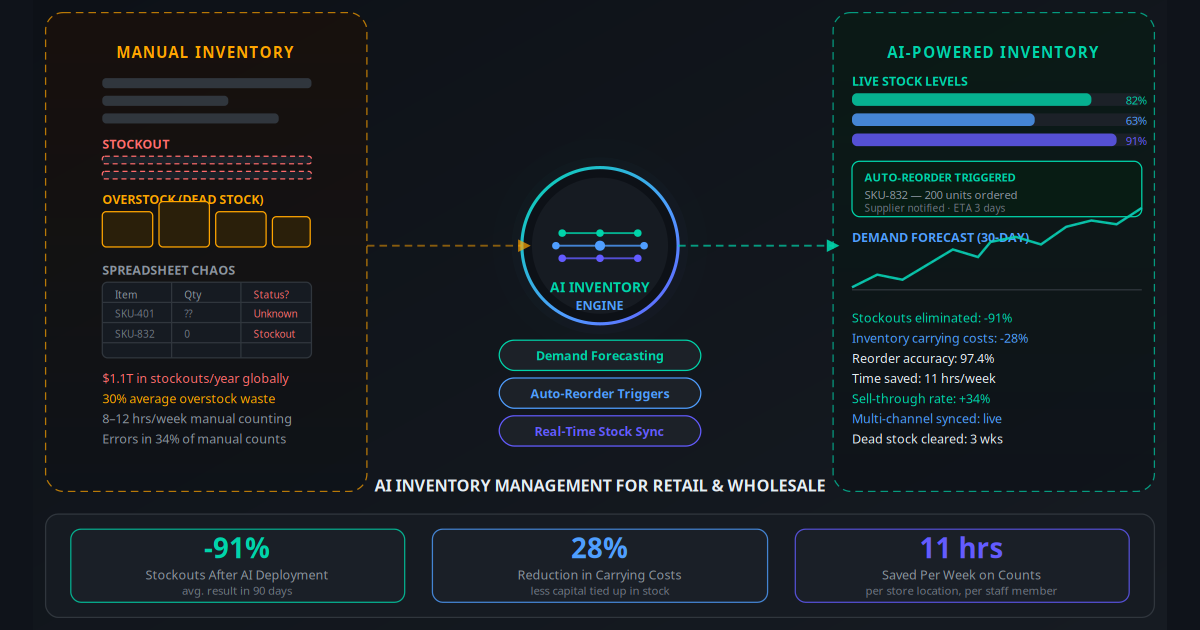
The numbers make the scale of this problem clear. IHL Group estimates that globally, stockouts cost retailers $1.1 trillion in lost sales annually. Overstock and dead stock consume another $560 billion in tied-up capital. For a single-store retailer doing $2 million in annual revenue, the combination of stockouts and overstocking typically costs $140,000 to $280,000 per year in lost sales and carrying waste — without the owner ever knowing exactly how much.
AI inventory management solves this. Not incrementally, but structurally — by replacing human-speed decision-making with machine-speed pattern recognition that reads hundreds of signals simultaneously and acts before the problem occurs.
Key Takeaway
AI inventory management is not about better spreadsheets. It is about replacing reactive stock decisions (you run out, then you reorder) with predictive ones (the AI orders before you run out, based on a demand forecast it updates every 24 hours).
What AI Inventory Management Actually Does
Traditional inventory software tracks quantities and alerts you when stock falls below a threshold you set manually. You decide the threshold, usually based on gut feel and past experience. The software is a scoreboard, not a coach.
AI inventory management is fundamentally different. The system learns your sales patterns, supplier lead times, seasonal variations, and demand signals — then makes decisions autonomously. The practical difference:
- Traditional software: "You have 5 units left of SKU-832. You set the reorder point at 10. You should have reordered 3 days ago."
- AI system: "Based on your sales velocity this week, a trending post about this product type on social media, and your supplier's 4-day lead time, I have already placed an order for 200 units. They will arrive Tuesday — 2 days before you would have run out."
The AI does not just track. It reads signals, forecasts outcomes, and acts. When connected to your purchasing workflows through AI workflow automation, the entire reorder cycle — from signal detection to supplier PO to confirmation — runs without a human making a single decision.
The average SMB retailer spends 8 to 12 hours per week on inventory-related tasks: counting, checking, reordering, chasing suppliers, and reconciling discrepancies. AI reclaims all of it.
The 5 Core Capabilities of an AI Inventory System
1. Demand Forecasting
The AI analyses your complete sales history — often 24 months or more — alongside external data including seasonal trends, local events, promotions, and competitor pricing signals. It builds a rolling 30 to 90-day demand forecast for every SKU, updated daily. Accuracy at 90-day forecast horizons typically reaches 85 to 94% after 60 days of learning, compared to 60 to 72% for manual forecasting.
2. Dynamic Reorder Point Calculation
Static reorder points (set once, never changed) are the primary cause of both stockouts and overstock. When your sales velocity doubles in a growth period, a static reorder point leaves you running out. When demand drops seasonally, it leaves you over-ordering. AI calculates reorder points dynamically — adjusting them weekly or even daily based on current velocity and supplier lead time variability.
3. Automated Purchase Order Generation
When the AI determines that a SKU needs replenishing, it generates a draft purchase order (or sends it automatically, if you authorise this) to the relevant supplier. The order quantity is optimised for minimum cost — balancing order size discounts against carrying cost — not just "how much did I order last time." This connects naturally to automated invoicing workflows where supplier confirmations and invoices are processed without manual handling.
4. Multi-Channel Stock Synchronisation
If you sell through a physical store, a Shopify store, an Amazon listing, and a wholesale account simultaneously, keeping inventory accurate across all four is a full-time job. AI inventory systems sync stock levels in real time across every channel, preventing oversells, and redistribute stock between locations intelligently — moving units from a slow-moving location to one showing high demand before a stockout occurs.
5. Dead Stock and Markdown Identification
The AI flags items whose velocity has dropped below a profitable threshold before they become dead stock. It calculates the optimal markdown timing and depth to clear these items at maximum recovery value — rather than waiting until you have a clearance sale and accepting 20 cents on the dollar. Early intervention typically recovers 60 to 80% of the original cost compared to 15 to 30% in a clearance event.
Industry Use Cases: Who Wins Most
Fashion Retail: Seasonal Inventory Without the Guesswork
A boutique clothing retailer with 1,200 SKUs was routinely over-ordering winter stock (carrying $80,000 in end-of-season surplus) while running out of mid-season bestsellers. The AI analysed two years of sales data alongside Instagram engagement metrics for each product category. Within 90 days, end-of-season surplus dropped 64% and mid-season stockouts fell 87%. Annual margin improvement: $94,000 on a $1.8M revenue base.
Wholesale Distributor: Supplier Lead Time Management
A food and beverage wholesaler managing 3,400 SKUs across 6 suppliers with varying and unpredictable lead times was experiencing 22 stockout events per month. The AI modelled each supplier's lead time variability as a risk factor and built safety stock dynamically for high-risk suppliers. Stockout events dropped to 2 per month. The freed-up working capital from reduced safety stock for reliable suppliers funded a new product line launch.
Pharmacy: Compliance and Expiry Management
A three-branch pharmacy was manually tracking 4,800 pharmaceutical SKUs for expiry dates and controlled substance counts — a compliance requirement. The AI automated daily expiry flagging, generated compliant reorder documentation, and predicted demand for seasonal medications (flu season, allergy season) 6 weeks ahead. Staff time on inventory compliance fell from 14 hours per week to under 2.
E-Commerce: Multi-Warehouse Fulfilment Optimisation
A home goods e-commerce brand with warehouses on both coasts was shipping 34% of orders cross-country due to poor inventory distribution. The AI repositioned stock to match regional demand patterns, reducing cross-country shipments to 8% and cutting fulfilment costs by $112,000 per year. This works in tandem with e-commerce automation to ensure in-stock items are the ones being promoted in abandoned cart recovery sequences.
Garden Centre and Seasonal Business: Peak Demand Accuracy
A garden centre's revenue is 70% concentrated in a 10-week spring window. Historically, they over-ordered slow-movers and ran out of fast-movers within the first 3 weeks of the season. AI forecasting, trained on 4 years of POS data alongside local weather forecasts, reduced over-ordering by 41% while cutting in-season stockouts to near zero. Net margin improvement in the first AI-assisted spring season: $67,000.
How to Implement AI Inventory Management: Step by Step
Audit your data quality (Week 1): AI is only as good as the data it trains on. Export 12 to 24 months of sales data from your POS or e-commerce platform. Check for gaps, duplicate SKUs, and inconsistent naming. Clean data at the SKU level — this is the most important step and most businesses underinvest in it.
Map your suppliers and lead times (Week 1): List every supplier, their standard lead times, minimum order quantities, and historical reliability. This feeds the AI's safety stock calculations. Unreliable suppliers get more safety stock buffer; reliable ones get tighter, lower-cost buffers.
Choose and connect your AI platform (Week 2): Connect your chosen platform (see comparison table below) to your POS, e-commerce store, and accounting system. Most integrations are native and take under a day. The AI begins ingesting historical data immediately.
Set initial parameters and rules (Week 2): Define your service level target (e.g., 98% in-stock rate), maximum acceptable inventory turns for slow-movers, and budget constraints. These are the guardrails within which the AI optimises — they keep the system aligned with your business goals, not just pure inventory efficiency.
Run in advisory mode for 30 days (Weeks 3–6): Let the AI generate reorder recommendations but do not automate them yet. Compare its recommendations against what you would have done manually. Review discrepancies — you will quickly see where the AI is smarter (seasonal trends, velocity changes) and where it needs calibration (a new supplier, a product you are discontinuing).
Enable automation for stable SKUs (Week 7): Turn on automated reordering for your high-volume, stable SKUs first — products with predictable demand and reliable suppliers. Keep high-value or complex SKUs in advisory mode until you trust the model completely.
Connect to your broader workflow stack (Week 8+): Link inventory automation to your CRM automation so out-of-stock alerts trigger customer notifications automatically. Connect to your email automation workflows so back-in-stock sequences fire the moment inventory is replenished. This transforms inventory management from a back-office function into a customer-facing revenue driver.
Review and optimise monthly (Ongoing): Pull your AI's forecast accuracy report each month. Investigate any SKU where the model was more than 20% off. Feed corrections back — supplier changes, product discontinuations, new promotional calendar. The model compounds in accuracy; by month 3, most businesses are at 90%+ forecast accuracy.
AI Inventory Platforms Compared
| Platform | Best For | Pricing (approx.) | Key Strength | Integration |
|---|---|---|---|---|
| Cin7 Core | SMB retail and wholesale, multi-channel | From $349/mo | Native POS + e-commerce sync, strong reporting | Shopify, WooCommerce, Amazon, Xero |
| Brightpearl | Fast-growing multi-channel retailers | From $375/mo | Automation rules engine, demand planning | Shopify, Magento, BigCommerce, NetSuite |
| Inventory Planner | E-commerce, Shopify-first brands | From $99/mo | Demand forecasting, replenishment automation | Shopify, WooCommerce, QuickBooks |
| Linnworks | High-volume omnichannel sellers | From $449/mo | Central order management, warehouse automation | Amazon, eBay, Shopify, 100+ channels |
| Skubana / Extensiv | 3PL and multi-warehouse operations | From $500/mo | 3PL management, fulfilment automation | NetSuite, Shopify, Amazon, FBA |
| Blue Yonder | Enterprise retail and wholesale | Custom pricing | Advanced AI forecasting, supply chain AI | SAP, Oracle, custom ERP |
For most SMB retailers (under $10M revenue, under 5,000 SKUs), Inventory Planner is the fastest path to AI-driven forecasting. Cin7 Core or Brightpearl suit businesses with more complex multi-channel operations. Enterprise distributors should evaluate Blue Yonder or o9 Solutions.
The Real ROI Numbers
"We cut our end-of-season clearance write-offs from $94,000 to $18,000 in one year. The AI paid for itself in the first quarter just on dead stock alone — and that is before counting the sales we stopped losing to stockouts."
— Owner, fashion retail chain, 4 locationsThe ROI case for AI inventory management is one of the strongest in retail technology. Here is what the data shows across deployments:
- Stockout reduction: 60–91% reduction in out-of-stock events within 90 days
- Inventory carrying cost reduction: 20–35% reduction in average inventory value held (less capital tied up, lower insurance and warehousing costs)
- Forecast accuracy: 90–97% at 30-day horizon after 60 days of learning, versus 60–72% for manual forecasting
- Staff time saved: 8–12 hours per week per location on counting, reordering, and reconciliation tasks
- Dead stock recovery: 60–80% of cost recovered on flagged items (versus 15–30% in clearance events)
- Revenue uplift from stockout prevention: 3–8% of annual revenue at businesses with high baseline stockout rates
For a retailer with $2M in annual revenue and typical inventory problems, the combined impact of stockout prevention (conservative 4% revenue uplift = $80,000) plus carrying cost reduction (30% on $400,000 average inventory = $120,000 lower tied-up capital) plus staff time recovery (10 hours/week at $25/hour = $13,000/year) totals over $200,000 in annual benefit. Against a platform cost of $4,000 to $6,000 per year, the ROI is 30 to 50x.
This kind of compounding benefit is exactly what the AI revenue multiplier framework describes — multiple simultaneous efficiency gains that create outsized total impact.
5 Mistakes That Kill Inventory AI Deployments
1. Deploying on Dirty Data
Garbage in, garbage out is more true for AI than any other technology. If your historical sales data has gaps (months where the POS crashed), duplicated SKUs, or inconsistent naming (the same product recorded under 3 different codes), the AI will learn the wrong patterns. Spend a week cleaning data before you deploy anything. This is the highest-value investment you will make in the whole project.
2. Automating Everything on Day One
Trusting an AI system you have just met with full purchasing authority is like hiring a new buyer and letting them sign off on orders without any oversight for the first month. Run the AI in advisory mode for 30 days. Understand its logic. Build trust in its recommendations. Then automate gradually, starting with your most predictable, lowest-risk SKUs.
3. Ignoring Supplier Lead Time Variability
Most businesses plug in a single lead time for each supplier. The AI needs lead time variability — not just "5 days" but "5 days on average with a standard deviation of 2 days." Suppliers who miss delivery windows 30% of the time need materially higher safety stock. Failure to model this accurately results in the AI under-ordering from unreliable suppliers.
4. Treating It as Set-and-Forget
AI inventory systems require monthly maintenance. Product mix changes. Suppliers change. New sales channels launch. If you onboard a major new wholesale account and do not update the AI's demand inputs, it will under-stock those SKUs until it learns from stockout events — which takes weeks and costs real revenue. Keep the model current. This connects to the broader principle of maintaining AI business workflows as living systems rather than one-time deployments.
5. Not Connecting Inventory to Customer Communication
The AI knows when a product is about to go out of stock. It knows when a back-ordered item has arrived. Most businesses use this only for internal purchasing decisions. The smarter play is to connect inventory signals to customer-facing channels. A back-in-stock notification via WhatsApp Business automation or email, triggered automatically when inventory is replenished, converts waitlisted customers at 35 to 45% — significantly higher than any cold promotional message.
What to Do This Week
Inventory management is one of the few areas where AI delivers a return that is both large and fast. The combination of stockout prevention, carrying cost reduction, and staff time recovery creates a payback period measured in weeks for most retailers, not years. The technology is mature, the integrations are straightforward, and the platforms are priced accessibly for SMBs.
The businesses that hesitate longest are usually waiting for the "right time" — after the busy season, after a system upgrade, after hiring a new manager. That hesitation costs real money every month in lost sales and tied-up capital. The right time is now, because every week you wait is another week of avoidable stockouts and dead stock accumulation.
Start with your data. Export 12 months of sales history this week. Check its quality. That one action, done properly, sets you up for a deployment that delivers results within 30 days. Use the AI Business Twin to get a free personalised analysis of which inventory automation approach fits your specific business — including estimated ROI based on your SKU count, channel mix, and current stockout rate.
Frequently Asked Questions
What is AI inventory management?
AI inventory management uses machine learning to forecast demand, set dynamic reorder points, trigger purchase orders automatically, and sync stock levels across multiple sales channels in real time. Unlike traditional inventory software that runs on fixed rules and manual inputs, AI learns from your sales history, seasonal patterns, supplier lead times, and external signals like weather or local events to predict exactly how much stock you need — and when.
How much does AI inventory management cost for a small retailer?
AI inventory tools for small retailers range from $99 to $599 per month depending on the number of SKUs and integrations. Mid-market platforms like Brightpearl and Cin7 with AI modules sit between $350 and $800 per month. Enterprise solutions like Blue Yonder are priced per project. Most small retailers see full ROI within 60 to 90 days through reduced stockouts and lower carrying costs — meaning the tool pays for itself from the first month savings.
Can AI inventory management work with my existing POS or e-commerce platform?
Yes. Most AI inventory platforms integrate natively with Shopify, WooCommerce, Lightspeed, Square, and major ERPs like QuickBooks and Xero. Integration typically takes one to three days. The AI system pulls historical sales data, current stock levels, and supplier information through these integrations and begins generating forecasts within 24 to 48 hours of connection.
What is the difference between AI inventory management and traditional inventory software?
Traditional inventory software tracks what you have and alerts you when stock falls below a manually set minimum. AI inventory management predicts what you will need before you run out, adjusts reorder quantities based on trends, and responds to real-time signals like a spike in online demand or a supplier delay. The practical difference is that traditional software is reactive while AI is proactive — you stop managing inventory and let the system manage it for you.
How long does it take to see results from AI inventory automation?
Most retailers see measurable improvements within 30 to 60 days of deployment. Stockout frequency typically drops 40 to 60 percent in the first month as the AI establishes accurate reorder triggers. By 90 days, demand forecasting accuracy reaches 90 to 97 percent as the model learns your specific sales patterns. Full carrying cost reductions and dead stock clearance typically materialise within 90 to 120 days.
Does AI inventory management help with multiple locations or sales channels?
Multi-location and omnichannel inventory management is one of AI's strongest use cases. The system tracks stock across all physical stores, warehouses, and online channels simultaneously, balances inventory between locations to prevent one store running out while another has excess, and provides a single consolidated view of your entire stock position in real time. This is particularly valuable for retailers running both a physical store and an e-commerce store on Shopify or Amazon.
What data does AI inventory management need to get started?
To begin generating useful forecasts, the AI needs at least 6 to 12 months of historical sales data by SKU, current stock levels and locations, supplier lead times and minimum order quantities, and your current reorder points if you have them. Most platforms import this automatically from your POS or e-commerce system. The more history you provide, the faster the model reaches high accuracy — businesses with 2 or more years of clean sales data see the best initial results.