AI Product Recommendations for E-Commerce: How to Boost AOV by 35%




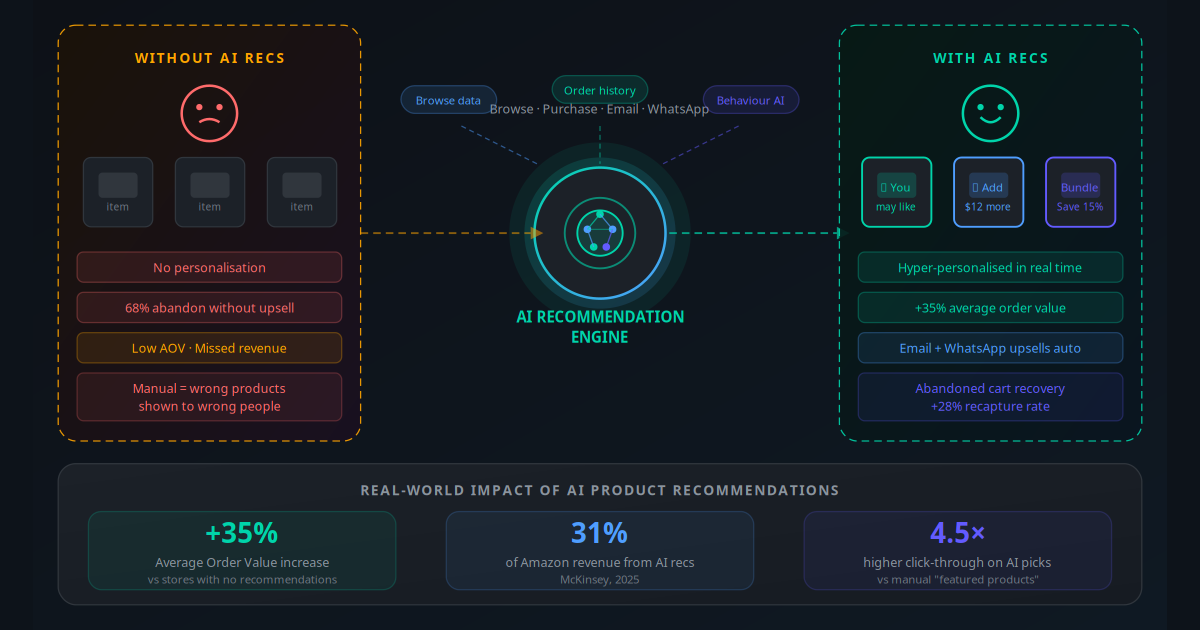
Amazon generates 31% of its revenue from its recommendation engine — "customers who bought this also bought" and "frequently bought together" — according to McKinsey. For a trillion-dollar retailer, that is a staggering figure. But the same principle scales down. Independent Shopify and WooCommerce stores that implement AI-powered product recommendations routinely see average order value climb 15–35% within 60 days of going live.
Most SMB e-commerce owners know they should be doing upsells and cross-sells. Many set up a "related products" widget and leave it. That widget shows the same items to every visitor, regardless of what they browsed, what they previously bought, or where they are in the buying journey. It is not a recommendation engine — it is a static list.
A real AI recommendation engine does something fundamentally different. It watches individual shopper behaviour in real time, compares it against patterns in thousands of previous sessions, and serves each person the products most likely to result in an add-to-cart. The result is not just higher order values — it is a better shopping experience that keeps customers coming back.
This guide walks through how the technology works, which tools to use for your platform, and exactly how to set up the full automation stack — from on-page widgets to triggered WhatsApp upsell sequences — without a developer.
The Revenue You Leave on the Table Without AI Recs
Consider a typical Shopify store doing $50,000 in monthly revenue with an average order value of $65. A customer lands on a product page, adds one item to cart, and checks out. No upsell, no cross-sell, no recommendation. Transaction complete.
With a functioning AI recommendation engine in that same store, 22% of customers who see a personalised recommendation will add an additional item. That secondary item averages $28. The math: 769 monthly orders × 22% uptake × $28 = $4,734 in incremental monthly revenue. That is $56,808 per year — from a tool that costs $30–$80 per month to run.
Personalisation at scale is the single highest-ROI lever available to e-commerce businesses under $10M in annual revenue. It does not require more traffic — it extracts more value from the traffic you already have.
The compounding effect matters too. Customers who buy more per session tend to have higher lifetime value. When an AI engine identifies and surfaces a product that genuinely improves the customer's purchase — a compatible accessory, a replenishment bundle, a size upgrade — it builds trust. Repeat purchase rates for customers who engaged with a recommendation are 18% higher than for those who did not, according to Barilliance's 2025 e-commerce benchmarks.
Key Takeaway
AI recommendation engines do not just increase average order value — they increase customer lifetime value by creating more complete, satisfying purchases. The revenue impact compounds over every subsequent order.
How AI Recommendation Engines Actually Work
There are three core algorithmic approaches that power modern e-commerce recommendation engines. Most production systems combine all three.
Collaborative Filtering
This is the original "customers who bought X also bought Y" algorithm. It finds patterns across thousands of orders: when customers who buy Product A consistently also buy Product B, the engine learns that association and surfaces Product B to new customers looking at Product A. No human categorisation required — the pattern emerges from purchase data alone.
Content-Based Filtering
Instead of purchase patterns, this approach uses product attributes — category, material, price range, colour, brand. A shopper who buys a navy blue linen shirt is shown other navy, blue, and linen products. It works well for new stores with limited order history and handles cold-start situations (new products and new visitors) gracefully.
Session-Based (Real-Time Behavioural) AI
The most powerful modern approach. It watches what a shopper does in the current session — which pages they visited, in what order, how long they spent on each, what they scrolled past. Using transformer-based sequence models (similar to the technology behind large language models), it predicts intent from browsing behaviour alone, even for anonymous visitors with no purchase history. This is what allows a first-time visitor to receive genuinely relevant recommendations from their very first page view.
Hybrid Models
Production systems at Shopify apps like LimeSpot and Wiser, and enterprise platforms like Dynamic Yield, combine all three approaches with rule overrides: "never recommend out-of-stock items," "always include a margin-positive upsell," "boost new arrivals during the launch window." The business controls the rules; the AI handles the individualisation.
The Data Signals That Drive Recommendation Accuracy
Your recommendation engine is only as good as the signals it can read. Here is what feeds a well-configured system:
| Signal Type | What It Tells the Engine | Strength |
|---|---|---|
| Product page views | Interest level — especially repeated views | Medium |
| Add to cart | Strong purchase intent for that item category | High |
| Purchase history | Confirmed preferences; replenishment timing | Very High |
| Search queries | Explicit intent with specific keywords | Very High |
| Time on product page | Deep engagement vs quick discard | Medium |
| Wishlist / save for later | Future purchase intent | High |
| Scroll depth on category page | Price range and style tolerance | Low–Medium |
| Email click behaviour | Category interest from off-site | Medium |
The critical insight: you do not need all of these signals perfectly instrumented on day one. Start with purchase history and product page views — these two alone power a functional collaborative filtering system. Layer in the richer signals over time as your integration matures.
5 Recommendation Strategies and Where Each Wins
1. "Frequently Bought Together" (Cross-Sell at Cart)
Triggered when a shopper views their cart. Shows items that historically appear in the same order as the items currently in the cart. This is the highest-converting placement — shoppers are already in buying mode. A sports nutrition store showing a protein shaker bundle when someone adds protein powder to their cart. Average lift: 12–18% additional items added.
2. "You May Also Like" (Upsell on Product Page)
Shows higher-value variants or premium alternatives on the product detail page. A shopper viewing a $89 running shoe is shown the $119 version with superior cushioning. This works especially well in fashion, electronics, and wellness. Frame the upsell as a quality comparison, not just a price bump.
3. "Complete the Look" (Fashion and Home)
Uses visual and attribute-based matching to suggest complementary items that work together aesthetically. Highly effective in fashion, home decor, and furniture. Requires good product tagging (style, colour palette, occasion) but produces the highest engagement in these categories — 4.8x higher click-through than generic related products.
4. Post-Purchase Upsell (Thank You Page)
The most underused placement. After checkout, when the customer is at peak satisfaction, present one focused offer — a complementary product at a small discount, or a bundle upgrade. No decision fatigue. No competing products. Conversion rates of 8–15% are typical because the customer has already committed to purchasing from you. One-click add-on with no re-entry of payment details is the key UX requirement.
5. "Recently Viewed + Personalised Picks" (Homepage)
For returning visitors, replace generic homepage content with a personalised feed based on their browse and purchase history. This reduces time-to-product-page and increases session depth. Stores that personalise homepage content for returning visitors see 24% longer sessions and 19% higher conversion rates compared to static homepages.
Industry Use Cases: Fashion, Beauty, Electronics, Food
Fashion E-Commerce: Complete the Look + Size Upsell
A DTC fashion brand selling women's clothing used AI to create "complete the look" cross-sells on every product page — pairing tops with matching bottoms and accessories using style and colour matching. They added a size-based upsell on the cart page (showing a premium fabric version at $30 more). AOV went from $74 to $108 in 45 days. Crucially, return rates dropped 12% because customers were buying coordinated outfits rather than individual items.
Beauty and Skincare: Routine Builder Cross-Sell
A skincare brand deployed a "build your routine" recommendation widget that suggested a cleanser when someone viewed a moisturiser, and a SPF when someone added a serum to cart. Post-purchase WhatsApp sequences prompted replenishment at 28-day intervals (matched to product usage patterns). The combination of on-page recs and automated replenishment WhatsApps increased 90-day customer lifetime value by 41%.
Electronics and Tech Accessories: Compatibility-Based Cross-Sell
A consumer electronics store integrated their product compatibility database with their recommendation engine — when someone bought a specific laptop, they were shown only compatible laptop bags, chargers, and accessories. This eliminated the "wrong item" return problem (returns dropped 23%) and increased accessory attach rate from 11% to 34% within 60 days. The AI handled the compatibility logic automatically, replacing a manual cross-sell table that took 8 hours per week to maintain.
Specialty Food and Beverage: Pairing and Bundle Automation
A specialty coffee and tea retailer used AI to suggest brewing equipment when customers bought coffee beans, and flavour companions when someone added a loose-leaf tea to cart. They set up a post-purchase email sequence triggered by purchase category: coffee buyers received a "brewing guide + accessories" email 3 days after delivery. Email open rate: 41%. Click-through: 18%. Add-on purchase rate from email: 11%. The sequence runs entirely without manual intervention.
Home and Garden: Replenishment + Project-Based Upsell
A garden supplies store tracked consumable purchase cycles (fertiliser, seeds, compost) and triggered replenishment emails at predicted depletion dates based on the product's typical usage period. Alongside replenishment prompts, they added AI-driven project recommendations — someone who bought raised bed soil was later shown raised bed kits, trowels, and seedling starter sets. Replenishment email revenue alone added $4,200 per month. Zero additional ad spend required.
Step-by-Step Implementation for Shopify and WooCommerce
Here is the exact sequence to go from zero to a fully functioning AI recommendation stack. Plan for 1–2 weeks of setup time and a 30-day learning period before optimising.
Audit your current product data: Check that every product has a complete title, description, tags, category, and price. Poor product data is the single biggest reason recommendation engines underperform. Spend 2–3 hours cleaning and standardising tags before installing any app.
Choose and install your recommendation app: For Shopify, start with LimeSpot or Wiser. For WooCommerce, use Frequently Bought Together or a Make.com workflow connected to a recommendation API. Install, connect your product catalogue, and let the app index your data (usually takes 2–4 hours).
Set up your on-page placements: Add recommendation widgets to product pages (you may also like), cart page (frequently bought together), and thank you / order confirmation page (post-purchase offer). Start with these three — they capture 80% of the AOV uplift with minimal complexity.
Configure business rules: Set rules to exclude out-of-stock items, prevent recommending the exact same item already in cart, and boost new arrivals or high-margin products. Most apps have a visual rule builder for this — no code required.
Connect to your email platform: Integrate your recommendation engine with Klaviyo, Mailchimp, or Omnisend. This enables browse abandonment emails (showing products the shopper viewed), cart abandonment emails with personalised alternatives, and post-purchase cross-sell sequences. See our guide on email automations for every business for the full flow setup.
Add WhatsApp upsell sequences: Using WhatsApp Business automation, set up a post-purchase message that fires 24 hours after delivery confirmation and includes 2–3 personalised product suggestions. This channel consistently outperforms email for upsell open rates (82% open rate vs 22% for email).
Let the model learn (30 days): During the first 30 days, do not make significant product catalogue changes. Let the algorithm accumulate session and purchase data. Review weekly: are recommendations visually relevant? Are they surfacing the right price range? Adjust category rules if needed.
A/B test placements and copy: After 30 days and at least 1,000 sessions on each placement, run A/B tests on widget copy ("You may also like" vs "Frequently bought together"), button colour, and the number of recommendations shown (3 vs 4 vs 5). Most stores find 3–4 recommendations outperform 5 or more, which creates decision paralysis.
AI Recommendation Tool Comparison for SMB Stores
| Tool | Best Platform | Starting Price | AI Model Type | Email Integration | Best For |
|---|---|---|---|---|---|
| LimeSpot | Shopify | $15/mo | Collaborative + Content | Klaviyo, Mailchimp | General merchandise, fashion |
| Wiser | Shopify | $9/mo | Collaborative + Session | Klaviyo, Omnisend | Post-purchase upsell focus |
| Glood | Shopify | $19/mo | Hybrid AI | Most major ESPs | Bundles and BOGO offers |
| WOOF (Recs) | WooCommerce | Free / $49 pro | Collaborative | WooCommerce email | Budget WooCommerce stores |
| Barilliance | Both (custom) | From $250/mo | Session-based AI | Full ESP + SMS + WhatsApp | Mid-market stores $500K+ |
| Dynamic Yield | Both (enterprise) | $1,000+/mo | Advanced hybrid | Full stack | Enterprise / high-volume |
For most SMB stores on Shopify, LimeSpot or Wiser is the right starting point. For WooCommerce stores, the free version of a collaborative filtering plugin combined with a workflow automation platform for the email and WhatsApp layers delivers a complete solution without enterprise pricing.
Email and WhatsApp Upsell Automation That Runs 24/7
On-page recommendations capture shoppers who are actively browsing. Email and WhatsApp automation captures revenue from shoppers who left — which is 97% of your visitors on any given session.
Browse Abandonment Email (Highest-Volume, Lowest-Converting)
Triggered when a shopper views 2+ product pages but does not add to cart. Fires 1–3 hours after they leave. Shows the products viewed with AI-generated "you might also like" additions. Open rate: 38–45%. Click-through: 12–17%. Purchase rate from this email: 3–6%. Run it — even at 3% conversion on a large segment it generates meaningful revenue. Connect this to your customer support workflows so anyone who replies with a question routes to a live agent or chatbot.
Cart Abandonment with AI Alternatives
Standard cart abandonment emails are table stakes. The AI upgrade: include not just the abandoned items but also 2–3 personalised alternatives at a slightly lower price point for customers who showed price sensitivity (multiple product views in descending price order). This catches customers who abandoned because the original item was too expensive. Purchase rate increases from 8% (standard) to 13% (with personalised alternatives).
Post-Purchase Cross-Sell Sequence
This is a 3-email / 2-message sequence triggered by order confirmation. It is the most profitable automation in e-commerce because it targets customers at their highest engagement point — they just bought from you, they trust you, they are happy.
- Day 1 (Order confirmation): Delivery ETA + "while you wait, you might need…" — 2 compatible accessories. Conversion: 4–7%.
- Day 7 (Post-delivery check-in): "How is your [product] working for you?" + related items that extend value. Conversion: 5–9%.
- Day 30 (Replenishment / upgrade prompt): For consumables: "Time to restock?" For durables: "Explore the premium range." Conversion: 6–11%.
WhatsApp Upsell Sequences
WhatsApp Business automation (covered in depth in our WhatsApp Business automation guide) adds a high-open-rate channel to the same sequence. WhatsApp messages in a post-purchase sequence see 82% open rates vs 22% for email — a 3.7x advantage that directly translates to revenue. The key rules: send 1 WhatsApp message per sequence (not 3), keep it conversational rather than promotional, and include a direct product link.
A good post-purchase WhatsApp message looks like this: "Hi [Name], your [Product] was delivered today! Since you picked that up, a lot of customers also love [Product B] — here is a quick look: [link]. No pressure, just thought you'd find it useful. Reply any time if you need help." That tone converts at 9–14% — no discount required.
ROI Benchmarks and What to Expect
"We added LimeSpot recs to all our product pages and Klaviyo browse abandonment flows in a single week. Within 60 days, AOV was up $22, and the browse abandonment email was generating $3,400 per month on autopilot — more than our entire paid social spend was bringing in."
— Shopify store owner, home decor, 1,200 monthly ordersBased on industry benchmarks and Jogi AI client data, here is what SMB e-commerce stores typically see after implementing a full AI recommendation stack:
- AOV increase: 15–35% within 60 days (median: 22%)
- Incremental monthly revenue from on-page recs: 8–14% of baseline revenue
- Browse abandonment email revenue: 2–5% of total email revenue
- Cart abandonment recovery rate: 8–15% of abandoned carts (up from ~4% with no email)
- Post-purchase sequence contribution: 4–8% of total store revenue
- WhatsApp upsell click-through: 18–28% vs 8–12% for equivalent email
- Customer repeat purchase rate: +18% for customers who engaged with a recommendation
- Payback period on tools: Most stores see 10–30x ROI on the cost of tools within 90 days
The total picture: a store doing $60,000 per month that implements this full stack can expect $8,000–$15,000 in incremental monthly revenue — from the same traffic, the same product catalogue, and the same customer base. For deeper reading on automation ROI, see our guide on calculating AI automation ROI for small businesses.
Mistakes That Kill Recommendation Performance
Showing Out-of-Stock Products
Nothing damages trust faster than clicking a "you may also like" recommendation and hitting a sold-out page. Configure your recommendation engine to exclude out-of-stock SKUs as a non-negotiable rule. Most apps do this by default — but verify it is active, especially after flash sales that clear inventory quickly.
Recommending the Same Category as the Cart (Instead of Complementary Items)
If a customer has a red dress in their cart and you recommend three more red dresses, you are competing with yourself. Effective cross-sells should be genuinely complementary — accessories, essentials that pair with the purchase, or items that complete a use case. Category-level rules in your recommendation engine let you specify: "when cart contains [dress], recommend from [shoes, bags, jewellery] only."
Overloading with Too Many Recommendations
Research consistently shows that showing 3–4 recommendations outperforms showing 8–10. More choices trigger decision paralysis. Your engine should surface its top-confidence picks, not everything that loosely correlates. If you are showing a scrollable carousel, 4 visible products with a scroll arrow to 4 more is a better pattern than 8 visible at once.
Ignoring Mobile-Specific Placement
On mobile, a "frequently bought together" widget that appears below the fold on desktop may be completely invisible. 62% of e-commerce traffic is now mobile. Test your recommendation placements on a phone — not just in browser developer tools, but on an actual device. Move critical widgets above the fold on mobile, even if that means separate placement logic for desktop vs mobile.
Not Connecting Email and On-Page Data
Your on-page recommendation engine has rich browsing data. Your email platform has purchase history and engagement data. When these systems are siloed, you lose the most powerful signals. A customer who browsed hiking boots three times but never bought them should receive a targeted email — but only if your email platform knows about those browse sessions. Klaviyo-to-Shopify integration handles this automatically; for WooCommerce, a Make.com workflow can bridge the gap. Our article on CRM automation fundamentals covers how to unify these data sources.
Treating the Launch as the Finish Line
The most common mistake is setting up recommendations, seeing an AOV bump, and never touching it again. AI recommendation engines need ongoing attention: new products must be tagged correctly to enter the recommendation pool, seasonal rule overrides should be activated during peak periods (e.g., "boost gift sets in December"), and underperforming placements need periodic A/B testing. Schedule a monthly 30-minute review of your recommendation analytics — CTR per placement, revenue per recommendation slot, and top-converting product pairs.
Recommendation Engines Are Not a Nice-to-Have. They Are Table Stakes.
Every major e-commerce platform at scale — Amazon, ASOS, Sephora — invests heavily in recommendation technology because the economics are undeniable. The same technology is now accessible to a Shopify store doing $20,000 per month for $15–$80 per month in tool costs, delivering the same compounding revenue advantages.
The window to gain a competitive advantage is still open. Most small and mid-size e-commerce businesses have a basic "related products" widget and nothing more. Stores that build the full stack — on-page AI recs, browse abandonment email, cart abandonment with alternatives, post-purchase sequences, and WhatsApp upsells — are extracting 20–35% more revenue from identical traffic. When you combine this with the broader e-commerce cart recovery and retention automation framework, the result is a self-compounding revenue engine that runs continuously without manual intervention.
The next step is understanding which specific automations will have the highest impact for your store's product mix, traffic volume, and current AOV. Use the AI Business Twin for a free personalised analysis in under 10 minutes.
Frequently Asked Questions
Do I need a large product catalogue for AI recommendations to work?
No. AI recommendation engines work well with as few as 50 products because they use behavioural signals — what shoppers browse, add to cart, and buy — rather than just catalogue size. A focused store of 50 to 200 products often sees stronger recommendation accuracy than a large catalogue with sparse behavioural data per item. Tools like LimeSpot, Wiser, and Glood work effectively for stores at this scale.
What is the difference between upsell and cross-sell in e-commerce?
An upsell persuades a customer to buy a higher-value version of the item they are considering — for example, a 128GB phone instead of the 64GB model they were viewing. A cross-sell suggests a complementary product — for example, a phone case when someone is buying a phone. Both increase average order value but operate at different points: upsells work best on product pages, while cross-sells perform best in the cart and post-purchase stages.
How does an AI recommendation engine differ from manual 'related products'?
Manual related products are static — a human editor selects which items appear together, and they stay fixed until someone manually updates them. AI recommendation engines continuously learn from every shopper interaction: browsing patterns, purchase sequences, basket contents, and session behaviour. They personalise suggestions per individual visitor and update in real time. The result is typically a 4.5x higher click-through rate and 15 to 35% higher average order value compared to manually curated recommendations.
Can WhatsApp be used for e-commerce upselling?
Yes. WhatsApp Business API allows automated messages triggered by purchase events. A post-purchase WhatsApp sequence can send order confirmation, then 24 hours later suggest complementary products from the customer's browsing history, then 7 days later offer a bundle or replenishment prompt. Stores using WhatsApp upsell sequences report 18 to 28% of recipients clicking through and 9 to 14% making an additional purchase — significantly higher than equivalent email sequences.
What is browse abandonment and how is it different from cart abandonment?
Cart abandonment is when a shopper adds items to their cart but leaves without buying. Browse abandonment is an earlier signal — the shopper viewed specific product pages but never added anything to their cart. Browse abandonment emails are triggered by this viewing behaviour and typically show the products viewed alongside AI-generated related recommendations. They convert at 3 to 6% — lower than cart abandonment emails but far higher than untargeted promotional emails, and they reach a much larger audience.
How long does it take for an AI recommendation engine to become accurate?
Most AI recommendation tools achieve meaningful accuracy after accumulating 1,000 to 5,000 individual shopper sessions. For a store with 100 or more daily visitors, that is 10 to 50 days of data collection. During the early period, tools fall back on popularity-based recommendations — showing best-sellers to new visitors — before personalisation kicks in fully. You can accelerate this by importing historical order data, which gives the algorithm a head start before it begins learning from live traffic.
Which platform is best for AI product recommendations on Shopify?
For most Shopify stores under 10,000 SKUs, LimeSpot and Wiser offer the best balance of AI accuracy, ease of setup, and price. LimeSpot starts from around $15 per month and includes on-page widgets, email integration, and A/B testing. Wiser adds strong post-purchase upsell flows. For stores needing deep CRM integration or WhatsApp sequences, pairing a recommendation app with an automation platform like Klaviyo or a custom Make.com workflow delivers the most complete result.