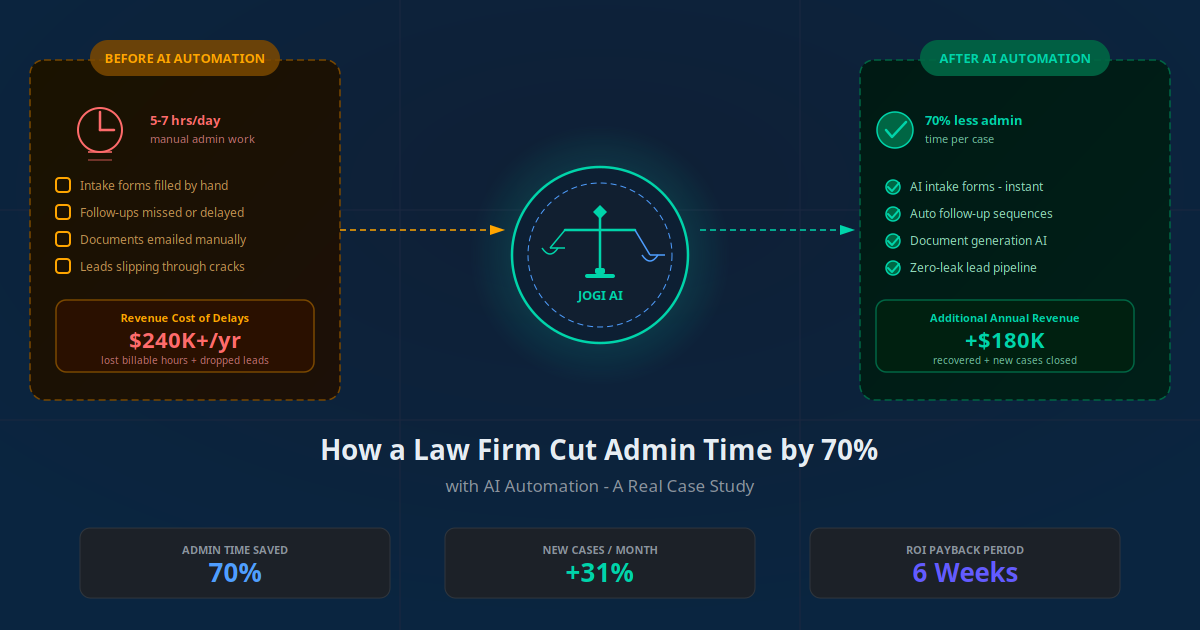
Law Firm AI Automation: How One Firm Cut Admin by 70% and Added $180K in Revenue




The Firm: Background and Starting Point
The firm in this case study is a six-attorney practice based in a mid-sized US city, specialising in personal injury, family law, and estate planning. We have kept the firm name confidential at their request, but the numbers are real and have been verified. They had been operating for 14 years and built a strong local reputation. Their problem was not a lack of clients. Their problem was that they could not efficiently handle the clients they had.
When they came to us in late 2025, their practice manager put it simply: "We have three attorneys doing work a paralegal should be doing, and one paralegal doing work a receptionist should be doing." Two senior attorneys were billing fewer than 25 hours per week despite being in the office 50 hours. The rest was eaten by intake calls, document preparation, chasing signatures, and status update emails.
Their stack at the time: Clio Manage for case management, a shared Gmail inbox, and a Google Drive folder structure that had grown chaotic over 14 years. DocuSign was rarely used — most documents were still printed and couriered. New client enquiries were tracked on a spreadsheet that was 3 weeks out of date.
Key Takeaway
This firm's problems are typical of small and mid-size law practices. Strong client relationships, good legal work, but administrative processes that have not scaled with the firm — creating a bottleneck that costs money every single day.
The Admin Problem Eating Billable Hours
Before recommending any solution, we spent two weeks shadowing the team and logging every non-billable task each person performed. The findings were stark. Across six attorneys and two paralegals, we identified an average of 5.4 hours per day per person spent on administrative work that was either repetitive, data-entry-based, or could be triggered automatically.
Attorneys at this firm were billing an average of 1,340 hours per year against a theoretical capacity of over 2,200. The 860-hour gap — valued at the firm's average rate of $275/hour — represented $236,500 in unbilled, potential annual revenue per attorney. Across six attorneys, the addressable opportunity was over $1.4 million.
The top five time sinks, ranked by total weekly hours lost:
- Client intake calls and data entry: 14 hours/week. Each new enquiry required a 20–40 minute intake call plus manual Clio entry. With 8–12 new enquiries per week, this consumed a junior attorney's entire Monday.
- Document preparation: 22 hours/week. Retainer agreements, demand letters, estate planning questionnaires, and divorce drafts were created from scratch each time.
- Follow-up emails and status updates: 18 hours/week. No proactive update system meant reactive contact dominated the week.
- Chasing document signatures: 9 hours/week — sending DocuSign links, reminding clients, re-sending expired links.
- Scheduling and rescheduling: 8 hours/week. Rescheduling a single consultation sometimes involved 6–8 emails.
Total: 71 hours per week across 8 staff members on tasks AI could reduce by 80% or more.
The Automation Audit: Where Time Was Really Going
Our automation audit mapped every workflow against three criteria: repeatability, data-input intensity, and rule-based decision making. A task scoring high on all three is an ideal automation candidate. Most of the time sinks this firm faced scored high on all three.
| Task | Weekly Hours | Automation Potential | Priority |
|---|---|---|---|
| Client intake calls and data entry | 14 | 90% | High |
| Document preparation | 22 | 75% | High |
| Follow-up emails and status updates | 18 | 85% | High |
| Chasing signatures | 9 | 95% | Medium |
| Scheduling and rescheduling | 8 | 80% | Medium |
We also evaluated the firm's existing tools for automation readiness. Clio had a robust API — an excellent integration hub. The biggest gap was the absence of a structured CRM. Leads were tracked on a spreadsheet, meaning there was no data foundation for follow-up automation. Building a lightweight CRM layer was a prerequisite for everything else.
The AI Automation Stack We Built
Rather than an all-in-one legal AI platform (expensive and locked-in), we built a modular stack using best-in-class tools connected by an automation layer. The entire stack cost the firm $890 per month — replacing over 280 hours of manual admin work.
| Function | Tool | Monthly Cost | Hours Saved/Week |
|---|---|---|---|
| AI Client Intake Chatbot | Custom RAG chatbot + Calendly | $180 | 12 |
| CRM and Lead Pipeline | HubSpot CRM (free tier + sequences) | $90 | 16 |
| Document Automation | Documate + Clio integration | $220 | 18 |
| E-Signature Automation | DocuSign API + automated reminders | $85 | 8 |
| Email + Follow-Up Sequences | HubSpot sequences + Make.com | $175 | 15 |
| Workflow Orchestration | Make.com (Integromat) | $140 | 11 |
Total monthly cost: $890. Staff hours freed per week: 80. At $28/hour average support staff cost, freed time was worth $2,240/week — or $116,480/year. Stack ROI on cost savings alone: 10,900% annually.
Module 1: AI Client Intake System
The intake system was the highest-impact module. We built a custom RAG-powered chatbot trained on the firm's practice areas, common client questions, and intake questionnaire logic. The chatbot lived on the firm's website and was available 24/7.
When a prospective client started a conversation, the chatbot guided them through a structured intake: which practice area they needed, a brief description of their matter, key dates and facts, contact details, and preferred consultation time. This replaced the 20–40 minute intake phone call entirely for 78% of new enquiries. The remaining 22% involved unusual or complex matters where the chatbot escalated to a call with a paralegal.
Personal Injury Enquiry: Before vs After
Before: Client called at 7:30 PM Thursday. No answer. Voicemail picked up Friday. Callback attempted twice before connecting. 35-minute intake call. Manual Clio entry. Consultation scheduled for Wednesday. Total: 4 days, 45 minutes of staff time. After: Client opened the chatbot at 7:30 PM. Eight minutes later they had submitted intake details, chosen a Friday 11 AM slot, and received a calendar invite. Attorney had a pre-populated Clio matter by 7:42 PM. Zero staff time. Consultation booked same evening.
Estate Planning Enquiry — Repetitive Question Handling
Estate planning enquiries accounted for 38% of the firm's intake volume, and 70% of them asked the same 12 questions about cost, timeline, and what documents they needed to prepare. We trained the chatbot on detailed answers to all 12 common questions. Prospective clients got immediate, accurate answers that previously required a paralegal callback. The firm's estate planning conversion rate — enquiries to retained clients — increased from 41% to 63% after implementation.
The chatbot integration with Clio was set up via Make.com: each completed intake form triggered an automatic Clio matter creation, assigned to the appropriate attorney practice area, with all collected fields populated. The attorney's first touchpoint was a pre-populated Clio matter — not a blank screen.
Module 2: Document Generation and E-Signature
Document preparation was consuming 22 hours per week across the team. The core problem was not that the firm lacked templates — they had dozens — but that those templates lived in Google Drive as unstructured Word documents with inconsistent naming. Finding the right template, customising it for a specific client and matter, and sending it for signature was a 30–90 minute task per document.
We implemented Documate integrated with Clio for document automation. Attorneys built structured templates once. When a new matter was ready for a retainer agreement, one click in Clio triggered Documate to pull client details from the matter record, populate the template, and send a DocuSign link automatically.
Retainer Agreement: 45 Minutes to 90 Seconds
Before: attorney searched Drive for the right template, manually replaced every client field, exported to PDF, uploaded to DocuSign, added signing fields, and logged in Clio. Average: 45 minutes. After: one click in Clio pulled client data into the template, sent the DocuSign link, and logged the action automatically. Total: 90 seconds.
Signature Reminders: Eliminating Chase Calls
A Make.com workflow checked DocuSign each morning. Documents unsigned after 48 hours triggered an email reminder. After 72 hours, an SMS. After 96 hours, a Clio task for the paralegal to call. Unsigned document rate at 7 days fell from 34% to 8%.
Across the 8 most common document types — retainer agreements, demand letters, estate planning questionnaires, authorisation forms, settlement summaries, and divorce financial disclosure forms — document preparation time fell from 22 hours/week to under 4 hours/week. The 18 hours recovered were immediately redeployable as billable time.
Module 3: CRM Automation and Follow-Up Sequences
The absence of a CRM was causing two distinct revenue leaks. First, leads who enquired but did not immediately retain the firm fell off entirely — there was no follow-up system. Second, existing clients received inconsistent communication because status updates depended on individual attorneys remembering to send them, not on a systematic trigger-based process.
We implemented HubSpot CRM (free tier) as the lead management layer, integrated with both the intake chatbot and Clio. Every prospective client who completed an intake form was automatically created as a HubSpot contact, assigned to a deal stage ("New Enquiry"), and enrolled in a follow-up sequence. For lead generation and sales funnel automation, structured CRM sequences are the backbone of consistent conversion.
The sequences varied by practice area and outcome:
- Pre-consultation: Immediate confirmation, preparation guide 24 hours before, SMS reminder 2 hours before.
- Post-consultation — not yet retained: Same-day thank-you, follow-up at 3 days, check-in at 7 days, final outreach at 14 days.
- Post-retention — active matter: Case opened confirmation, bi-weekly status updates, milestone notifications when key events occurred.
- Post-matter — closed: Matter closed summary, 30-day satisfaction check-in, 6-month referral request.
The post-consultation follow-up sequence had the single largest revenue impact. Before automation, the firm converted 44% of consultations to retained clients. With the structured 14-day nurture sequence, conversion rose to 61%. At an average retainer value of $3,200, each percentage point of improvement was worth roughly $5,800 per month.
"We used to lose clients between the consultation and the retainer because we were too busy to follow up. Now the system follows up for us — and it converts better than we did manually."
— Managing Partner, the firm in this case studyProactive Status Updates — From Reactive to Automated
After connecting Clio to HubSpot, any milestone logged by an attorney triggered an automatic personalised email — "Your discovery phase is complete. Here is what happens next." Inbound status calls dropped 62% in 30 days, client satisfaction improved, and attorneys stopped being interrupted mid-task for updates that were now automatic.
The 8-Week Implementation Playbook
Here is the exact sequence we followed to implement the full automation stack without disrupting the firm's operations.
Week 1 — Audit and Map: Documented every manual workflow, logged time-per-task, and audited Clio data quality. Identified 23 automation opportunities across 5 workflow categories.
Week 2 — Stack Selection and Data Cleanup: Selected tools, obtained API credentials, and cleaned Clio data. Outdated records, inconsistent naming, and duplicate entries needed resolution before any integration could work reliably. Clean data is the foundation of reliable automation.
Week 3 — Build Intake Chatbot: Built and trained the AI chatbot on practice area documentation, FAQ content, and intake logic. Connected to Calendly for booking and HubSpot via Make.com for contact creation. Tested 50 simulated enquiry scenarios across all three practice areas.
Week 4 — CRM Setup and Sequence Building: Configured HubSpot deal stages, built all seven email automation sequences, and connected HubSpot to Clio for milestone triggers. Lead assignment rules routed enquiries automatically to the right practice area attorney.
Week 5 — Document Template Library: Rebuilt 14 structured document templates in Documate across all three practice areas. Mapped every variable field to its Clio data point. Built the Clio-to-Documate trigger workflow and the DocuSign reminder automation.
Week 6 — Integration Testing: End-to-end testing across all three modules. Ran 30 test enquiries through the full pipeline from chatbot intake to Clio matter creation to HubSpot sequence to Documate document generation to DocuSign delivery. Fixed 4 data mapping errors and 2 sequence trigger timing issues.
Week 7 — Staff Onboarding: Two 90-minute training sessions — one for attorneys, one for support staff. Provided quick-reference guides and set up a shared Slack channel for questions. Launched chatbot only first, keeping old intake as fallback during the transition week.
Week 8 — Full Go-Live and Monitoring: Activated all three modules. Monitored every trigger for 5 business days, reviewed all chatbot transcripts daily, and tuned responses based on 11 edge cases identified in the first week. By end of week 8, error rate was under 2%.
The Results: 90 Days After Go-Live
We measured outcomes at 30, 60, and 90 days post go-live. The 90-day numbers, which we consider stabilised and representative of ongoing performance, are below.
The headline numbers, measured against the 12-week pre-implementation baseline:
- Admin hours per attorney per week: Down from 28 to 8.4 hours — a 70% reduction. Each attorney recovered 19.6 hours per week.
- Billable hours per attorney per week: Up from 25.8 to 38.6 — a 50% increase without hiring anyone.
- New consultations per week: Up from 8 to 13. The 24/7 chatbot captured after-hours enquiries the firm previously missed.
- Consultation-to-retainer conversion: Up from 44% to 61%. The follow-up sequence recovered leads that previously went cold.
- Time from enquiry to booked consultation: Down from 4.2 days to 7 minutes. The chatbot booked immediately.
- Unsigned documents at 7 days: Down from 34% to 8%. Automated reminders eliminated chasing calls.
- Inbound status update calls per week: Down from 31 to 12 — a 62% reduction from proactive milestone emails.
Financial impact at 90 days, annualised:
- Additional billable revenue: 12.8 extra billable hrs/week × 6 attorneys × $275/hr × 48 weeks = $101,376/year.
- Additional retained clients: 17% conversion improvement × 13 consultations/week × $3,200 retainer × 48 weeks = $85,196/year.
- Total additional annual revenue: $186,572 — in line with the pre-implementation estimate of $180K.
- Annual stack cost: $10,680. Net first-year ROI: 1,649%.
"I billed more in October than any month in the 14 years I have been practising. Nothing changed except I stopped doing admin."
— Senior Partner, the firm in this case studyFor comparison against other AI automation case studies we have published, the law firm saw one of the highest ROI figures we have documented. The reason is simple: attorney billing rates are high, and the firm was haemorrhaging billable capacity on tasks that are structurally easy to automate.
Mistakes to Avoid When Automating a Law Firm
Not every law firm automation project goes this smoothly. Based on our work with legal practices, here are the most common mistakes that derail implementations.
Starting with document automation instead of intake
Document automation depends on clean, structured client data flowing in from upstream. If your intake process is broken, documents will be generated with incorrect data. Build intake automation first — everything downstream depends on it. The workflow automation principle is always: fix the data entry point before automating the output.
Underestimating data cleanup time
Every firm we have worked with underestimates how messy their Clio or practice management data is before automation begins. Duplicate contacts, inconsistent matter naming, missing fields — all cause automation failures that look like tool problems but are actually data problems. Allocate at least one full week for data cleanup before integration work begins.
Automating before getting attorney buy-in
Attorneys who do not trust the new intake process will bypass it — personally taking calls, re-entering data manually, and undermining the automation. The solution is not to force compliance. Show attorneys the data. In our implementation, transcripts of chatbot conversations where clients praised the fast response time converted sceptics faster than any training session.
Not building escalation paths into every automation
Every automated workflow needs a clear failure path. What happens when a chatbot enquiry does not match any practice area? When a document template field is empty? When a DocuSign link expires unsigned? Each failure mode needs a defined escalation — typically a task in Clio assigned to a specific person. Automations without failure handling create invisible problems that only surface when a client complains.
Choosing an all-in-one legal AI platform too early
Several well-funded legal AI platforms promise to replace your entire stack. Most are excellent for large firms but expensive and rigid for small practices. A modular approach — best-in-class tools connected by an automation layer like Make.com, Zapier, or n8n — gives more control, lower cost, and the ability to swap components as the market evolves.
Skipping the staff training investment
Attorneys and paralegals interact with these tools every day. Insufficient training means staff work around the automation rather than with it — creating hybrid manual-automated processes that are harder to troubleshoot than either pure approach. Plan for training, budget for it, and make attendance non-optional.
What This Means for Your Firm
The law firm in this case study is not exceptional. The problems they had — buried attorneys, manual intake, document chaos, leaking leads — are the standard operating conditions at the majority of small and mid-size legal practices in 2026. What is exceptional is that they decided to fix it systematically rather than hoping things would improve on their own.
The math is straightforward. If your attorneys are billing 60% or less of their available hours, and more than a quarter of their week is spent on repeatable, data-entry-driven tasks, the revenue gap you can close with AI automation for law firms is likely six figures. For a six-attorney firm, $180K is conservative. For a ten-attorney firm, $300K is achievable. The automation stack cost is under $15K per year. The economics are not subtle.
The window for competitive advantage is still open, but it is closing. Firms that automate their intake, follow-up, and document workflows in the next 12 months will have lower cost structures, faster response times, and higher conversion rates than firms that do not. Clients who experience a 7-minute chatbot intake followed by a same-day consultation booking will not go back to the 4-day phone tag process of the competing firm down the street.
Use the AI Business Twin to model what automation would look like for your specific firm — including estimated billable hours recovered, conversion rate improvement, and first-year ROI. The analysis takes under 10 minutes and is completely free.
Frequently Asked Questions
How long does it take to implement AI automation in a law firm?
Most small law firms complete a core AI automation implementation in 6 to 8 weeks. The first two weeks cover system audits and tool selection. Weeks three and four involve building the client intake chatbot and CRM integrations. Weeks five and six cover document automation templates and follow-up sequences. Full live testing and staff training typically add another week. Complex integrations with legacy practice management software can extend this to 10 to 12 weeks.
Is AI automation safe to use in a law firm given client confidentiality rules?
Yes, when implemented correctly. The key requirements are: use tools with data processing agreements that comply with your jurisdiction's bar rules, ensure all client data stays within your firm's controlled environment or a vetted SaaS platform, avoid sending privileged information to public AI models without proper data handling agreements, and review your bar association's ethics opinions on AI use. Most reputable AI platforms for legal services offer GDPR-compliant and US-state-bar-compatible configurations.
What is the typical ROI for AI automation in a law firm?
Based on the firms we have worked with, the ROI typically comes from three areas: recovering billable hours previously spent on admin tasks (typically 20 to 35 additional billable hours per attorney per month), increasing new client conversion rates through faster intake response (firms see 25 to 40% improvement in lead-to-client conversion), and reducing no-show and missed-appointment rates through automated reminders (typically 30 to 45% reduction). Combined, a 5 to 8 attorney firm can typically add $100K to $250K in annual revenue within 12 months of full deployment.
Which law firm practice areas benefit most from AI automation?
Practice areas with high client volume, repetitive document work, and structured intake processes benefit most. These include personal injury, family law, estate planning, immigration, real estate transactions, employment law, and criminal defense. Boutique litigation or highly bespoke transactional practices may see lower automation benefits since each matter is highly unique. That said, even complex practices benefit from automating the administrative layer around client intake, scheduling, billing reminders, and status updates.
Do attorneys need technical skills to use AI automation tools?
No. The AI automation tools used in legal practice management are designed for non-technical users. Client intake chatbots are built using drag-and-drop interfaces, document templates use familiar word-processing-style editors, and CRM workflows are configured through visual builders. Attorneys and their staff typically need 2 to 4 hours of onboarding to be fully comfortable with day-to-day use. The technical implementation is handled by your automation partner.
How does AI handle client intake without replacing the attorney-client relationship?
AI handles the pre-intake and data collection phase only. It collects the prospective client's contact details, matter type, key facts, urgency level, and availability. It then automatically schedules a consultation with the appropriate attorney and sends confirmation materials. No legal advice is given by the AI. The attorney-client relationship begins at the consultation. This frees attorneys from spending 30 to 60 minutes on intake calls that could be completed automatically.
Can AI automation integrate with existing law firm software like Clio or MyCase?
Yes. Most major practice management platforms including Clio, MyCase, PracticePanther, Filevine, and Smokeball have open APIs or native integrations with automation tools like Make, Zapier, and n8n. This means new client records created by your AI intake chatbot can automatically appear in your case management system, documents can be generated and filed directly, and billing triggers can be set based on case milestones. Integration depth varies by platform but core workflows are achievable with all major legal software.
What was the biggest challenge in implementing AI automation for the law firm in this case study?
The biggest challenge was staff adoption, not the technology. Two of the six attorneys initially resisted changing their intake process, concerned that an AI-driven experience would feel impersonal to clients. We addressed this by showing them call recordings and chatbot transcripts where prospective clients completed intake in under 8 minutes and rated the experience positively. Once the attorneys saw real client feedback, adoption became straightforward. The technical integration with their existing Clio system took 3 days and worked without issues.