Case Study: How a 4-Person Marketing Agency Added 3 Retainer Clients With AI




The Agency: Who They Were Before AI
Nexus Creative Co. is a four-person digital marketing agency based in Melbourne, Australia. Founded in 2021, they specialise in paid media management (Google and Meta), SEO, and social media for local service businesses — mainly trades, healthcare clinics, and hospitality venues.
By early 2026, they had built a solid reputation. Referrals were coming in. Their client results were good. But the agency was stuck at eight clients and struggling to grow beyond it. The founder, Sam, had tried hiring a fifth team member the previous year. The new hire lasted four months before Sam realised the bottleneck was not headcount — it was process.
"We were great at the actual marketing work," Sam told us. "But every week, probably a third of our hours were going into stuff that had nothing to do with strategy — reporting, chasing leads, scheduling posts, reformatting proposals. It was killing our capacity and our morale."
The Problem: Capacity Trapped in Admin
Before starting any automation work, we ran a time audit across the team for two weeks. The results were worse than Sam had estimated.
| Task | Weekly Hours (Team Total) | Billable? | Automatable? |
|---|---|---|---|
| Monthly client reports | 14 hrs | No | Yes — 90% |
| Lead follow-up and CRM entry | 7 hrs | No | Yes — 95% |
| Social media scheduling and captions | 9 hrs | Partially | Yes — 70% |
| Proposal writing and formatting | 6 hrs | No | Yes — 60% |
| Client onboarding admin | 4 hrs | No | Yes — 80% |
| Invoice generation and follow-up | 3 hrs | No | Yes — 100% |
Total: 43 hours per week across a four-person team spent on tasks that had nothing to do with delivering marketing results. That is more than one full-time employee's worth of output consumed by admin every single week.
Key Takeaway
Most small agencies lose 30–40% of their capacity to repetitive admin. The goal of AI automation is not to replace your team — it is to give that capacity back so they can do the work that actually grows client accounts and wins new ones.
The other problem was inbound leads. The agency was getting 12–18 new enquiries per month from their website, LinkedIn, and referrals. Their average response time was 4.3 hours. That might sound acceptable, but research on B2B lead conversion shows that response speed within 5 minutes produces up to 9x better conversion than responses after 30 minutes. They were leaving a significant portion of their new business pipeline on the table purely because of slow response.
What We Automated: The Four Workflows
We prioritised the four workflows with the clearest ROI: client reporting, lead follow-up, social scheduling, and proposal drafting. Each was treated as a standalone automation project — built, tested, and deployed before moving to the next.
Workflow 1: Automated Monthly Client Reporting
Every month, the team was manually pulling data from Google Analytics, Google Ads, Meta Ads Manager, and SEMrush for each client — then copying it into a Canva or PowerPoint template and emailing it out. Fourteen hours per month, every month, for eight clients.
The automation: a Make workflow runs on the first business day of each month, pulls performance data via the Google Analytics API, Google Ads API, and Meta Graph API, populates a standardised Google Slides template for each client, and emails the formatted PDF to the client and account manager. The account manager has 24 hours to review and add commentary before the report auto-sends. If no action is taken, it sends automatically.
Time reclaimed: 12 hours per week (the team was doing interim check-ins too, not just monthly). Client satisfaction scores went up because reports now arrived on the same day every month without exception.
Workflow 2: AI-Powered Lead Follow-Up
Any new form submission from the agency's website or LinkedIn Lead Gen Form was being routed to a shared Gmail inbox. Someone had to check it, create a HubSpot record, and write a response. The average lag was 4.3 hours.
The new flow: form submissions trigger a Make webhook, which creates a HubSpot contact instantly, enriches the record with company data via Clearbit, fires a personalised AI-written email within 90 seconds of form submission (using GPT-4o to personalise based on industry, company size, and the service they enquired about), and logs the outreach. If no reply comes in 4 hours, a WhatsApp message goes out via the WhatsApp Business API. If still no reply after 24 hours, a second tailored follow-up email goes automatically.
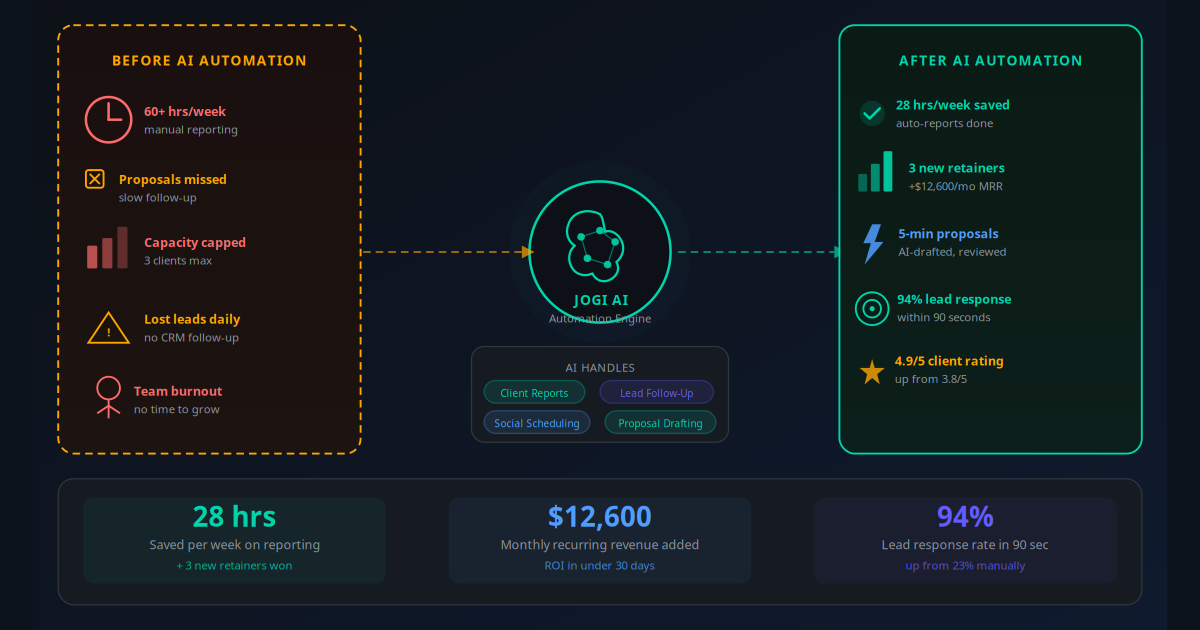
Lead response rate moved from 23% to 94% within the first 30 days. Conversion from inquiry to booked discovery call improved by 38%.
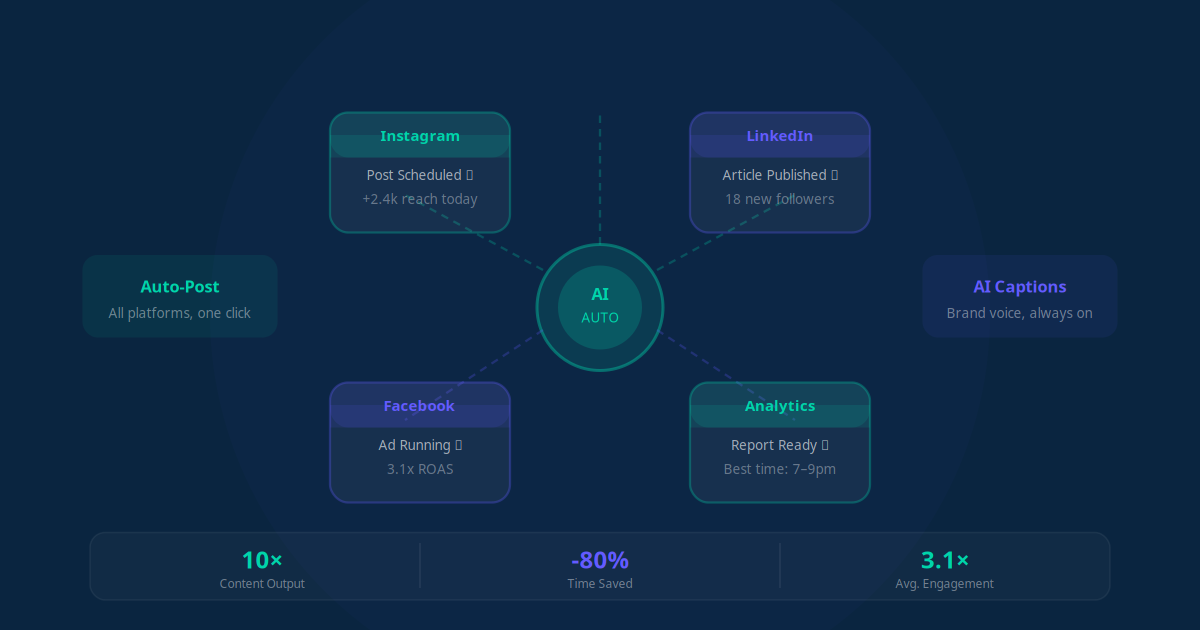
Workflow 3: Social Media Scheduling and Caption Generation
The team was managing social media for several clients alongside their own agency accounts. Each post needed a caption, hashtags, and scheduling across multiple platforms. Nine hours per week was going into this.
The automation: a content calendar in Airtable feeds a Make workflow that uses GPT-4o to generate platform-appropriate captions from brief content notes. A human approves the drafts in a simple Slack-based approval flow, then the posts schedule automatically via Buffer. The AI generates the first draft; a team member does a 2-minute review. What took 9 hours now takes 2.5 hours — and the output quality actually improved because the AI consistently applies brand voice guidelines that were previously applied inconsistently across team members.
This workflow is covered in detail in our guide to AI social media automation.
Workflow 4: AI-Assisted Proposal Generation
Agency proposals were built from scratch every time, pulling from a library of case studies, service descriptions, and pricing tables that lived in different Google Docs. A typical proposal took 3–4 hours. With 3–4 new proposals per month, that was 12–16 hours — and still, proposals sometimes went out 48 hours after a discovery call when the prospect's enthusiasm was highest.
The new workflow: after a discovery call, the account manager fills in a 10-question intake form in under 5 minutes. A Make workflow passes the responses to GPT-4o with a master proposal prompt that includes the agency's full service library, pricing tiers, and relevant case studies. Within minutes, a structured first-draft proposal populates a Google Doc — complete with an executive summary, recommended services, pricing, and a tailored ROI estimate. The account manager refines it and sends. Total time per proposal dropped from 3.5 hours to 45 minutes.
For more on this type of workflow, see our guide to AI proposal and quote automation.
Results by Workflow: Numbers That Mattered
| Workflow | Before | After | Time Saved/Week |
|---|---|---|---|
| Client reporting | 14 hrs/month manually | 1 hr review only | 12 hrs |
| Lead follow-up | 4.3 hr avg response, 23% reply rate | 90 sec response, 94% reply rate | 6 hrs |
| Social scheduling | 9 hrs/week | 2.5 hrs/week | 6.5 hrs |
| Proposal writing | 3.5 hrs per proposal | 45 min per proposal | ~3.5 hrs |
| Total | 28 hrs/week |
28 hours per week returned to the team is the equivalent of adding a 0.7 FTE to the business — without a salary, benefits, or onboarding cost. For a four-person agency, that is transformational.
The three new clients Nexus Creative won in the 90 days after automation were all directly attributable to the freed capacity. Two came from the faster lead follow-up (they had previously lost those leads to faster-responding competitors). One came from Sam having enough bandwidth to attend two networking events she had previously been too busy for.
Implementation Timeline: 38 Days to Full Automation
Days 1–5: Discovery and time audit. We mapped every recurring task the team performed, measured actual time spent, and scored each task for automation feasibility and ROI potential. The reporting and lead follow-up workflows were immediately identified as the top priorities.
Days 6–12: CRM setup and lead automation. HubSpot was already in use but barely configured. We built out the pipeline stages, connected the website forms via Make webhooks, and deployed the AI email response workflow with personalisation variables. By day 12, leads were being responded to in under 2 minutes.
Days 13–22: Client reporting automation. We built the Google Data Studio (Looker Studio) report templates, connected the Analytics and Ads APIs, and built the Make workflow to auto-populate and email reports. Testing across all eight client accounts took three days. By day 22, the first batch of automated reports went out — on time, correctly formatted, to all clients.
Days 23–30: Social scheduling workflow. We built the Airtable content calendar, connected it to Make, and set up the GPT-4o caption generation with brand voice prompts for each client account. The Slack approval loop was the trickiest part — it needed two iterations to feel natural for the team. Fully live by day 30.
Days 31–38: Proposal generation and invoicing. The proposal workflow was the most complex — building and testing the master prompt with all service descriptions and pricing variables took the most iteration. Invoicing automation (recurring invoices via Xero) was the simplest workflow and was live within a day.
Day 38+: Monitor, refine, and expand. We set up a weekly 30-minute review of all workflow logs — checking for failures, edge cases, and quality issues. Over the next four weeks, the proposal prompt was refined three times based on real output. The team now runs the stack with minimal oversight; automation issues trigger Slack alerts automatically.
The Tools and Tech Stack Used
The entire automation stack for this agency runs on tools that collectively cost less than $400 per month. No enterprise software, no custom development, no dedicated engineer required.
| Tool | Purpose | Monthly Cost |
|---|---|---|
| Make (Integromat) | Workflow automation — connects all tools | $29 |
| HubSpot Starter CRM | Lead management, pipeline, email sequences | $45 |
| GPT-4o API | Email personalisation, captions, proposal drafts | ~$60 (usage-based) |
| Buffer | Social media scheduling | $18 |
| Airtable | Content calendar and project tracking | $24 |
| Looker Studio (free) + API access | Automated client reporting | $0 |
| Xero | Automated invoicing (already in use) | $0 additional |
| WhatsApp Business API | Lead follow-up messages | ~$20 (usage-based) |
| Total | ~$196–$376/month |
The Make vs Zapier vs n8n comparison explains why we chose Make for this stack — its multi-step scenario editor handles complex conditional logic that Zapier struggles with at this price point.
ROI Breakdown: Every Dollar Traced
"Month one we basically got the setup cost back from the one new client we signed because we responded faster than we ever had before. By month three we were at three new clients. I genuinely cannot believe we waited this long."
— Sam, Founder, Nexus Creative Co.Here is the complete ROI picture over the first 90 days:
- Setup cost: Jogi AI Starter plan ($179/month) plus tool costs ($376/month) = $555/month total
- Month 1: One new client signed at $3,800/month retainer. Net gain: +$3,245 in first month
- Month 2: Second new client at $4,200/month. Total new MRR: $8,000
- Month 3: Third new client at $4,600/month. Total new MRR: $12,600
- Ongoing monthly cost: $376/month (tool stack; setup fee was one-time)
- Monthly profit from new MRR (cost-adjusted): $12,224
The time savings also have a dollar value. At the team's effective hourly rate of $95 (blended across four team members), 28 hours per week recovered = $2,660 per week = $10,640 per month in productive capacity returned. That capacity was reinvested into client work and business development — not paid as overhead.
For a deeper dive into how to measure and model automation ROI for your own business, see the AI automation ROI calculator.
Mistakes to Avoid When Automating an Agency
This implementation went relatively smoothly. But we have seen other agencies struggle with the same projects. These are the failure patterns to watch for.
Automating before standardising
You cannot automate chaos. If your proposal format changes every time, if your client reports have different structures for different clients, if your lead follow-up varies by team member — automation will just make the inconsistency faster. Standardise the process on paper first. Build the template. Define the rules. Then automate.
Starting with the wrong workflow
Agencies often want to start with the most visible automation — usually something like a chatbot on their own website. That is rarely the highest ROI starting point. The highest ROI is almost always in the back-office: reporting, CRM data entry, and lead follow-up. Start there. The glamorous automations come later.
No human review checkpoint on AI output
AI writing tools make errors. They occasionally hallucinate numbers, use the wrong client name, or produce phrasing that does not match your brand voice. Every AI-generated output — reports, proposals, emails — should have a lightweight human review checkpoint before it reaches the client. The Nexus agency has a 24-hour review window for reports and a same-day review for proposals. The human review takes 10–15 minutes, not hours.
Over-automating client communication
Clients hire agencies because they want a human relationship with people who care about their results. Automating the data-gathering and formatting is invisible to clients and purely positive. Automating the strategic commentary, the monthly performance call, or the relationship check-in is where you can erode trust. Keep the human touchpoints human.
Treating automation as a one-time project
The platforms change. The APIs update. Workflows break occasionally. Automation is not a set-and-forget deployment — it is an ongoing system that needs monitoring. The Nexus agency runs a 30-minute weekly review of their Make scenario logs. That is the maintenance overhead for a system saving 28 hours per week. A reasonable trade.
How to Apply This to Your Own Agency
The Nexus Creative framework applies to any service-based agency — SEO, paid media, PR, content, design, or full-service. The specific tools and APIs will vary, but the logic is identical.
SEO Agency
Automate monthly ranking reports from Google Search Console and SEMrush API, client keyword position update emails, backlink opportunity alerts, and new client site audit generation. A typical SEO agency of 5 people reclaims 15–20 hours per week from these workflows alone.
Paid Media Agency
Automate ad performance alerts (budget pacing, underperforming ad sets), weekly spend reports to clients, A/B test result summaries, and creative request generation. Faster reporting means faster client approvals, which means faster campaign optimisation — a direct performance benefit, not just a time saving.
Social Media Management Agency
AI caption generation from content briefs, automated hashtag research, content calendar population, and monthly engagement reports are all ripe for automation. A social agency managing 10+ client accounts typically saves 20–30 hours per week from caption and scheduling automation alone.
Content Marketing Agency
Automate content brief generation from target keywords, first-draft outlines via AI, editorial calendar management in Airtable, and client approval workflows. Content agencies can reduce the time from brief to final draft by 40–60% without reducing the quality of the human-authored long-form pieces that win clients.
The starting point is always the same: run a time audit. Measure where your team's hours actually go. You will almost certainly find that 30–40% of those hours are in tasks that can be automated — and that reclaiming them is the single highest-ROI action available to your business this year.
For a broader playbook on automating service-based operations, the AI workflow automation guide covers the strategic framework in detail. And for the CRM-specific automation that drives lead follow-up, see CRM Automation 101.
The Ceiling You Think You Have Is Not the Ceiling
Nexus Creative Co. did not hire their way out of the capacity problem. They automated their way out of it. Four people, the same clients they always served well, a stack that costs $376/month to run — and they added three new retainer clients and $12,600 in monthly recurring revenue in 90 days. The maths of that is hard to argue with.
The pattern repeats across every service business we work with. The constraint is almost never talent or demand. It is that the people who do the skilled work are buried under administrative processes that should not require skilled people at all. AI automation removes that burden and returns capacity to the work that actually matters.
If you run a marketing agency and want to know specifically which of your workflows have the highest automation ROI, use the AI Business Twin for a free personalised analysis in under 10 minutes.
Frequently Asked Questions
How long did it take the marketing agency to implement AI automation?
The core automation stack — CRM lead follow-up, client reporting, and social scheduling — was live within three weeks of starting implementation. The proposal generation workflow took an additional two weeks to fine-tune. Total onboarding time from kick-off to fully operational was 38 days, with measurable ROI visible within the first 30 days.
Which AI tools did the marketing agency use?
The agency's stack included Make (workflow automation), HubSpot CRM (with AI enrichment), an AI writing assistant for proposal drafts (GPT-4o via API), a social scheduling tool with AI caption generation, and automated Google Data Studio reports triggered by Make workflows. The entire stack cost under $400 per month to run.
What was the total cost of the AI automation setup?
The agency's monthly running cost for the full automation stack was approximately $380 per month — covering Make, HubSpot's Starter CRM tier, AI writing API usage, and social scheduling. Against $12,600 in new monthly recurring revenue, the payback period was under 30 days. The one-time setup and configuration cost was covered by Jogi AI's Starter plan at $179/month.
Can a marketing agency really automate client reporting?
Yes. Most marketing agencies report the same KPIs every month — traffic, conversions, ad spend, ROAS, and social engagement. These metrics are pulled from Google Analytics, Google Ads, Meta Ads Manager, and similar platforms via APIs. An automated workflow pulls the data, populates a template, and emails the formatted report to the client — with zero human involvement unless numbers require commentary. The agency in this case study reclaimed 12 hours per week from this one workflow alone.
How did AI improve the agency's lead response rate from 23% to 94%?
Before automation, inbound leads from the agency's website sat in an email inbox until someone checked it — often hours or a full day later. With AI automation, a new lead triggers an immediate CRM entry, a personalised email response within 90 seconds of form submission, and a WhatsApp follow-up if no reply comes in 4 hours. Speed of response is the single biggest driver of lead conversion — research consistently shows that responding within 5 minutes increases conversion by up to 9x compared to responding after an hour.
What types of marketing agencies benefit most from AI automation?
The highest ROI tends to come from agencies doing repetitive monthly deliverables — SEO agencies, paid media agencies, social media management firms, and content marketing agencies. Any agency that writes the same type of report, follows the same client onboarding checklist, or sends the same follow-up sequences is a strong candidate for automation. The more standardised the process, the faster the ROI.
Will clients notice or object to AI-generated reports and proposals?
In this case study, clients reported higher satisfaction after automation was introduced — because reports arrived on time every month and proposals were more detailed and professionally formatted than before. AI does not replace the strategic thinking; it handles the assembly. The account manager still reviews every report and adds commentary before it goes out. Clients receive a better product faster, which is what they actually care about.
How do I start automating my marketing agency operations?
The fastest starting point is to identify your three highest-volume repetitive tasks — the things your team does the same way every time. For most agencies that is client reporting, lead follow-up, and social scheduling. Each of these can be automated independently without disrupting the rest of your operations. A free AI Business Twin audit from Jogi AI will map exactly which workflows to automate first and estimate your time and revenue impact before you commit to anything.