5 Property Management Tasks to Automate Before You Hire Another Admin




Property management is a hundred small jobs stitched together. A rent reminder here. A leaking tap there. An applicant who wants a viewing on Saturday. A tenant asking, again, where the recycling goes. None of these are hard. The problem is the volume, and the fact that they all arrive at once, usually on the day you had planned to do something bigger.
The numbers back up what the job feels like. Around 39% of property managers spend more than 20 hours a month just handling maintenance requests, and that is one category out of many. Meanwhile 72% of tenants say they prefer digital communication over a phone call, so the old way of doing things is quietly costing you both time and goodwill.
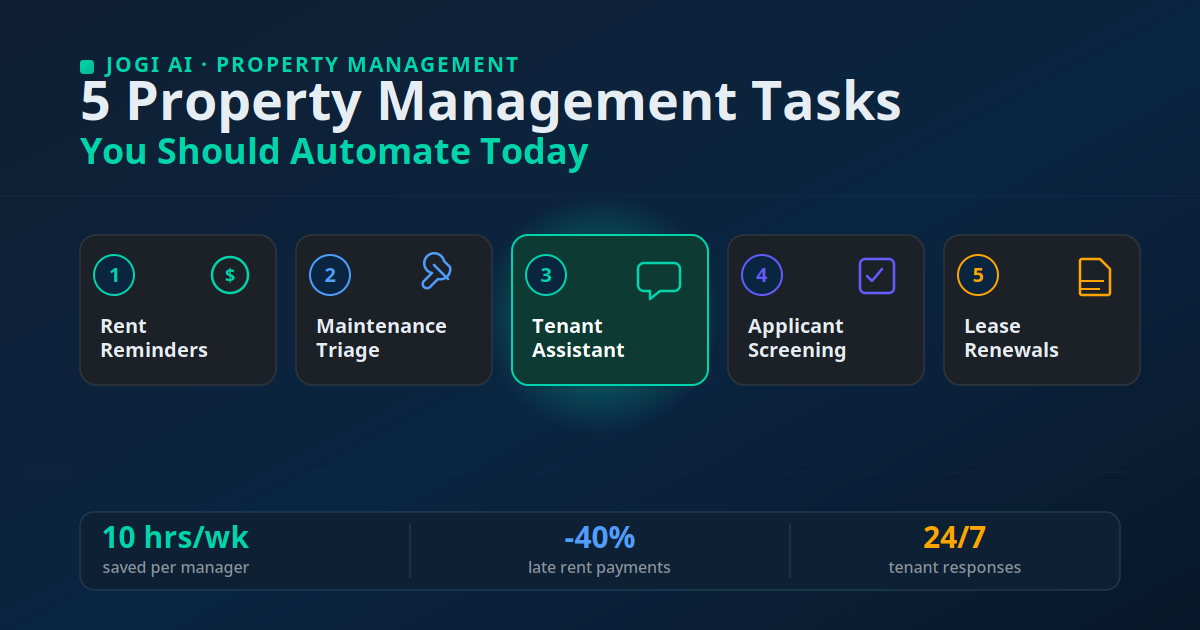
Here is the encouraging part. Managers who bring in AI and automation report saving roughly 10 hours a week and 20 to 30% gains in operational efficiency. AI adoption in the sector jumped from 21% in 2024 to 34% in 2025, yet only 8% of operators have fully automated even a single workflow. This piece walks through the five tasks I would automate first, why they pay off quickly, and roughly what each one costs to stand up.
Where property managers actually lose their week
Before picking tools, it helps to name where the hours go. In the property teams we have worked with, the drain is rarely one giant task. It is the constant switching between tiny ones. You start a rent-due message, a maintenance call interrupts, then a prospective tenant emails. By evening you have touched forty things and finished none of them cleanly.
That pattern costs more than your sanity. Slow, inconsistent communication is one of the top reasons tenants leave. Renters who feel good about how their manager communicates are 43% more likely to renew and 169% more likely to recommend the property. The busywork does more than eat your day. It quietly chips away at retention and referrals too.
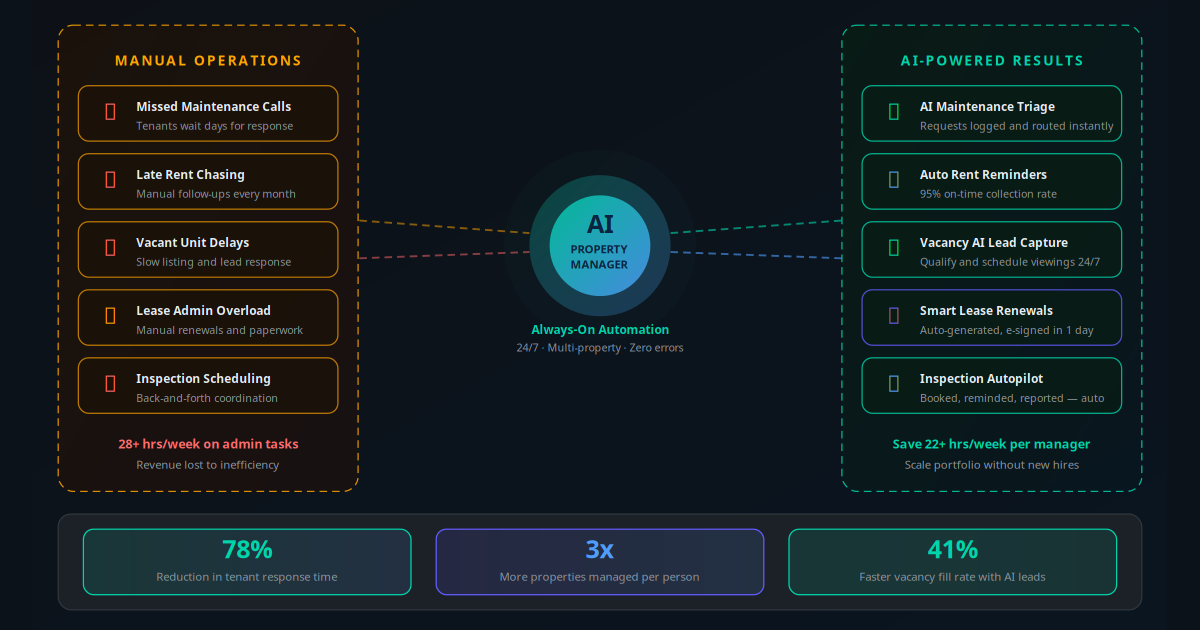
Automation fixes this by taking the predictable, repeatable pieces off your plate so the judgement calls get your full attention. The five tasks below are the ones where the work is high-volume, the rules are clear, and a machine can handle the first 80% without anyone feeling neglected. For the wider picture, our full guide to AI for property managers maps how these pieces connect into one system.
Key Takeaway
Do not try to automate everything at once. Pick the two or three tasks that are high-volume and low-judgement — rent reminders and maintenance intake are the usual starting points — get them working, then stack the rest on top.
Task 1: Automated rent reminders and collection
Chasing rent is the task nobody enjoys and everybody does badly. You forget the reminder, feel awkward sending it late, and the payment slips another week. Multiply that across a portfolio and you have a cash-flow problem built entirely out of missed messages.
An automated rent workflow removes the awkwardness. It sends a friendly reminder a few days before rent is due, a confirmation when payment lands, and a firmer nudge if the date passes. The tenant gets a consistent message every month, and you are never the person who forgot to follow up. Businesses that automate rent collection see late payments drop by up to 40%, simply because the reminder always goes out on time.
You can run this on top of a resident portal, a CRM, or even a well-configured WhatsApp Business number, and route confirmations through email automation so every payment leaves a paper trail. The setup is genuinely quick; most landlords have this live inside a day.
In practice
When I set up rent reminders for a landlord managing about 40 units, the change was almost boring in how well it worked. A three-touch sequence — five days before, on the due date, and three days after — cut his late payments by roughly a third in the first two months. The bigger win, in his words, was getting his Saturday mornings back from making chase calls.
Task 2: Maintenance request intake and triage
Maintenance is where most manual systems fall apart, because requests come in through every channel at once: a text here, a voicemail there, a note slipped under a door. Things get lost. A small leak that should have been a five-minute fix becomes a ceiling repair because the message sat unread over a weekend.
An intake-and-triage workflow gives every request one front door. The tenant reports the problem through a form or a message, and an AI layer reads it, tags the urgency, asks for a photo if it helps, and routes it to the right person. A burst pipe gets dispatched immediately. A squeaky hinge joins the normal queue. Given that maintenance already swallows more than 20 hours a month for two in five managers, this is often the highest-return workflow you can build.
The triage logic is where AI earns its keep. Instead of you reading every message and deciding what matters, the system applies your rules consistently, every time, at any hour. It works the same way the AI support workflows we build for other industries do: classify, prioritise, route, and only escalate what genuinely needs a human.
In practice
One thing I have learned setting these up: the value is in the routing, as much as the intake. A property team we worked with had the AI auto-tag anything mentioning water, gas, or electrics as urgent and text the on-call contractor within minutes. Their average response time on genuine emergencies dropped sharply, and the low-priority jobs stopped clogging the same inbox.
Task 3: A tenant communication assistant
A huge share of tenant messages are the same handful of questions. What is the Wi-Fi password. When is bin collection. How do I report a problem. Answering these one by one is a slow leak on your day, and tenants hate waiting on hold for something so basic.
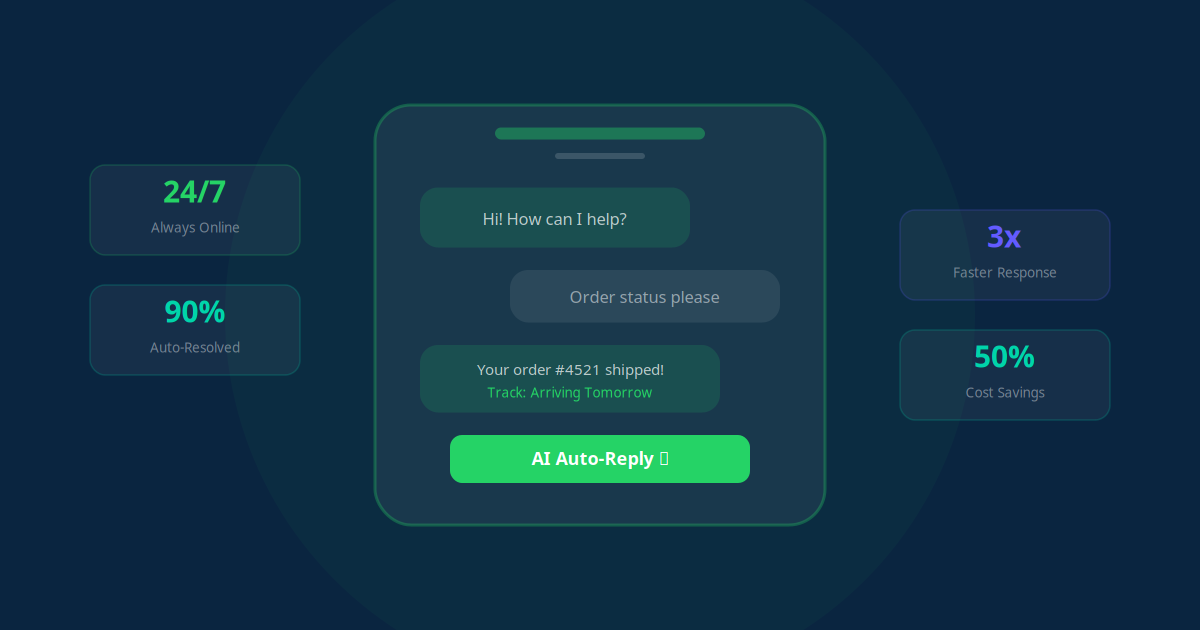
A tenant communication assistant — essentially a chatbot trained on your properties and policies — handles these instantly, around the clock. It sits on your website, a WhatsApp number, or a resident app, answers the routine questions accurately, and hands off to you the moment something needs judgement. Since 75% of renters say a resident portal is important to them, self-serve answers are exactly what they want. Here is how a well-built assistant handles a single incoming message:
Tenant messages at 9 PM: "My heating isn't working and it's freezing." The assistant picks it up instantly, no queue.
It identifies the tenant from the phone number or login, and pulls up the correct unit and lease on record.
It recognises urgency: heating in cold weather is a priority, so it does not treat this like a general FAQ.
It gathers detail: asks whether the boiler shows an error code and requests a quick photo, so the contractor arrives prepared.
It creates the ticket in your maintenance system and confirms a visit window to the tenant in the same conversation.
It escalates to you only if the tenant sounds distressed or the issue falls outside its rules — with the full chat attached.
The assistant is only as good as the escalation path behind it, so design that first. Done right, it deflects the routine volume and still makes tenants feel heard. For the mechanics of how these bots stay accurate, our piece on WhatsApp Business automation covers the messaging side in depth.
Task 4: Applicant screening and viewing scheduling
Filling a vacancy is a race against empty-unit costs, and most of the delay is admin, not decision-making. You are reading applications, cross-checking references, and playing calendar tag to book viewings. Every day that unit sits empty is money gone.
Automation compresses both halves. On screening, AI reads applications, extracts the key details from pay stubs and references, and flags candidates against the criteria you set, which turns hours of manual review into minutes. On scheduling, an assistant offers open viewing slots, books them, and sends reminders, so you skip the back-and-forth entirely. It is the same engine behind our AI appointment scheduling setups, pointed at property viewings.
A Toronto manager with a 40-unit portfolio cut application review from six hours to two per leasing cycle after automating screening — a two-thirds reduction, with no drop in quality.
One caution worth stating plainly: screening touches fair-housing law. Use consistent, documented criteria and keep a human on the final decision. The automation should speed up the process you already follow, not quietly invent its own rules.
In practice
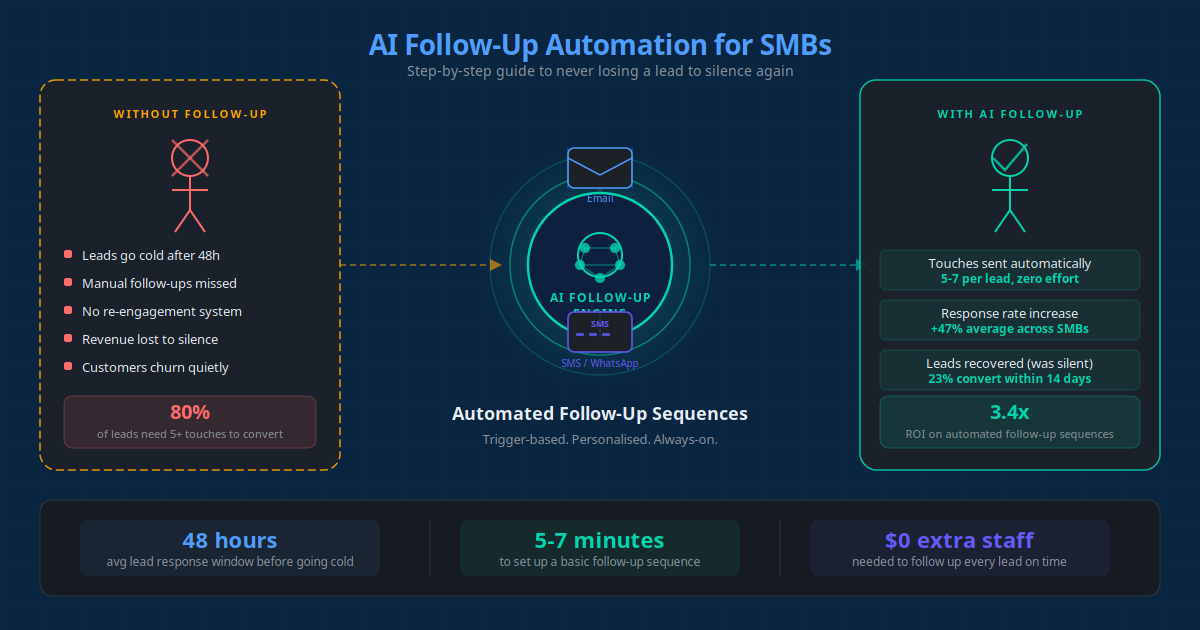
Single-family rental owners using automation tools report saving 15 to 20 hours per listing, mostly by killing the scheduling ping-pong. When a lead comes in, the assistant books the viewing and confirms it before the owner has even seen the enquiry. That is the kind of speed our automated follow-up work is built around.
Task 5: Lease renewal reminders that protect occupancy
Renewals are easy to forget until they are urgent. A lease lapses, a tenant who would happily have stayed starts browsing other listings, and suddenly you are marketing a unit you never needed to lose. Turnover is expensive: cleaning, marketing, void weeks, and screening a whole new applicant.
A renewal workflow watches your lease dates and acts early. Around 75 to 90 days out, it sends the tenant a warm renewal offer, follows up if there is no reply, and flags the ones leaning toward leaving so you can step in personally. Because good communication already makes tenants 43% more likely to renew, a timely, friendly nudge does real work here. You can run the whole sequence from your CRM automation with no new software at all.
In practice
The teams that get the most from this treat renewals like a pipeline, not a deadline. Reminders go out early, non-responders get a second touch, and anyone who hesitates gets a human call, much like the sequencing in this real estate follow-up case study. The result is fewer surprise vacancies and a renewal conversation that starts while there is still time to save it.
What each task costs and what to automate first
None of this requires a big budget or a developer on staff. Most of it layers onto tools you already pay for. Here is a realistic view of effort, cost, and payback for a small landlord or a manager with a few dozen units:
| Task | Tool you'll likely use | Setup effort | Rough monthly cost | Time saved |
|---|---|---|---|---|
| Rent reminders | Portal / CRM + WhatsApp | Half a day | $20–50 | 3–4 hrs/week |
| Maintenance triage | Intake form + AI router | ~1 day | $30–60 | 5+ hrs/week |
| Tenant assistant | Chatbot on web / WhatsApp | 2–3 days | $50–150 | 6+ hrs/week |
| Applicant screening | Screening tool + scheduler | ~1 day | $30–80 | 4 hrs/listing |
| Lease renewals | CRM sequence | ~2 hours | $0–20 add-on | 2 hrs/month |
On sequencing, my advice is boring but reliable: start with rent reminders or maintenance triage. They are quick to build, hard to get wrong, and the results show up in days. Once one is running smoothly and you trust it, add the tenant assistant, then screening and renewals. Trying to launch all five in one week is how people burn out and abandon the whole idea. Stack the wins instead.
Mistakes to avoid (and the compliance part)
Automation goes wrong in predictable ways. A few things to get right from the start.
Automating the human moments too
Some conversations should never be fully automated. A tenant in financial distress, a dispute, or a complaint about safety needs a person. Build clear escalation triggers so those messages reach you fast, with the full context attached. The goal is to free up time for the hard conversations, not to hide from them.
Skipping the compliance paper trail
Rent notices, late fees, and anything eviction-adjacent are governed by local landlord-tenant law. Keep dated records of every automated notice the system sends. For screening, follow fair-housing and adverse-action rules and apply your criteria consistently. Treat the automation as a faster way to follow your legal process, never a way around it.
Ripping out software you already rely on
You rarely need to replace your current platform. Most of these workflows connect to what you have through integrations or a workflow tool that ties your business processes together. Add layers first. Only switch systems if the core one genuinely cannot connect to anything.
Setting it and forgetting it
Automation is not a slow cooker. Read a sample of the AI's replies each week for the first month, check what got escalated, and tune the wording. Treat month one as training, then let it run with a light hand.
"77% of operators using AI reported moderate-to-significant operating-expense reductions, and 85% reported measurable improvement in lead-to-lease conversion."
— EliseAI 2025 multifamily industry surveyConclusion: start with one, not five
Property management will always be a lot of small jobs. The point of automation is not to remove the work you are good at — the judgement, the relationships, the tough calls. It is to clear the repetitive layer underneath so you have room to do that well.
Pick one task this week. Rent reminders or maintenance intake are the easiest to trust, and both pay for themselves quickly. Get it running, feel what it is like to have those hours back, then add the next. With managers already saving around 10 hours a week, the cost of waiting is measured in the vacancies, late payments, and lost renewals that pile up while you do it all by hand.
Use the AI Business Twin for a free, personalised analysis of which property management tasks would save you the most time — in under 10 minutes.
Frequently Asked Questions
Which property management task should I automate first?
Start with rent reminders or maintenance intake, because both are high-volume, repetitive, and low-judgement. Rent reminders remove the awkward chase and cut late payments by up to 40 percent. Maintenance intake stops requests getting lost in texts and voicemails. Both take under a day to set up and pay for themselves fast, which makes them the safest place to build confidence before you automate anything more sensitive.
Will automating tenant communication make it feel impersonal?
It usually does the opposite when it is built well. A tenant who gets an instant, accurate answer at 9 PM feels better served than one waiting two days for a callback. The rule I give every client is simple: automate the repetitive answers and the routing, but keep a clear human escalation path for anything emotional, financial, or legal. Tenants care about speed and being heard far more than about who typed the reply.
How much does it cost to automate these property management tasks?
For a small landlord or a manager with a few dozen units, most of these workflows run on 20 to 150 dollars a month in tools, plus a few hours of setup per task. Many of them layer on top of software you already pay for, like your CRM, your booking calendar, or a WhatsApp Business number. The bigger cost is the time you spend now doing the work by hand, which is often 8 to 10 hours a week.
Do I need to replace my current property management software?
No. Most automation sits on top of what you already use through integrations or a workflow tool. Your existing portal, accounting system, or listing platform stays in place, and the automation handles the messaging, routing, and reminders around it. Ripping out working software to chase one feature is a common and expensive mistake. Add layers first and only switch platforms if the core system genuinely cannot connect.
Is automated rent collection and tenant screening compliant?
It can be, but compliance is on you, not the tool. Rent notices, late fees, and eviction-related messages are governed by local landlord-tenant law, so keep dated records of every automated notice sent. For screening, use consistent, documented criteria and follow fair-housing and adverse-action rules, since AI that filters applicants inconsistently creates legal risk. Treat the automation as a faster way to follow your existing legal process, not a replacement for it.
How much time can automation actually save a property manager?
Property managers who adopt AI and automation report saving roughly 10 hours a week and 20 to 30 percent gains in operational efficiency. Maintenance intake alone matters because 39 percent of managers spend more than 20 hours a month on repair requests. The time comes back in small pieces across rent chasing, tenant replies, screening, and renewals, which is why stacking a few workflows adds up faster than perfecting one.