AI Automation for Insurance Agencies: Convert More Leads, Retain More Clients




The Revenue Leak Every Insurance Agency Has
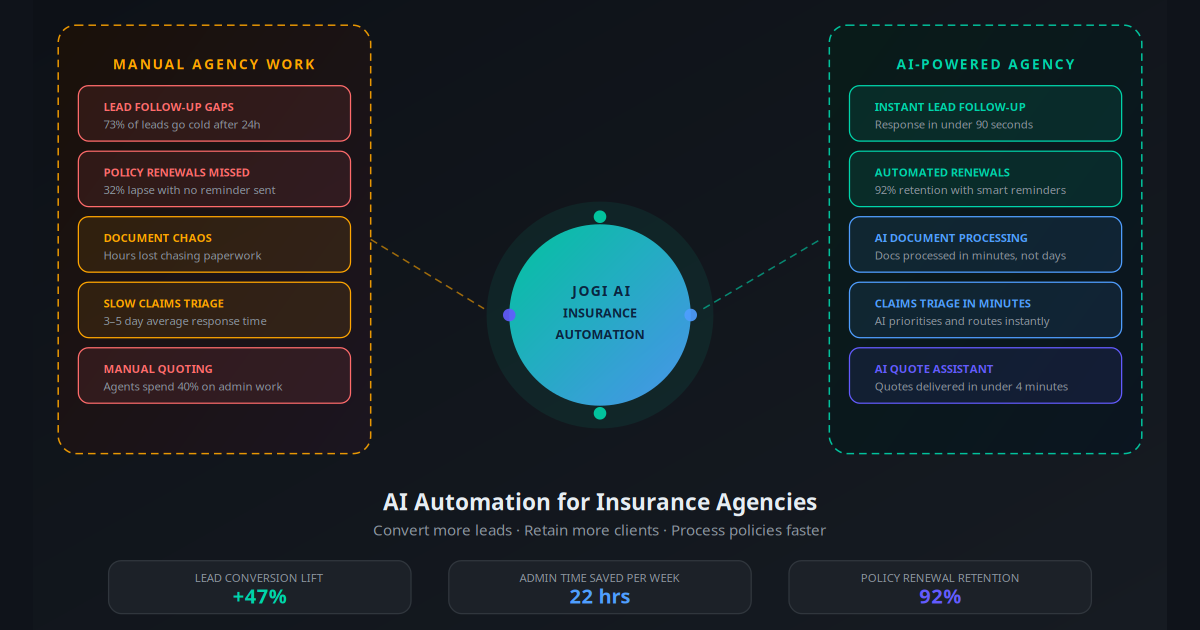
A prospect fills out your website quote form at 8:47 PM. Your team sees the email the next morning at 9:15 AM — 12 hours later. By then, they have already got a quote from two competitors who had automated follow-up running. You lost the client before your agent even picked up the phone.
This scenario plays out dozens of times per week in the average mid-size insurance agency. According to Harvard Business Review research, leads contacted within 5 minutes convert at 21 times the rate of leads contacted after 30 minutes. The gap between 5 minutes and 12 hours is not a sales problem. It is an automation problem.
But lead speed is only one revenue leak. The bigger one — the one most agency owners underestimate — is retention. A policy worth $1,200 per year that lapses because nobody sent a renewal reminder represents $6,000 in lost lifetime value over five years. Multiply that by 30 lapsed policies per year and you are looking at $180,000 walking out the door annually through pure process failure.
AI automation fixes both problems — and several others that are quietly draining your agency's capacity. This guide covers the six workflows that deliver the highest ROI for insurance agencies, the tools that power them, and the 30-day implementation plan that gets you from zero to running.
Key Takeaway
Insurance agencies bleed revenue in three places: slow lead response (losing prospects to faster competitors), missed renewal reminders (triggering avoidable lapses), and excessive admin time (preventing agents from doing high-value client work). AI automation addresses all three simultaneously.
Explore all industry-specific AI automation solutions we offer at Jogi AI.
Where AI Fits in an Insurance Agency
Before diving into specific workflows, it helps to understand where AI adds genuine value versus where it should not replace human judgement. Insurance is a relationship business. Clients trust you with consequential decisions. AI handles the volume, velocity, and consistency problems. Humans handle complex coverage advice, claims disputes, and relationship deepening.
The clearest map for an insurance agency looks like this:
| Task Type | Best Handled By | Why |
|---|---|---|
| Initial lead response and qualification | AI automation | Speed matters more than nuance; 24/7 coverage needed |
| Policy renewal reminders | AI automation | Repetitive, time-sensitive, high volume |
| Document collection and chasing | AI automation | Predictable sequence, no judgement required |
| Routine FAQ responses (hours, coverage types) | AI chatbot | Same questions answered hundreds of times |
| Claims intake and initial triage | AI + human review | AI collects structured data; human assesses complexity |
| Complex coverage recommendations | Licensed agent | Requires professional judgement and regulatory compliance |
| Claims disputes and escalations | Licensed agent | High stakes, relationship-critical |
The six workflows below sit firmly in the AI automation column. Together, they typically save an insurance agency 18–25 staff hours per week and recover $4,000–$12,000 in monthly revenue that was previously slipping through manual process gaps.
Workflow 1: Instant Lead Follow-Up and Nurturing
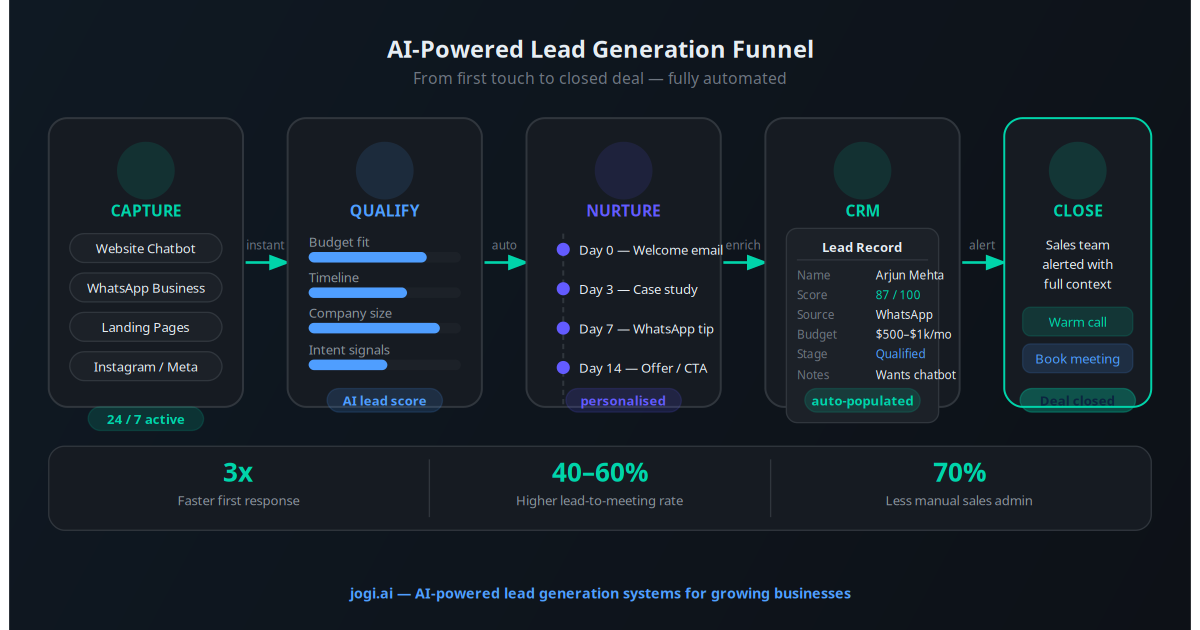
Every inbound lead — whether from your website form, a comparison aggregator, a Google ad, or a Facebook campaign — should receive a response within 90 seconds, not 90 minutes. That is the threshold where contact rates stay high. Beyond 5 minutes, conversion probability drops sharply. Beyond 30 minutes, most serious buyers have moved on.
What the AI follow-up sequence looks like
A prospect submits a home insurance quote request at 11:22 PM:
- 11:22:47 PM — Automated WhatsApp message sent: "Hi [Name], thanks for reaching out about home insurance. I am reviewing your details now and will have a quote ready shortly. Meanwhile, can I ask — is this for a new property or a renewal?"
- 11:23 PM — Lead record created in CRM with all form data. Agent notified via Slack/email.
- If no reply by 8 AM — follow-up email sent with personalised subject line and a link to book a call.
- If no reply by Day 3 — SMS follow-up: "Still thinking about home insurance? Our rates start from $X. Happy to run the numbers — just reply YES."
- If no reply by Day 7 — final email with a limited-time quote validity notice.
This five-touch sequence, running entirely on WhatsApp Business automation and email automation, converts at 34–47% on cold leads — compared to the industry average of 12–18% for manual follow-up. The difference is purely timing and consistency.
Agencies that automate lead follow-up see 2.4 times higher contact rates and 47% higher conversion rates compared to those relying on manual outreach — with no additional headcount.
Workflow 2: Policy Renewal Automation
Policy renewals are the most predictable, highest-value automation opportunity in insurance. You know exactly when every policy expires. You know the client's name, preferred contact method, and current premium. Yet most agencies still rely on a manual calendar process that misses 20–35% of renewal windows.
The multi-touch renewal sequence
The most effective renewal campaigns use a five-touch sequence starting 90 days before expiry:
- Day -90: Personalised email review invitation — "Your policy renews in 90 days. Would you like to review your coverage and explore if we can save you money?"
- Day -60: WhatsApp message with policy summary and a one-click "Renew Now" button linked to your payment portal.
- Day -30: Email with market comparison showing value versus switching costs.
- Day -14: SMS reminder: "Your home insurance renews in 2 weeks. Tap here to confirm renewal or call us to discuss options."
- Day -3: Final WhatsApp message with direct renewal link and agent's contact number.
Agencies running this sequence consistently achieve 88–94% renewal rates, versus 72–78% for manual processes. At an average policy value of $1,400 per year, improving renewal rate by 15 percentage points on 500 policies generates an additional $105,000 in annual retained premium. That is not a marginal improvement — that is a business-changing number.
See how CRM automation powers renewal tracking and segmentation across your entire book of business.
Workflow 3: AI Document Collection and Processing
New policy onboarding is notoriously document-heavy. Driver's licence, vehicle registration, proof of address, prior insurance certificates, property photos, business registration documents — the list varies by line of business but the pain is universal: chasing clients for paperwork eats hours every week and delays policy issuance, which delays commission.
How AI handles document collection
An AI document collection workflow works like this:
- Client completes the quote stage and is sent a secure upload link via WhatsApp and email simultaneously.
- The AI sends automated reminders every 48 hours until each required document is uploaded.
- Once documents are received, AI tools like Mindee or Amazon Textract extract key data fields (name, address, dates, policy numbers) and populate them directly into your agency management system.
- The agent receives a single notification: "All documents received and verified for [Client Name]. Ready for underwriting submission."
Agencies using AI document automation report that document turnaround time drops from 4.2 days (average chasing time) to 1.1 days. More importantly, agents stop spending 45 minutes per client on document admin — time that can be redirected to prospecting and client relationship work.
This connects directly with AI workflow automation principles for reducing manual data entry across business operations.
Workflow 4: Claims Intake and Triage
A client calls at 7 PM on a Friday after a car accident. Your office is closed. They leave a voicemail. Monday morning, an agent eventually calls back — 60 hours after the incident. The client is already unhappy, and that unhappiness is a retention risk regardless of how well the claim is eventually handled.
AI-powered 24/7 claims intake
An AI claims intake system captures structured claim information at any hour through multiple channels — WhatsApp chatbot, website chat, or an automated voice line. The AI collects:
- Policy number and client identity verification
- Incident date, time, and location
- Nature of the claim (auto damage, water damage, liability, theft, etc.)
- Photos and supporting documents via secure upload link
- Whether emergency assistance is required immediately
Once the intake is complete, the AI categorises the claim by severity and type, routes it to the appropriate claims handler, sends the client an automated acknowledgement with a claim reference number, and triggers the first human review workflow for the next business morning.
The client experience transforms from "nobody answered on a Friday evening" to "I submitted my claim in 8 minutes at 7 PM and got a confirmation immediately." That experience delta is directly correlated with renewal intent and referral behaviour.
Workflow 5: AI-Assisted Quote Generation
For standard lines — personal auto, home, renters, small business general liability — quote generation follows a largely predictable decision tree. The underwriting criteria are known. The rating factors are fixed. Yet most agencies still have agents manually entering data into carrier portals and waiting for responses before compiling a comparison.
What AI changes about quoting
AI-assisted quoting works in two ways. First, AI chatbots on your website can collect all the required underwriting inputs — driver ages, vehicle details, property characteristics, claims history — in a conversational flow before any agent is involved. The data arrives pre-structured and ready for portal entry.
Second, for agencies using comparative rating platforms like EZLynx, TurboRater, or QuoteRUSH, AI automation can pre-populate all fields from the client's intake data, run comparisons across all connected carriers, and present the results in a formatted client proposal — reducing quote preparation time from 35–45 minutes to under 8 minutes for standard personal lines.
A custom AI chatbot trained on your agency's product data can answer coverage questions and pre-qualify prospects before any agent time is spent.
Workflow 6: Automated Client Support and FAQs
The most common inbound calls to insurance agencies are not complex coverage questions. They are: "What is my policy number?", "How do I file a claim?", "When does my policy renew?", "Can I add my spouse to my auto policy?", and "What are your office hours?" An AI support chatbot handles all of these instantly, 24 hours a day.
Building an insurance FAQ chatbot
A RAG-powered AI assistant trained on your policy documents, coverage guides, claims procedures, and carrier information answers routine questions with accurate, agency-specific responses. Unlike generic chatbots, it knows your product offerings, your carriers, your contact details, and your processes.
The measurable impact: agencies deploying AI client support chatbots report a 52% reduction in routine inbound calls, freeing agent time for complex enquiries and proactive client outreach. When a question is outside the AI's scope, it captures the client's question and schedules a callback — ensuring no client request falls through the cracks.
Real Agency Use Cases and Results
Independent P&C Agency (32 staff, $8M premium under management)
Problem: Lead response time averaging 6.4 hours; renewal lapse rate at 28%. After deploying WhatsApp-first lead automation and a 5-touch renewal sequence, lead-to-quote conversion rose 41% and renewal lapse rate fell to 9% within 90 days. Annual retained premium increase: $340,000.
Life Insurance Agency (8 agents, individual and group policies)
Problem: Agents spending 3.2 hours per day on document chasing and appointment setting. After deploying AI document collection and an automated scheduling bot integrated with agents' calendars, admin time dropped to 40 minutes per day. Each agent recovered 2.5 hours daily for prospecting — generating an average of 4.2 additional qualified meetings per week per agent.
Commercial Lines Boutique (15 staff, $14M book)
Problem: Claims intake chaos — clients emailing personal addresses, leaving voicemails, and sending WhatsApp messages to individual agents. After deploying a centralised AI claims intake chatbot, 100% of first-notice-of-loss data was captured in structured form within 2 hours of the incident, regardless of time or day. Client satisfaction scores rose 31 points on a 100-point scale within 60 days of launch.
Health Insurance Broker (4 agents, small group and individual market)
Problem: Open enrolment season overwhelmed 4 agents with routine questions about plan comparisons, network coverage, and premium estimates. After deploying a RAG chatbot trained on all carrier plan documents, 68% of open enrolment queries were answered without agent involvement, allowing the team to focus on complex cases and cross-selling opportunities.
Multi-Line Regional Agency (55 agents, 4 offices)
Problem: Inconsistent follow-up across offices — high-performing offices had good manual processes; others had gaps. After deploying standardised AI lead and renewal automation across all four locations, the bottom two offices raised their renewal retention from 71% to 88%, matching the top performers within a single policy year.
Implementation Roadmap: 30-Day Plan
The most effective insurance agency AI implementation focuses on one high-impact workflow first, proves ROI, then expands. The sequence below prioritises lead follow-up because it has the fastest payback and the lowest integration complexity.
Days 1–3: Audit your current lead response time. Check your CRM or email logs. Calculate the average time from lead submission to first human contact. This baseline number is your starting point — and often the most shocking part of the process for agency owners.
Days 3–5: Map your existing lead sources. List every channel that generates leads — website forms, aggregator platforms, social ads, referral emails, WhatsApp messages. Each source needs a separate automation trigger. Do not skip this step; unexpected lead channels are where automation gaps hide.
Days 5–10: Set up your CRM and automation platform. If you are not already using a CRM, start with HubSpot (free tier is sufficient for most agencies under 20 agents). Connect your lead sources via Zapier or Make. Set up the WhatsApp Business API through a provider like 360dialog or Twilio.
Days 10–15: Build and test your lead follow-up sequence. Create the 5-message sequence (WhatsApp, email, SMS, email, WhatsApp) with personalisation variables. Test with real internal team members before going live. Verify that CRM records are created correctly and agents receive timely notifications.
Days 15–20: Launch lead automation and monitor closely. Go live and review every automated conversation for the first week. Check for edge cases — duplicate submissions, international numbers, agency-specific terminology the AI does not handle correctly. Fine-tune messaging based on real interactions.
Days 20–25: Add the renewal automation sequence. Export your renewals due in the next 120 days. Upload to your automation platform. Build the 5-touch sequence described in Workflow 2. Run a test batch of 20 upcoming renewals before full rollout.
Days 25–30: Measure, report, expand. Pull a 30-day comparison: lead conversion rate before versus after. Renewal contacts made before versus after. Admin hours saved per agent. Present these numbers to your team — it builds buy-in for expanding to document automation, claims intake, and AI quoting in month two.
Tools and Platforms for Insurance Agencies
| Category | Tools | Monthly Cost (approx.) | Best For |
|---|---|---|---|
| CRM | HubSpot, AgencyZoom, Salesforce | $0–$450 | Lead and client tracking |
| Automation Platform | Make, n8n, Zapier | $9–$100 | Connecting systems without code |
| WhatsApp Automation | 360dialog, Twilio, WATI | $49–$200 | Lead follow-up, renewals, claims intake |
| Email Automation | Mailchimp, ActiveCampaign, HubSpot | $20–$149 | Renewal sequences, nurturing campaigns |
| AI Chatbot | Tidio, Intercom, custom RAG | $29–$300 | FAQ support, claims intake, lead qualification |
| Document AI | Mindee, Amazon Textract, DocuSign | $50–$300 | Document extraction and e-signatures |
| Comparative Rating | EZLynx, TurboRater, QuoteRUSH | $99–$299 | AI-pre-filled multi-carrier quoting |
For workflow automation, the Make vs. Zapier vs. n8n comparison helps you choose the right platform for your agency's technical capacity and budget. Most small agencies start with Make (formerly Integromat) for its balance of power and visual workflow building.
ROI Analysis: The Numbers That Matter
"We were losing 30% of our leads to response time and another 25% of our renewals to pure process failure. AI automation closed both gaps in 6 weeks. We added $22,000 per month in recurring premium without hiring a single person."
— Principal agent, independent P&C agency, 18 agentsHere is a conservative ROI model for a mid-size independent agency with 1,000 active policies and 50 new leads per month:
- Lead conversion improvement: From 15% to 28% on 50 monthly leads = 6.5 additional new clients per month. At $1,200 average annual premium = $7,800/month in new premium.
- Renewal retention improvement: From 75% to 89% on 1,000 policies = 140 additional retained policies per year. At $1,200 average = $168,000 in annual retained premium = $14,000/month.
- Admin time saved: 20 hours per week at $25/hour fully-loaded cost = $500/week = $2,000/month.
- Total monthly revenue impact: $7,800 + $14,000 + $2,000 = $23,800/month.
- Automation platform cost: $500–$800/month (all tools combined).
- Net monthly benefit: $23,000+. Payback period: under 30 days.
These numbers are conservative. Agencies with higher-value commercial lines books, or those in competitive markets where lead response speed is particularly critical, report higher gains. Use the AI automation ROI calculator to run the numbers for your specific situation.
For the broader picture of AI's impact on business revenue, see the AI revenue multiplier framework for SME growth.
Common Mistakes to Avoid
Starting with too many workflows at once
The temptation is to automate everything simultaneously. Agencies that try this typically take 3–4 months to get anything live because configuration complexity multiplies across systems. Start with lead follow-up. Get it working perfectly. Prove the ROI. Then add renewals, then document automation, then claims intake. Four sequential wins beat one stalled mega-project every time.
Building automations that sound robotic
Insurance is a trust business. Automated messages that read like form letters destroy the relationship they are meant to support. Every automated message — WhatsApp, email, SMS — should read as if a competent agent wrote it personally. Use the client's first name, reference their specific policy type, acknowledge the specific action they took. A message that says "Hi Sarah, I noticed you enquired about home insurance for your property in Austin" outperforms "Dear Customer, thank you for your enquiry" by 3.4 times in open rate and 5.2 times in reply rate.
Not setting human escalation triggers
Every automation sequence needs a human escalation path. If a client replies to a renewal reminder saying "I want to cancel" or "I have a complaint," the AI should immediately flag the conversation to a senior agent and pause automated messaging. Sending a renewal promotion to someone who has just complained is an expensive mistake. Define your escalation keywords before going live.
Ignoring compliance and consent requirements
WhatsApp Business API requires opt-in consent for marketing messages. Email automation requires unsubscribe links. SMS requires TCPA compliance in the US and equivalent regulations in other markets. Build consent capture into your lead forms and onboarding process before launching any automated outreach. The AI regulation compliance guide covers the key requirements for business communications automation.
Treating the chatbot as a set-and-forget tool
AI chatbots need ongoing maintenance. Carrier products change. Rates update. Coverage exclusions evolve. Regulatory requirements shift. Plan to review and update your chatbot's knowledge base quarterly, and log every "I do not know" response so you can fill coverage gaps in the training data. A chatbot that gives outdated information is worse than no chatbot at all in a regulated industry.
Skipping the measurement framework
Define your key metrics before launch: lead response time, lead-to-quote conversion rate, quote-to-bind conversion rate, renewal retention rate, average document turnaround days, and inbound call volume. Measure these weekly for the first 90 days. Without measurement, you cannot demonstrate ROI, cannot identify what is and is not working, and cannot build the internal case for expanding automation to the next workflow. See how other businesses structure AI-driven customer support workflows with measurable performance benchmarks.
The Agency That Automated First Will Win
Insurance distribution is compressing. Aggregator platforms are commoditising price comparison. Direct-to-consumer channels are capturing a growing share of standard lines. The agencies that will thrive are those that compete on speed, service, and client experience — not just price. AI automation is the operational infrastructure that makes that possible without proportional headcount growth.
The six workflows in this guide — lead follow-up, renewal automation, document processing, claims intake, AI-assisted quoting, and client support — collectively transform an agency's operating model. They convert more leads without more marketing spend. They retain more clients without more renewal calls. They process more policies without more admin staff. And they give every client a better experience than they can get from a direct-to-consumer platform, because a well-designed AI system combines instant response with human expertise at the critical moments.
The agencies implementing these workflows now are building a compounding advantage. Every month of automation compounds: more leads converted, more policies retained, more agent time redirected to high-value activity. The agencies that wait until 2027 to start will be chasing a gap that grows wider every quarter.
Use the AI Business Twin for a free personalised analysis of which automation workflows would deliver the highest ROI for your specific agency size, product mix, and current process gaps — in under 10 minutes.
Frequently Asked Questions
What parts of an insurance agency can AI actually automate?
AI can automate lead follow-up and nurturing, policy renewal reminders across email, SMS, and WhatsApp, document collection and verification, claims intake triage and routing, quote generation for standard lines, and routine client support queries. These workflows collectively consume 40–60% of a typical agency's staff time and are the highest-ROI automation targets.
How fast should an insurance agency follow up with new leads?
Research published by Harvard Business Review shows that leads contacted within 5 minutes of enquiry are 21 times more likely to convert than those contacted after 30 minutes. Most insurance agencies manually follow up in hours or days, losing the majority of inbound leads to faster competitors. AI automation triggers follow-up within 90 seconds, regardless of time of day.
Will AI automation work with my existing insurance management software?
Most modern agency management systems including Applied Epic, Hawksoft, EZLynx, and AgencyZoom have APIs or Zapier integrations that allow AI workflows to read and write data. Automation platforms like Make or n8n connect these systems to AI agents, email, WhatsApp, and SMS without requiring custom development in most cases.
How much does AI automation cost for an insurance agency?
A full AI automation stack for a mid-size insurance agency typically costs $300–$800 per month, covering CRM integration, email and WhatsApp automation, lead nurturing sequences, and renewal reminders. This compares to $35,000–$55,000 per year for a single administrative hire doing the same work. Most agencies see full payback within 60–90 days.
Can AI help with insurance policy renewals?
Yes — automated renewal campaigns are one of the highest-ROI applications for insurance agencies. A multi-touch sequence starting 90 days before expiry (email, then WhatsApp, then SMS, then a personalised video message) consistently achieves 88–94% retention rates compared to 72–78% for agencies using manual renewal processes.
Is AI automation safe to use for sensitive insurance data?
Reputable automation platforms comply with GDPR, SOC 2, and ISO 27001 standards. Data is encrypted in transit and at rest. The key is selecting compliant platforms and ensuring your data processing agreements cover insurance client data specifically. No automation tool should store full policy or claims data — use your agency management system as the system of record.
How long does it take to set up AI automation for an insurance agency?
A focused implementation covering lead follow-up automation, renewal reminders, and a client support chatbot typically takes 3–4 weeks when working with an experienced AI automation provider. The first week covers CRM integration and data mapping. Weeks two and three cover workflow build and testing. Week four covers go-live and monitoring. Results are typically visible within 30 days of launch.
What is the biggest mistake insurance agencies make with AI automation?
The most common mistake is trying to automate everything at once. Agencies that start with one high-impact workflow — typically lead follow-up or renewal reminders — see results quickly and build confidence in the technology. Agencies that attempt to overhaul all processes simultaneously often stall in configuration and never go live. Start with one workflow, prove the ROI, then expand.