GPT-4o & Real-Time AI: What Every SMB Owner Needs to Know in 2026




Why the 2025-2026 Model Wave Changes Everything for Your Business
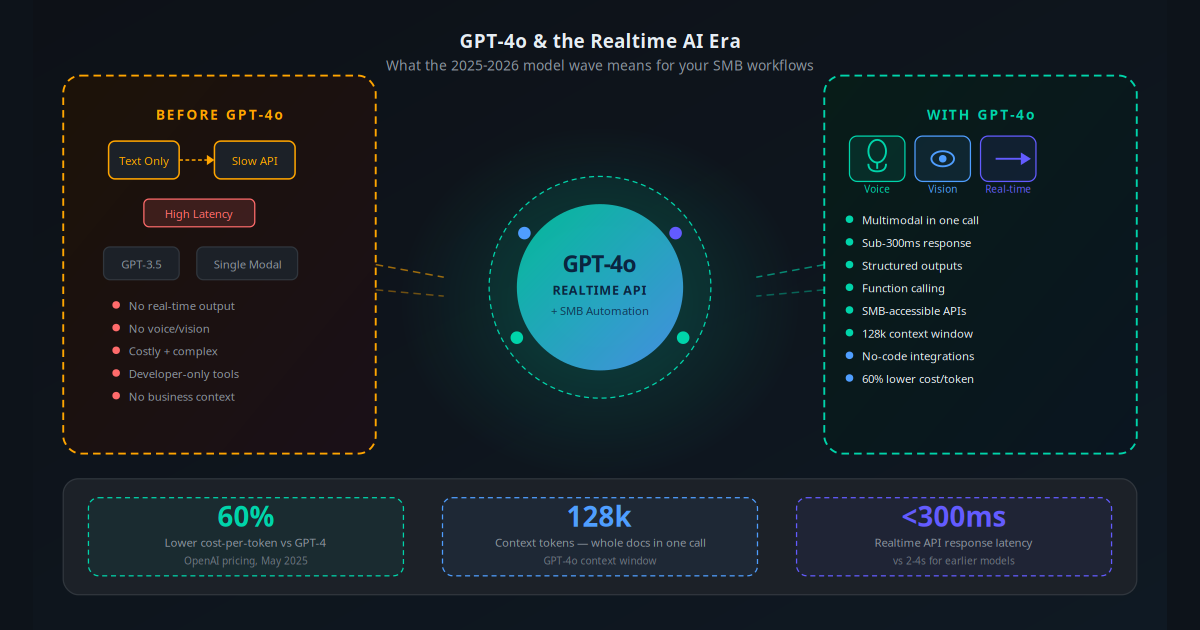
In May 2024, OpenAI released GPT-4o — and then spent the next 18 months quietly making it 60% cheaper, 40% faster, and capable of things that were science fiction two years earlier. By mid-2026, you can give an AI model a phone number to answer, a stack of your invoices to process, and your product catalogue to search — and it handles all three natively, in real time, for a few dollars a month.
The technology shift is real. But most SMB owners are still trying to figure out what any of it means for their business. They hear "GPT-4o," "Realtime API," "Claude 3.5 Sonnet" and "Gemini 2.0 Flash" and assume this is still a tech-company conversation — something for developers with large budgets and engineering teams.
It is not. The cost curve has crossed a threshold where a restaurant owner in Mumbai, a dental clinic in Dubai, or an e-commerce brand in Bangalore can deploy production-grade AI automation for under $200 per month. The only question is whether you understand enough about what changed to make good decisions about where to start.
This article breaks down exactly what the 2025-2026 model releases mean for your operations — with specific numbers, use cases, and the compliance basics you need to know about.
Key Takeaway
GPT-4o reduced the cost of AI automation by 60% while adding real-time voice and vision capabilities. This is not incremental — it moves AI automation from "tech-company luxury" to "accessible SMB tool" in a single pricing change.
What GPT-4o Actually Is (Without the Jargon)
GPT stands for Generative Pre-trained Transformer — the underlying architecture of the model. The "4o" means fourth generation, omni (handling multiple modalities). What matters practically is what it can do that earlier versions could not.
GPT-4o is a single model that processes and generates text, images, and audio. Its predecessor, GPT-4, could only handle text. GPT-4 Vision added images as a separate feature. GPT-4o unified them. This matters because real business tasks are multimodal: an invoice is a document with text and layout structure, a support ticket often includes a screenshot, a customer call is audio that needs to be understood and acted on.
The three capabilities that matter most for SMB automation are:
- 128,000 token context window: This means the model can read and reason over approximately 96,000 words in a single call — effectively your entire product catalogue, customer history, or a year of email correspondence at once.
- Structured outputs and function calling: You can instruct GPT-4o to return responses in exact JSON formats and to call external APIs (your calendar, CRM, payment system) as part of generating a response. This is what makes AI agents possible — the model does not just answer; it acts.
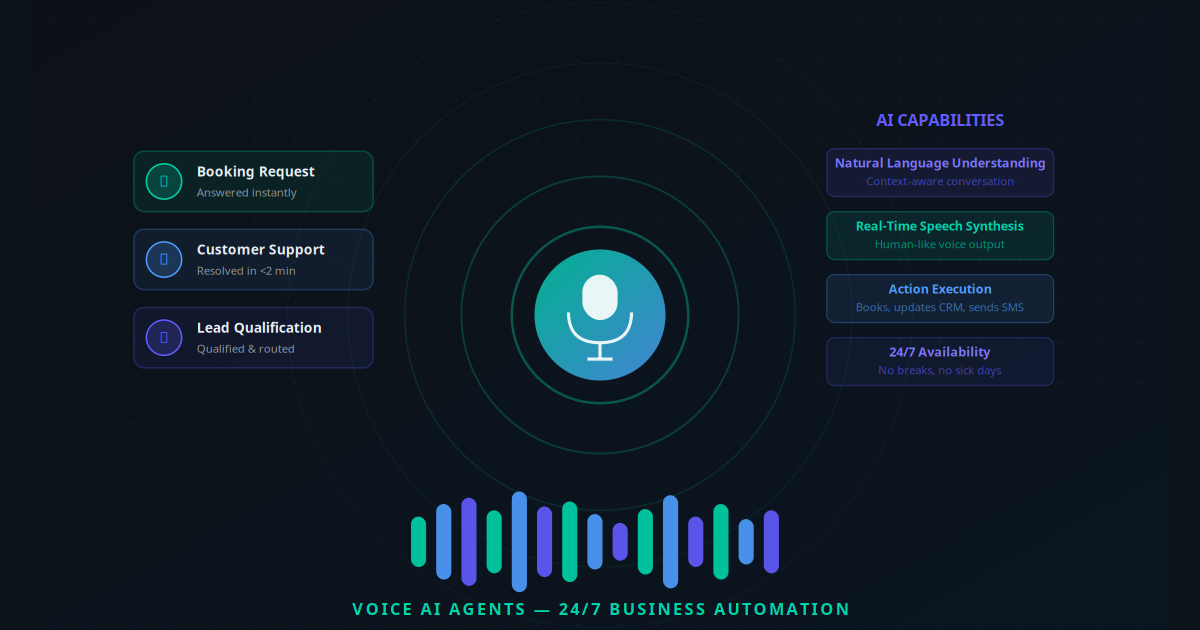
- Native audio processing: GPT-4o can hear audio directly, understand tone and emotion, and respond in natural speech — enabling the voice AI agents that are now handling calls for clinics, restaurants, and service businesses at scale.
GPT-4o processes text, images, and audio in a single model at 60% lower cost than GPT-4 Turbo. For SMBs, this is the equivalent of going from enterprise-only pricing to utility pricing.
The Model Landscape: GPT-4o, Claude, and Gemini Compared
GPT-4o is not the only major model release of this period. Understanding where each sits helps you pick the right tool for specific workflows rather than defaulting to one provider for everything.
| Model | Provider | Best At | Context Window | Approx. Cost (input/1M tokens) |
|---|---|---|---|---|
| GPT-4o | OpenAI | Voice/realtime, multimodal, function calling | 128k | $5 |
| GPT-4o mini | OpenAI | High-volume low-cost tasks, classification | 128k | $0.15 |
| Claude 3.5 Sonnet | Anthropic | Long documents, nuanced writing, coding | 200k | $3 |
| Claude 3 Opus | Anthropic | Complex reasoning, research synthesis | 200k | $15 |
| Gemini 2.0 Flash | Google Workspace integration, speed | 1M | $0.075 | |
| Gemini 2.0 Pro | Massive document analysis, multimodal | 2M | $1.25 | |
| Llama 3.3 70B | Meta (open) | Self-hosted, data privacy, no API fees | 128k | Free (self-host) |
The practical routing strategy for most SMBs: use GPT-4o mini or Gemini Flash for high-volume, lower-stakes tasks (email triage, classification, simple Q&A). Use GPT-4o or Claude 3.5 Sonnet for customer-facing conversations and document understanding. Use GPT-4o's Realtime API specifically for any voice application. This approach reduces costs by 70–80% compared to routing everything through a premium model.
For orchestrating this routing without writing code, tools like Make, Zapier, and n8n now have native AI model nodes that let you point different workflow steps at different models.
The Realtime API: Voice AI Just Got 10x More Accessible
OpenAI released the Realtime API in October 2024 — and it fundamentally changed the economics of voice automation. Before it, building a voice AI system required stitching together three separate services: a speech-to-text provider, an LLM, and a text-to-speech engine. Each added latency, cost, and complexity.
The Realtime API collapses all three into a single WebSocket connection. The model hears audio directly, reasons about it, and responds in audio — with end-to-end latency under 300 milliseconds. That is fast enough to feel like natural conversation. It also understands tone, pace, and hesitation in ways a text transcript cannot capture.
For SMBs, the practical impact is this: the voice AI agents that previously required a developer, a significant setup budget, and ongoing engineering support can now be deployed on platforms like Vapi or Retell AI — which wrap the Realtime API in a no-code builder — in a day or two. The pricing is $0.06 per minute of audio input. A business handling 500 inbound calls per month at 3 minutes average duration pays $90 in model costs. That same volume handled by a part-time receptionist costs $800–1,200.
Key Takeaway
The OpenAI Realtime API reduces voice AI infrastructure costs to approximately $0.06 per minute. For a business with 500 monthly calls of 3-minute average duration, that is $90/month in model costs — compared to $800-1,200 for human receptionist coverage.
5 SMB Workflows Transformed by GPT-4o
1. Inbound Call Handling and Appointment Booking
A clinic or service business uses GPT-4o's Realtime API to answer every inbound call, understand what the customer needs, check availability in the calendar system, and confirm the booking — all in under 2 minutes. One physiotherapy practice handling 200 calls per month saw its missed call rate drop from 54% to 3% within 6 weeks of deploying a voice agent on the Realtime API. Monthly bookings increased by 28%.
2. Invoice and Document Processing with Vision
GPT-4o's vision capability reads PDFs and images natively. An accountancy firm sends supplier invoices directly to a GPT-4o pipeline that extracts vendor name, amount, line items, and due date, then creates the corresponding record in the accounting system. This replaced 4 hours of manual data entry per week with a 2-minute automated process that costs under $2 per 100 invoices in API fees. Read more about AI invoice automation and what it saves in practice.
3. Customer Support Escalation and Resolution
A 128k context window means GPT-4o can hold an entire customer's order history, previous support tickets, and current query in a single prompt — and give a coherent, contextually accurate response without asking the customer to repeat themselves. An e-commerce business reduced average support handling time from 8 minutes to 90 seconds using a GPT-4o powered support workflow, with 71% of queries resolved without human escalation.
4. CRM Enrichment from Sales Calls and Emails
Instead of sales reps manually logging call notes, GPT-4o summarises call transcripts, extracts deal stage, objections raised, and agreed next steps, then writes the CRM record automatically. A 10-person sales team saved 45 minutes per rep per day on admin. That is 375 hours per month freed for actual selling. The model also flags at-risk deals by identifying language patterns associated with disengagement, enabling proactive CRM automation that was previously only available to enterprise teams.
5. AI-Assisted Proposal and Quote Generation
A consulting or professional services firm feeds GPT-4o the client brief, their standard service menu, and past successful proposals — and the model generates a first draft proposal within minutes. Teams that previously spent 3–5 hours on each proposal now spend 30–45 minutes reviewing and personalising an AI-generated draft. With an average proposal value of $8,000 and 8 proposals per month, even a 5% increase in win rate from faster, better-quality proposals represents $3,840 in additional monthly revenue.
How to Start Using GPT-4o in Your Business
You do not need to understand the technical details of the model to use it effectively. Here is the practical path from zero to working automation:
Pick one workflow to automate first: Do not start with a master AI strategy. Pick the single workflow that costs you the most time or loses you the most money. For most service businesses, that is inbound call handling or email triage.
Choose your entry-point tool: For voice automation, start with Vapi or Retell AI (both sit on top of GPT-4o's Realtime API). For document and email automation, start with Make or n8n — they have native GPT-4o nodes and pre-built templates. For customer chat, start with a RAG-based chatbot built on your knowledge base.
Connect your data sources: GPT-4o is only as useful as the context you give it. Feed it your product catalogue, FAQ document, CRM data, and calendar availability. This is the knowledge base layer — the difference between a generic AI response and one that knows your business specifically.
Define what actions it can take: The model should do more than answer questions. Map out the actual actions: create booking, update CRM record, send SMS confirmation, escalate to human. Each action requires a connected API. This is where workflow automation tools become essential — they handle the API connections so you do not need to write code.
Test with real scenarios: Before going live, run 50 test cases covering typical queries, edge cases, and graceful failure modes. What does the AI say when asked something outside its scope? Is the escalation path to a human clear and easy to reach?
Monitor the first 30 days: Review every case where the AI escalated to a human. These are your improvement opportunities. Adjust the system prompt, knowledge base, or action logic to handle them automatically going forward.
Add a second workflow: Once your first automation is stable and you understand the economics, identify the next highest-impact workflow. Most businesses reach a steady-state of 3–5 automated workflows within 6 months of starting. See the complete SMB automation guide for a sequenced implementation roadmap.
Cost Analysis: What You Actually Pay in 2026
One of the biggest barriers to AI adoption is uncertainty about cost. Here is a concrete breakdown of what GPT-4o-based automation actually costs at realistic SMB usage levels.
| Use Case | Volume (monthly) | Est. Token Usage | Model Cost | Platform Cost | Total/Month |
|---|---|---|---|---|---|
| Voice agent (inbound calls) | 500 calls, 3 min avg | 1,500 audio-min | $90 | $30–$80 (Vapi/Retell) | $120–$170 |
| Email triage and auto-reply | 2,000 emails | ~4M tokens | $20 (gpt-4o-mini) | $0–$30 (Make/Zapier) | $20–$50 |
| Invoice data extraction | 500 invoices | ~500k tokens | $2.50 | $0–$20 (workflow tool) | $3–$23 |
| Customer support chatbot | 1,000 queries | ~2M tokens | $3 (gpt-4o-mini) | $30–$60 (platform) | $33–$63 |
| CRM enrichment (call summaries) | 200 calls | ~600k tokens | $3 | $0–$20 | $3–$23 |
A realistic SMB running all five of these workflows simultaneously pays $179–$329 per month in total AI infrastructure costs — roughly the cost of 10–15 hours of part-time labour. The time those automations replace is typically measured in hundreds of hours per month. This is why the ROI on AI automation for SMBs in 2026 is often 10–30x.
"We replaced $3,200 of monthly admin cost with $210 in AI tools. The models got good enough, the prices dropped low enough. This year was the tipping point."
— Owner, 6-location physiotherapy groupEU AI Act: The Compliance Basics Every SMB Needs to Know
The EU AI Act came into force in August 2024 and began applying to businesses from February 2025. If your business interacts with EU residents — or you plan to — you have compliance obligations regardless of where your company is based.
Most SMBs fall into the "limited risk" category, which means relatively light-touch obligations. Here is what you actually need to do:
Transparency obligations for customer-facing AI
Any AI system that interacts with people must identify itself as AI. Your voice agent must say at the start of calls: "Hi, I am an AI assistant — how can I help you today?" Your chatbot must not impersonate a human. This is not optional and applies even if your business is based outside the EU but serves EU customers.
Explainability for automated decisions
If your AI makes or significantly influences decisions that affect customers — like qualifying or rejecting a credit application, prioritising service requests, or routing insurance claims — you must be able to explain the basis of those decisions on request. For most customer service and booking automation, this is not an issue. For AI-assisted hiring or credit decisions, it requires maintaining decision logs.
High-risk AI applications require human oversight
AI used in employment (CV screening, performance monitoring), critical infrastructure, or healthcare diagnosis is classified as high risk and requires more rigorous oversight, testing, and documentation. If you are deploying AI for employee monitoring or automated HR decisions, review the high-risk requirements carefully or engage a compliance specialist.
For the vast majority of SMB automation use cases — answering calls, processing invoices, triaging emails, managing bookings — compliance is straightforward. Add AI disclosure to any customer-facing interaction and keep logs of automated actions for 30 days. That covers most of the obligation at minimal operational overhead.
3 Mistakes to Avoid When Adopting New AI Models
Mistake 1: Treating every model as interchangeable
GPT-4o is not always the best choice just because it is the most well-known. For high-volume email triage, GPT-4o mini does the same job at 97% lower cost. For analysing a 200-page legal contract, Claude 3.5 Sonnet's 200k context window and careful reasoning outperforms GPT-4o. Routing the right task to the right model is a $100–$500/month cost decision that pays for itself immediately. Platforms like Make or n8n make model routing easy with conditional logic.
Mistake 2: Automating without a knowledge base
A GPT-4o voice agent that answers calls with generic AI responses is not an asset — it is a customer service liability. The model only knows your business if you tell it about your business. Before deploying any customer-facing AI, build a structured knowledge base: your services, prices, policies, FAQs, team details, and booking rules. RAG-based AI assistants retrieve from this knowledge base in real time, keeping responses accurate and up to date as your business changes.
Mistake 3: Going live without a human escalation path
No AI system handles 100% of cases perfectly. A customer with an unusual complaint, a complex multi-part query, or an emotional state that needs human empathy should always be able to reach a person easily. Build in an explicit escalation path: say "press 0 to speak with someone" on voice, or "type 'human' to connect with our team" on chat. Businesses that remove the escalation option to save costs end up with higher churn than before they automated anything. The goal is efficiency, not alienation.
The Model Wave Has Already Arrived — The Question Is Whether You Catch It
The GPT-4o release in 2024, the Realtime API in late 2024, Claude 3.5 Sonnet, Gemini 2.0 — these are not future capabilities to watch for. They are live, they are affordable, and thousands of SMBs globally are already running their customer interactions, document processing, and internal workflows on them. The cost-per-task has dropped below the threshold where the question is no longer "can we afford AI?" but "can we afford not to automate?"
The businesses that move now have a 12–18 month window to build operational advantages that will be difficult for slower competitors to replicate. The businesses that wait will spend those 18 months covering manual costs that their competitors have already automated away. The compounding effect of AI automation on SMB growth is real, measurable, and already showing up in the numbers of businesses that acted in 2024–2025.
The practical starting point is understanding what your specific workflows cost today — in time, in missed opportunities, in staff hours — and mapping the highest-impact automation targets against them. That analysis takes under 10 minutes with the right framework.
Use the AI Business Twin to get a free personalised analysis of which AI models and workflows would create the highest ROI for your specific business — including estimated time savings and cost projections.
Frequently Asked Questions
What is GPT-4o and why does it matter for small businesses?
GPT-4o is OpenAI's flagship multimodal model released in May 2024 and updated throughout 2025. It processes text, images, and audio natively in a single model, costs 60% less per token than its predecessor GPT-4 Turbo, and offers a real-time API with sub-300ms voice latency. For small businesses, this means AI-powered voice agents, document analysis, and customer-facing automation are now affordable and production-ready without needing a developer team.
What is the OpenAI Realtime API and can my business use it?
The OpenAI Realtime API enables low-latency, bidirectional audio conversations with GPT-4o — the same technology powering ChatGPT's Advanced Voice Mode. Any business can access it via the OpenAI API with pay-as-you-go pricing at approximately $0.06 per minute of audio input. Platforms like Vapi and Retell AI wrap it into no-code builders, so a working voice agent can be deployed without writing code.
How much cheaper is GPT-4o compared to earlier AI models?
GPT-4o costs $5 per million input tokens and $15 per million output tokens — approximately 60% less than GPT-4 Turbo at the time of its launch. A typical SMB workflow processing 1 million tokens per month (roughly 750,000 words of customer emails, documents, and queries) would cost around $5-15, compared to $30-60 under GPT-4 Turbo pricing. This cost reduction makes previously uneconomic use cases viable.
What SMB workflows benefit most from GPT-4o's new capabilities?
The highest-impact use cases for GPT-4o in SMBs are: voice agents for inbound call handling and appointment booking, invoice and document processing using vision capabilities to extract data from PDFs and images, customer support chatbots with long context windows to understand full conversation history, and CRM enrichment by automatically summarising sales calls and emails. The combination of multimodality, low cost, and function calling makes GPT-4o particularly suited to customer-facing automation.
Do I need a developer to use GPT-4o in my business?
Not for many use cases. Platforms like Make, Zapier, and n8n provide no-code GPT-4o integrations for automating email responses, document processing, and CRM updates. Voice agent platforms like Synthflow and Retell AI offer drag-and-drop builders on top of GPT-4o's realtime API. For more custom workflows — connecting GPT-4o to your specific databases, booking systems, or legacy software — an AI automation specialist can build and maintain these integrations without you needing to write code yourself.
What about Claude, Gemini, and other models — should I use GPT-4o or a different AI?
The honest answer is: it depends on your specific workflow. GPT-4o leads for voice and real-time applications due to its native audio support. Anthropic's Claude models (Claude 3.5 Sonnet, Claude 3 Opus) often outperform GPT-4o on long-document analysis and nuanced writing tasks. Google Gemini 2.0 has the largest context window and is deeply integrated into Google Workspace. For most SMBs, the practical approach is to use a tool like Make or n8n that can route tasks to the best model per use case, rather than committing to a single provider.
What is the EU AI Act and does it affect how my business uses GPT-4o?
The EU AI Act came into force in August 2024 and applies to any business using AI to interact with EU residents, regardless of where the business is based. Key obligations for SMBs include: AI systems interacting with people must disclose that they are AI (voice agents must identify themselves at the start of calls), you must be able to explain automated decisions that affect customers, and high-risk AI applications in areas like employment or credit require additional oversight. For most customer service and workflow automation use cases, compliance is straightforward — add AI disclosure to your voice agent greetings and maintain logs of automated decisions.